Adding Chapters to YouTube Video Without Losing Your Mind
Parth Jasrapuria
Founder
A 47-minute SaaS demo has just gone live. The pricing slide appears somewhere after the product tour, the implementation details arrive later, and a buyer who only wants security information is scrubbing the progress bar like a contestant on a game show. Six minutes in, the buyer leaves. The video may be useful, but usefulness buried in a featureless timeline is still difficult to use.
Adding chapters to a YouTube video gives viewers a labelled map of the content. It doesn't repair a weak opening, rescue irrelevant footage, or turn a dull webinar into entertainment. It does make long-form B2B content easier to browse, revisit, and connect with a specific information need.
Why Chapters Save Long Videos From the Trash Heap
A chapter list starts as ordinary text in a video description. Each line pairs a timestamp with a section title. YouTube then turns those markers into labelled segments on the progress bar, giving viewers a way to move directly to the part they need instead of dragging the playhead through 45 minutes of conference-room audio.
That matters for B2B audiences because viewers rarely arrive with identical goals. A prospect may want the implementation process, an existing customer may need a setup detail, and an executive may jump straight to pricing or the commercial conclusion. A chaptered video supports those routes without requiring the production team to create a separate video for every question.

A native feature with broad reach
YouTube launched Video Chapters globally in May 2020, after testing it with selected users in April. At launch, the feature worked across desktop, Android, and iOS, and YouTube later stated that chapters had expanded to Smart TVs and gaming consoles. The launch history and original requirements are documented in MacRumors' coverage of YouTube's Video Chapters rollout.
The original rules were simple but strict:
Start at 0:00: The first timestamp must begin at the start of the video.
Use at least three chapters: A pair of timestamps isn't enough to activate the structure.
Keep every chapter at least 10 seconds long: Tiny fragments don't qualify as useful sections.
Those rules turn timestamps into navigation infrastructure rather than a casual list of production notes. A B2B episode can use chapters for Problem, Framework, Product demonstration, Customer example, and Implementation steps, provided the actual timing supports those boundaries.
The adoption gap is useful context
A third-party analysis of more than 4 million YouTube videos found chapters in only 63,283 videos, while chaptered videos showed approximately 2.18 to 2.8 times more engagement than videos without chapters, according to Taja's analysis of YouTube chapters and engagement. That result is observational, not proof that chapters caused the difference. Chaptered videos were also 50% longer, and longer videos may be more likely to receive chapters and generate engagement for other reasons.
The practical lesson is less glamorous and more useful. Many long-form videos still lack a clear route through the content. Chapters won't guarantee more views, but they can stop a relevant viewer from abandoning a video just because the answer is difficult to find.
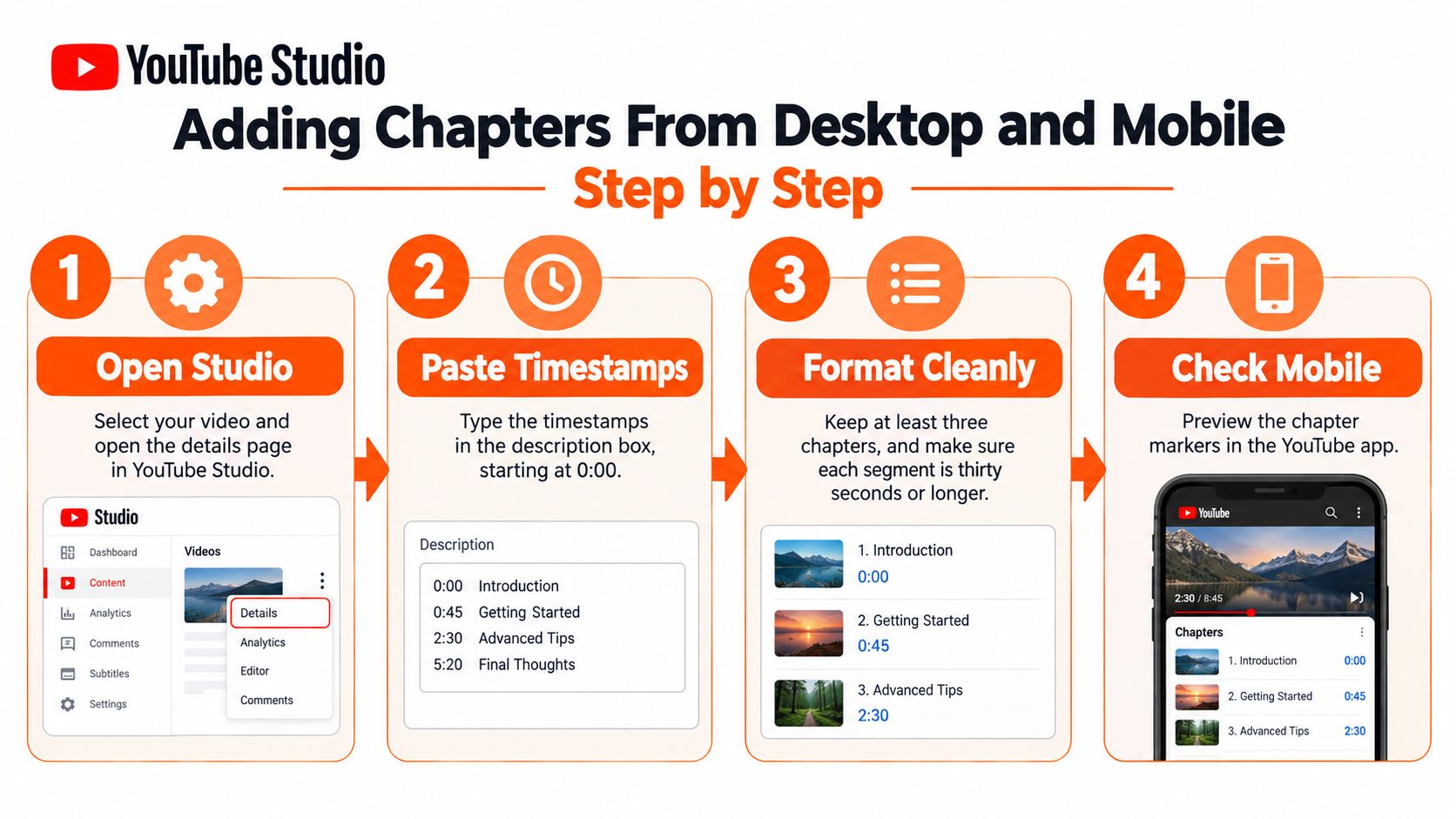
Adding Chapters From Desktop and Mobile Step by Step
The reliable workflow begins with the transcript or edit timeline, not with random tapping inside YouTube Studio. Mark the points where the subject, workflow stage, or viewer intent genuinely changes. A slide transition isn't automatically a chapter, and a pause certainly isn't one.
On desktop, open YouTube Studio, select Content, and choose the video. Open the details page, find the description field, and place one timestamp-title pair on each line. A short video uses MM:SS, while a video longer than one hour uses H:MM:SS, as set out in YouTube's chapter documentation.
A clean example might look like this:
00:00 Why this workflow fails
04:18 The buyer’s implementation problem
11:42 Product demonstration
24:06 Security and integrations
36:30 Pricing and next steps
The first marker must be exactly 00:00. The timestamps must move forward in ascending order, there must be at least three chapters, and each chapter must span at least 10 seconds. If the final marker creates a segment shorter than the minimum, the timeline may not render as intended.
Save the description, then open the public watch page. The editor showing a neat list is not proof that the visual chapters appeared. YouTube needs to process the change, and the public page is where the result matters.
The mobile route has a small hiding trick
In the YouTube Studio app, open the content list, select the video, and choose the edit option. Find the description field, which may sit behind an additional details or expand control depending on the app version and device. Paste the timestamp-title pairs on separate lines, check the first marker and sequence, then save using the app's confirmation control.
Mobile editing is where first-time users often update the description but leave the screen without confirming the save. The change then exists only in the editor session, which is not a particularly useful publishing system. Reopen the video after saving to confirm that the description still contains the chapter list.
For teams that create descriptions from structured notes, a YouTube description generator can help organize the surrounding copy, but chapter timing still needs human review. A generator cannot determine if the pricing discussion begins at the marker supplied by an editor.
The final QA pass should happen in two environments:
Desktop watch page: Check the progress bar, labels, and jump behavior.
Mobile watch page: Confirm that the labels remain readable and the chapter navigation behaves properly.
Timeline audit: Make sure no marker exceeds the next one and no intended segment has disappeared.
Viewer test: Ask someone unfamiliar with the edit to find pricing, implementation, or the main product answer.
A chapter list that passes syntax but fails the stranger test needs better labels or better boundaries.
Writing Chapter Titles Viewers Actually Click
A technically valid chapter can still be useless. “Section 3,” “Asset 4,” and “CEO Intro” may make sense in a production folder, but a buyer doesn't browse YouTube to admire the folder taxonomy. The title needs to describe the answer waiting at that point in the video.
Compare these rewrites:
Production label | Viewer-facing label
Intro by CEO | Why the old pricing model stopped working
Section 3 | How the implementation process works
Asset 4 | Security controls and data handling
Demo part two | Automating approval workflows
Final thoughts | What to do before adopting the platform
The improved labels use the viewer's information need. They also give search systems clearer topical context, although chapter titles shouldn't be stuffed with awkward keywords. “Enterprise SaaS platform workflow automation implementation” sounds less like a useful label and more like a keyboard fell down the stairs.
A practical vocabulary for B2B chapters
For a product demo, useful labels often include Problem, Workflow, Live demonstration, Integrations, Security, Pricing, Implementation, and Next steps. For a webinar, labels such as Market context, Common mistakes, Operating framework, Audience questions, and Action plan usually describe the content more clearly than internal speaker names.
For podcasts and thought-leadership videos, the title should capture the idea rather than merely identify the guest. “Interview with the CTO” can become “Why procurement delays technical buying decisions.” “Episode conclusion” can become “The operating change teams should make first.”
A useful test: If a tired buyer saw only the chapter title, would the label tell them whether to click?
Titles should stay compact enough to scan on smaller screens, but brevity isn't the same as vagueness. “Pricing” is short and clear. “Pricing for teams with complex approval workflows” may be more useful when the episode serves a specific B2B audience.
A title generator can support brainstorming, particularly when a team needs several variations from a transcript. The YouTube title generator is one option for developing clearer phrasing, but the final label should be checked against the actual words and promise in the video. A clever title that sends viewers to the wrong segment creates a trust problem with a timestamp attached.
Automatic Chapters, AI Tools, and Repurposing Workflows
Automatic chapters are useful when the alternative is no chapters at all. YouTube can generate chapter suggestions from structural cues, but creator-authored timestamps take precedence when supplied, so manual chapters should come first for videos where wording and structure matter. That relationship is also explained in Influencer Marketing Hub's guide to YouTube chapters and key moments.
The decision rule is straightforward:
Use manual chapters for priority B2B videos: Product demos, high-intent tutorials, sales webinars, and thought-leadership episodes benefit from controlled labels.
Use automatic chapters as a fallback: Raw podcasts, older uploads, and low-priority backlog content may not justify a detailed editorial pass.
Review every automatic result: A machine can detect a topic shift, but it may name that shift with a generic or misleading phrase.
A transcript-based workflow gives editors a stronger starting point. Export the transcript, highlight durable topic transitions, compare those points with the edit timeline, and then write titles around the viewer's likely question. AI transcription services can timestamp spoken content, but spoken transitions and useful navigation boundaries aren't always identical. A speaker may spend several minutes circling a point before stating the conclusion, while a chapter may work better at the beginning of the practical explanation.
Repurposing makes chapter work earn its keep
Chapter boundaries can also become clip boundaries. A long product discussion may produce a short clip about the customer problem, another about implementation, and another about a security objection. The same structure can support blog sections, sales enablement links, social captions, and show notes.
ContentBuck operates one example of this broader B2B production model, combining long-form video editing with chapter and timestamp handling, then repurposing the material into shorter assets. Teams comparing this approach with broader automation practices can also review this YouTube channel success framework from MakeAutomation.
The ceiling of automation is judgment. A transcript can locate words, an AI tool can suggest sections, and YouTube can generate markers. Someone still needs to decide whether “Integration overview” is better than “Connecting the CRM to the sales workflow,” and whether that boundary serves a prospect or merely reflects the edit sequence. For teams evaluating supporting software, a guide to AI video tools for B2B marketing can help separate transcription, editing, clipping, and publishing tasks instead of treating them as one magical button.
SEO Wins, Engagement Claims, and What the Numbers Really Mean
Chapters improve a video's information structure. They do not repair an irrelevant title, weak content, or a thumbnail that attracts the wrong audience. Treat them as navigation infrastructure: useful for helping viewers and platforms understand where key topics begin, not as a guaranteed SEO lever.
As covered earlier, the engagement uplift reported for chaptered videos is observational, not causal. The analysis examined more than 4 million videos, and the comparison does not prove that adding chapters produced the result. Chaptered videos may differ in length, subject, audience intent, and production quality. Those differences can affect likes, views, and viewing behavior before chapters enter the picture.
Claims about retention or viewing time need the same caution. If the comparison design is unclear, treat the claim as a testable hypothesis rather than a forecast. Compare similar uploads, audiences, traffic sources, and topics, then judge whether chapters help people reach useful material and take the next business action.
Can chapters lower average view duration?
Yes. That can happen even when chapters improve the viewing session. A prospect may open the implementation chapter, watch the relevant explanation, replay one section, and leave after getting the answer. Continuous viewing falls, but the video may have served its commercial purpose.
B2B reporting should pair viewing metrics with signals of intent. Track chapter clicks, retention immediately after chapter boundaries, segment replays, returning viewers, demo-page visits, assisted conversions, and qualified leads. Separate search-led views from recommendation traffic, since viewers arriving with a specific question may use chapters differently from viewers browsing suggested videos. For broader context on search-focused video planning, browse AIMVG's YouTube SEO guide.
Metric | Misleading reading | Useful business question
Average view duration | “Lower means the chapters hurt.” | Did viewers reach and consume the high-intent section?
Average percentage viewed | “Higher is always better.” | Did continuous viewing lead to a meaningful action?
Chapter clicks | “More clicks prove success.” | Which topics attract qualified viewers?
Segment replays | “Replays show confusion.” | Are buyers revisiting a valuable explanation?
Demo-page visits | “The video caused every visit.” | Do viewers who reach a commercial chapter visit the page more often?
Assisted conversions | “Chapters closed the deal.” | Did chaptered viewing contribute to a broader buying journey?
Measure the route to value, not just the distance watched.
A chapter that helps a qualified prospect find pricing may matter more than one that keeps an unqualified viewer watching through an unrelated introduction. Review chapters alongside audience quality, retention shape, watch time, and downstream actions. The practical test is simple: can the right viewer find the right answer, and does that visit support a useful next step?
Why Your Chapters Are Not Showing and How to Fix Them
When chapters don't appear, the description often looks perfectly reasonable. YouTube is less interested in reasonable than in exact formatting, eligibility, and processing.
Start with the timestamp list itself:
The first marker isn't 0:00: Change the opening line to exactly 00:00.
A timestamp is malformed: Use colons and the correct MM:SS or H:MM:SS format.
The sequence moves backward: Check every marker against the one before it.
There are fewer than three chapters: Add enough meaningful sections to meet the minimum.
A segment is too short: Inspect the gap between every pair of timestamps, including the final segment.
Next, confirm the publishing state. The description may not have saved, a marker may sit beyond the video's duration, or a recent edit may still be processing. Open the public watch page after saving on both desktop and mobile rather than relying on the Studio editor.
Automatic chapters create a separate trap. YouTube may suggest chapters from structural cues, but automatic chapters aren't guaranteed for every eligible video. A manual list also overrides automatic suggestions, so changing an automatic setting won't replace a malformed manual list already in the description.
Finally, check account and content conditions. YouTube's documentation says chapters may be unavailable when a channel has active strikes or when content is judged inappropriate for some viewers. The relevant details appear in YouTube's documentation on chapter availability and requirements.
Troubleshoot in order: syntax, timing, save state, manual override, processing, then channel or content eligibility.
A hard refresh can remove an old browser display, but it can't fix a timestamp that violates the rules. If the list passes every check and still doesn't render, test the public page from another browser or device, then review the video's eligibility notices in Studio. The goal is to identify whether the failure belongs to the chapter list, the account, the content, or the display environment.
ContentBuck plans and produces B2B YouTube videos with editing, SEO support, chapters, timestamps, and repurposed clips for teams that need a repeatable publishing workflow. Visit ContentBuck to discuss a chapter-ready video system for demos, webinars, podcasts, and thought-leadership content.
Parth Jasrapuria
Founder at ContentBuck
Building video systems for B2B businesses. Obsessed with YouTube growth, creative strategy, and organic SEO.