How to Launch a B2B YouTube Channel from Scratch
Parth Jasrapuria
Founder
The founder has a webcam. Marketing has a folder of webinar recordings. Sales keeps answering the same product questions, and someone has suggested a company introduction video featuring inspirational music and a very slow shot of the office kettle.
For a lean team figuring out how to launch a B2B YouTube channel from scratch, the better starting point is a library of buyer questions, not a brand film. Each useful answer should help a prospect understand a problem, compare options, or feel confident about implementation. A repeatable recording process keeps that library growing without turning the company's experts into full-time presenters.
The First Videos a New Channel Should Publish
Starter videos by buyer stage
An accounts payable software team can build its first YouTube library around the questions buyers ask as they move from recognizing a problem to choosing and using a tool. The lengths below are editorial starting points, not performance benchmarks.
Buyer stage | Example video | Useful length | Next step
Problem education | How a 50-person finance team closes faster | 8-12 min | Guide page
Problem education | Five invoice errors that stall approvals | 6-8 min | Checklist download
Evaluation | Best AP tools for a mid-market team | 10-15 min | Comparison page
Evaluation | Alternatives to the incumbent tool | 10-15 min | Alternatives page
Decision | Product A vs Product B for multi-entity teams | 8-12 min | Demo form
Decision | First 15 minutes of setup | 8-12 min | Demo form
Post-purchase | Implementation checklist for week one | 6-10 min | Help page
Proof | Customer walkthrough of one workflow | 8-12 min | Case study page
An analysis shared by Foundation Marketing examined 8,566 keywords across more than 130 B2B SaaS categories. It found YouTube in Google's top 10 results for 80.2% of demo searches, 22.5% of best searches, and 20% of versus searches.
That makes buying questions a practical starting point. A video explaining invoice routing can help a prospect understand a real workflow. A logo reveal, however cinematic, does little to answer what they came to learn.
Choose questions sales already hears
Ask sales and customer support which questions repeatedly slow a conversation. Prioritize questions an expert can answer with a demonstration, since a visible workflow often explains more than a list of features.
A practical topic brief could look like this:
Buyer: The finance operations lead managing approvals across business units.
Question: Why do invoices keep getting stuck before payment?
Useful answer: A screen-based explanation of approval ownership and exception handling.
Next action: A checklist that helps the viewer inspect the current workflow.
Teams can expand these questions into distinct formats by asking which format best answers each one. A B2B YouTube video ideas guide can offer prompts, but the buyer's actual question should determine the topic.
Match the format to the explanation
A presenter isn't compulsory. Screen recordings, annotated diagrams, and narrated product walkthroughs can suit technical topics. For teams considering an off-camera approach, the Magic Genie faceless channel guide offers format ideas.
Use the buyer's language in each title, then answer the question promptly. Chapters and accurate captions make the video easier to use, while a relevant next step gives interested viewers somewhere to go. The aim is a useful answer first, with a meeting invitation only when it fits.
How Long Videos Should Be
A snack and a Sunday roast are both food. Judging both by how quickly someone clears the plate is how a marketing team accidentally cancels its most useful product demonstration.
Length should follow the buying question. A definition needs less room than a migration walkthrough, and a complicated implementation shouldn't be squeezed into a short clip merely because completion looks tidier.
Wistia's 2024 analysis found only a minor engagement difference between one- and five-minute videos, followed by a significant decline beyond five minutes; instructional videos lasting 3-5 minutes averaged 74% engagement, compared with 43% across all videos of that length. The same analysis found that 30-60-minute videos can generate more than ten times the total watch time of 1-3-minute videos, despite roughly half the engagement rate.
The distinction is easier to remember visually.
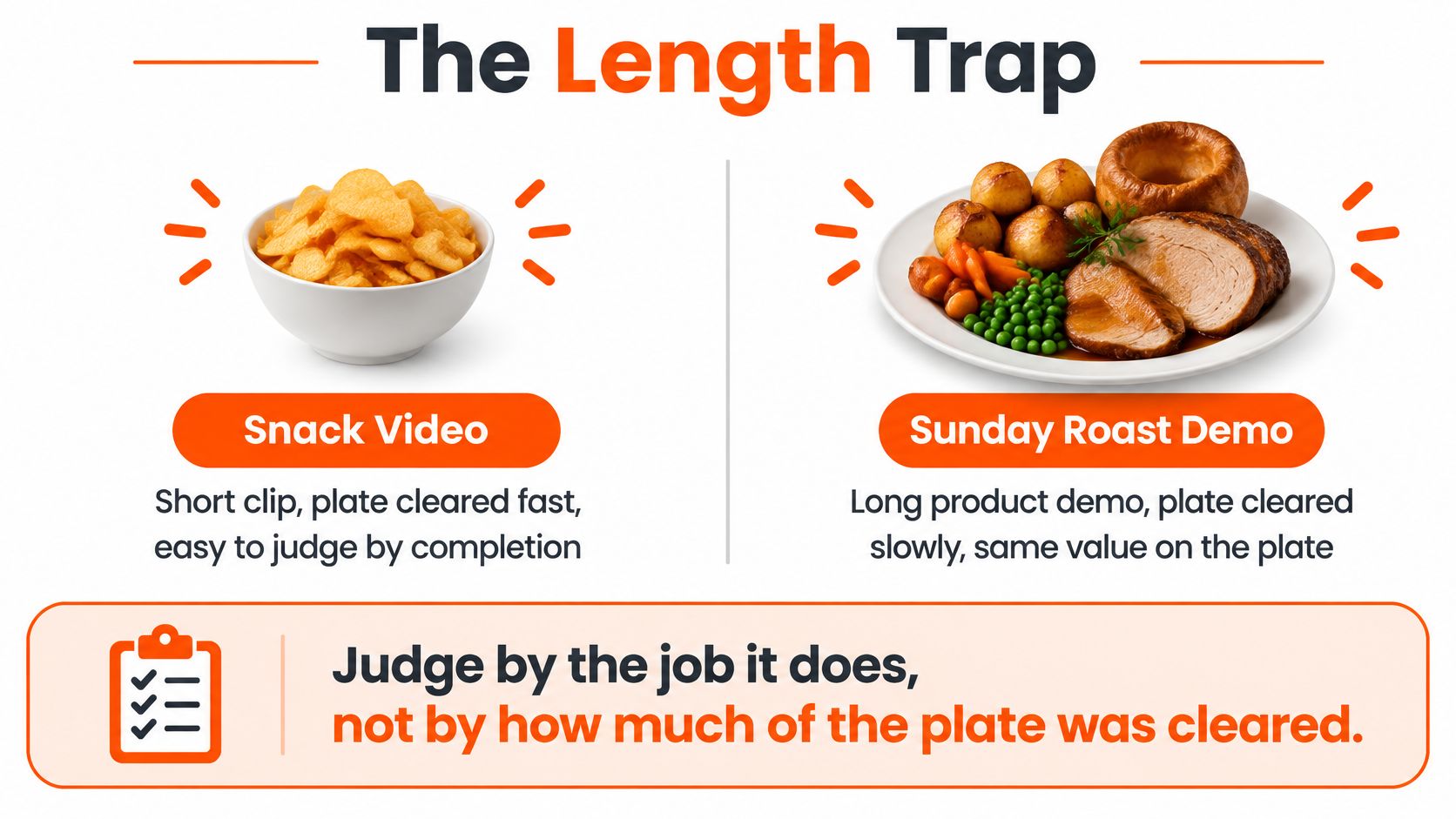
Choose duration by the job
How long the first videos should run
The table applies those findings to proposed launch formats. Suggested demo lengths are production choices rather than universal benchmarks.
Job | Length | Engagement pattern | Keep it when
One searchable answer | 3-5 min | Instructional videos average 74% engagement versus 43% for all videos of that length | The question fits a short lesson and a checklist
Short explainer | 1-5 min | Only a minor engagement difference between one- and five-minute videos | A definition or proof point needs no demo
Buying demo or interview | Beyond 5 min, often 8-15 min | Engagement declines after five minutes, so judge absolute watch time | A versus, setup, or expert objection needs the walkthrough
Long trust episode | 30-60 min | More than ten times the watch time of 1-3-minute clips at about half the engagement | The buying group needs the whole method, not a snack
Test formats without changing everything
A useful initial test uses search-led problem solving, executive opinion tied to a real objection, and product or customer proof. These are distinct editorial lanes, not excuses to publish the same pitch wearing different hats.
For example, an accounting software channel might explain approval rules, challenge the idea that every exception needs executive review, and demonstrate an actual exception-handling workflow. Each serves a different buyer need.
The team should hold thumbnail quality and its chosen publishing cadence steady while testing topics, openings, and duration. Otherwise, a stronger thumbnail might receive credit that belongs to a better lesson.
Practical rule: Keep a format when relevant viewers stay long enough to learn and then take a useful action, such as visiting a comparison page or sharing the explanation during a sales conversation.
One Recording That Feeds the Month
The exhausted engineer isn't refusing to help marketing. The engineer is refusing another vague calendar invitation called content brainstorm.
Expert access is the production bottleneck. A camera can be replaced; the person who understands why an integration fails is harder to substitute. A simple recording setup keeps attention on that expertise.
An industry summary from Pitch Avatar indicates that roughly 82% of businesses use YouTube for video publishing. Showing up therefore isn't a distinctive editorial strategy. Specific, credible explanations matter more than another polished introduction.
Make the expert session easy to attend
The interviewer should prepare a brief from live sales objections, then send it before the session. The expert needs the questions and supporting examples, not a script full of sentences nobody would willingly say.
A useful running order is:
State the problem: Describe what the buyer is struggling to do.
Explain the method: Walk through the practical steps using a screen, diagram, or example.
Name the limits: Explain who shouldn't use this approach and what could go wrong.
Finish cleanly: Stop when the question is answered rather than adding a ceremonial closing speech.
The CEO doesn't need a ring light and a personality transplant. An interviewer can prompt a knowledgeable but hesitant speaker, then remove the pauses during editing.
ContentBuck's operating model turns one 45-minute recording session with a client, technology partner, or industry expert into a YouTube video, 3-5 LinkedIn clips, a blog post, and an audio episode. That's a content supply chain rather than a fresh creative emergency for every platform.
The embedded video offers another viewing resource alongside the production workflow.
Assign each cut a destination
The full explanation can serve search visitors. An objection-handling excerpt can support sales, a self-contained short can introduce the topic on social, and a practical paragraph can become a nurture email.
The editor should preserve specific details while removing unsupported claims and vague thought leadership. A proposed two-day fact-check window, with a named approver, keeps review focused on accuracy rather than endless adjective negotiations.
For distribution planning, the Creators Toolbox guide on how to manage social media marketing helps connect assets to an operating calendar. ContentBuck's guide to distributing video content provides a complementary framework for assigning destinations.
The minimum kit remains modest: a lavalier microphone, window light, a quiet room, and a useful brief.
How to Run the First 90 Days
A launch needs assigned work, not a motivational speech about consistency. The following is a proposed operating calendar for a lean team, with room to reduce output when expert access is limited.
Week 1 starts with the buyer. The marketing owner writes the ideal customer profile, or ICP, in a sentence and collects ten questions from sales calls and support tickets. A useful description names the role, company situation, and problem, such as a finance lead struggling with approvals across several entities.
Select four starter videos. Each gets a named owner and a one-line promise describing what a viewer will understand afterward. A promise such as explaining approval routing is easier to deliver than transforming finance forever, which sounds expensive and difficult to schedule.
Set up the channel basics. The owner claims the channel handle, adds a plain banner, completes the description, and establishes a captions workflow in YouTube Studio. The banner should identify the audience and subject, not contain the company's entire positioning document in microscopic type.
Book a 45-minute expert recording. A sensible pilot captures two focused answers rather than a speech. If concise preparation makes more recordings practical, the team can batch additional answers, but the calendar shouldn't assume unlimited usable footage.
Edit the first lesson around its promise. The proposed opening delivers the answer within the first 30 seconds, followed by the demonstration and relevant caveats. Chapters and a matching destination page make the finished lesson easier to follow.
The routine becomes easier to maintain when preparation, recording, and publishing have separate owners.
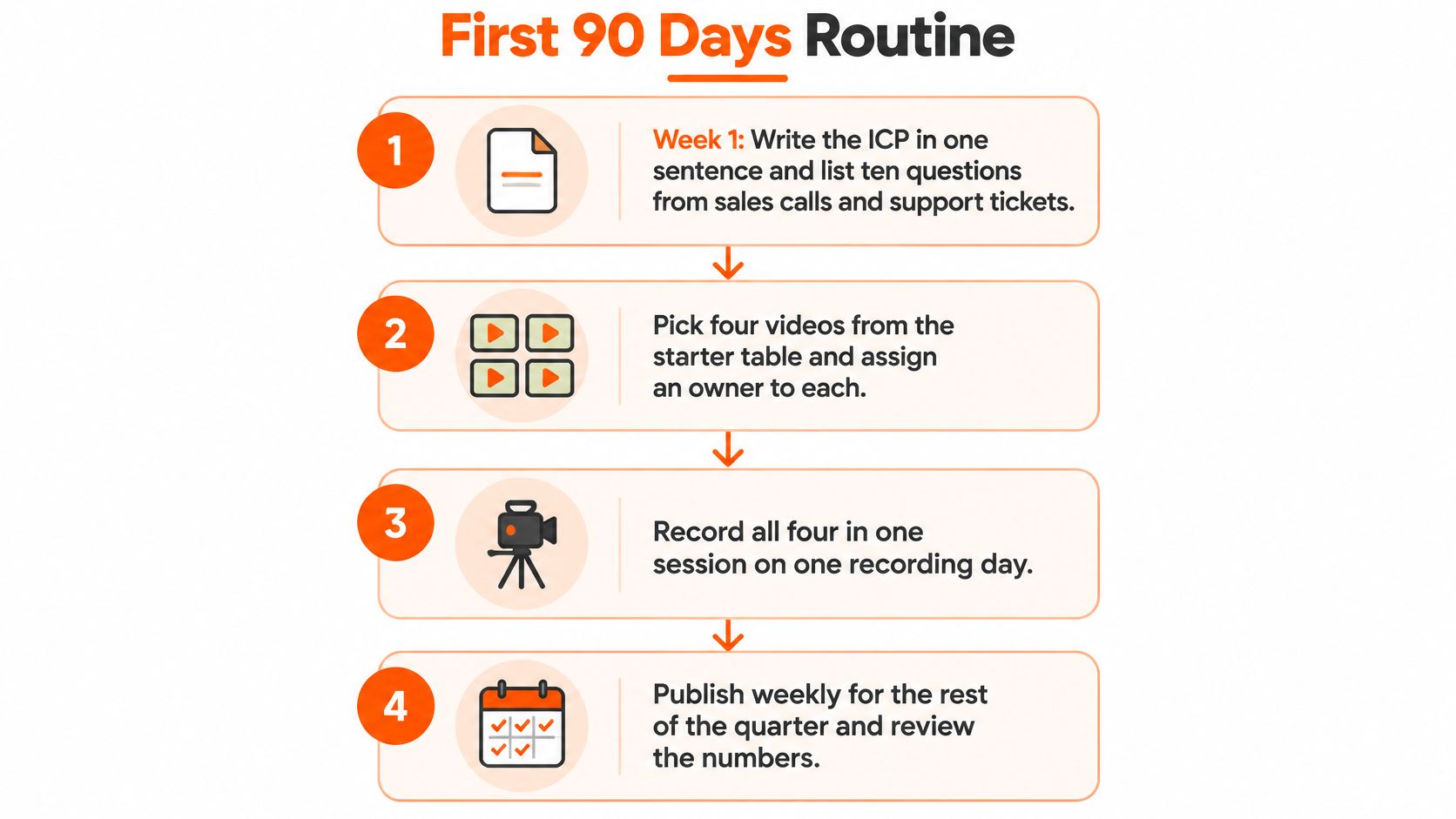
Turn publication into a repeatable task
Publish, then distribute deliberately. A proposed starter package includes three LinkedIn clips, each with a complete point. A clip that ends just before the answer feels less like education and more like a mildly annoying ransom note.
During weeks 3-8, aim for a weekly long-form release. Topics should stay within the established editorial lanes so comparisons remain meaningful. If the team can't maintain that pace without rushed explanations, it should reduce frequency rather than publish filler.
Review each upload in YouTube Studio. The owner records whether enough people saw the thumbnail to make click behavior informative and notes where viewers leave. These observations should produce a specific editing or packaging task, not a declaration that YouTube doesn't work.
During weeks 9-12, repeat the strongest lane. A topic with weak demand should be narrowed or replaced. LesFM's YouTube SEO and audience engagement tips can support the practical work of refining discovery and viewer experience.
Confirm measurement before increasing output. Tracking links and the booking-form attribution question should already work before the first release. The closing review checks that those signals reach the CRM rather than disappearing into a spreadsheet nobody opens.
Four honest videos in a proposed launch month are more useful than a perfect studio that never opens.
A brand documentary might impress colleagues, but it won't necessarily explain how to choose, implement, or evaluate the product. The calendar should protect those buying questions first.
What the First 24 Hours Tell You
A thumbnail promises a complete migration walkthrough. The video opens with company history, a mission statement, and a presenter thanking everyone for joining. The viewer leaves before any migration happens, which is a reasonable response rather than a character flaw.
Packaging is a promise, not decoration.YouTube's discovery and optimization guidance identifies titles, thumbnails, and descriptions as important discovery metadata, with tags mainly useful for spelling variants; it recommends examining Home and Suggested CTR during the first 24 hours on videos with above-average impressions and pairing that with retention through the opening 30-60 seconds.
Separate the click problem from the lesson problem
Early packaging signals and the fix
These combinations suggest a diagnosis, not proof of a single cause. A tiny sample shouldn't trigger a full reshoot.
Signal | What it means | Fix
High CTR, retention drops in 30-60 seconds | Title or thumbnail overpromises, or the open is slow | Answer the promise in the first sentence
Low CTR, strong retention | Useful video, weak package | Rewrite title and thumbnail, keep the edit
Low CTR and weak retention | Topic or audience miss | Retire or narrow the question
Healthy CTR and retention past the first chapter | Package and lesson agree | Make the next video in that lane
Home and Suggested matter because they can expose the lesson to people who don't already subscribe. For a new channel without a reliable baseline, the owner should collect observations before declaring a winner or loser.
A retention drop at a chapter change deserves inspection too. The presenter may have finished the useful answer, moved into an unrelated pitch, or skipped a necessary explanation.
Rewrite before commissioning a reshoot
Before scripting, the producer should identify a buyer, a problem, and a promise. The title and thumbnail should express that same promise without pretending the lesson delivers more than it does.
For an approval-routing tutorial, a useful opening explains the routing rule immediately and then demonstrates it. A childhood story about the presenter's lifelong love of invoices probably isn't necessary, even if the family found it moving.
The pre-publication review should also ask whether the episode adds a distinct explanation, example, or demonstration. A recognizable series format is useful; a script that merely exchanges product names isn't a useful lesson.
Diagnostic shortcut: When viewers stay after clicking, the editor probably doesn't need to rebuild the whole video. The title and thumbnail deserve attention first.
Give Each Video a Page Google Can Read
A video about reducing SaaS churn should also help someone reading the company's churn guide. Leaving the lesson only on YouTube misses an opportunity to place the explanation beside the checklist, comparison, or service information a buyer needs.
Google's video search guidance recommends accurate Video structured data and unique values for each video's thumbnailUrl, name, and description. Structured data helps Google understand the video, but it doesn't guarantee a search appearance or repair an unhelpful page.
Build a coherent video page
For a page called How to Reduce SaaS Churn, the publishing workflow should follow this sequence:
Publish the finished lesson on YouTube. Its title and description should accurately describe the explanation.
Embed it prominently on the relevant guide. A visitor should find the video without searching through unrelated promotional sections.
Create a distinct thumbnail. A consistent visual template is fine, but the image should identify this particular lesson.
Write useful surrounding copy. The page should explain the method, define important terms, and offer a relevant next action.
Add matching VideoObject markup. The website owner can use the CMS or its schema tools to enter accurate video information.
Validate the implementation. Google's Rich Results Test can help identify markup problems before the page is submitted for indexing.
The visible title, description, thumbnail, and actual content should agree. A thumbnail promising a guaranteed churn reduction shouldn't lead to a video that merely defines churn.
Treat keywords as topic labels
Buyer-intent keywords identify the question being answered. Phrases such as SaaS churn reduction, accounts payable software demo, and product alternatives belong on pages that address those subjects.
They don't need to be repeated in every sentence. A transcript can improve access to the explanation, but an edited written summary is usually easier to scan than a raw transcript full of verbal detours.
ContentBuck's guide to ranking YouTube videos on Google expands the connection between channel publishing and website search visibility.
The next step should match the lesson. A setup tutorial belongs beside implementation help, while a versus video fits a comparison page with a demo option. Schema labels the content; it doesn't replace the content.
When to Keep Funding the Channel
Keep funding when relevant buyers engage, sales uses the library, and opportunities show credible video influence. Pause expansion when those signals remain absent despite on-topic publishing and working measurement. ContentBuck describes YouTube as a 3-6 month investment, not a suitable choice for companies needing leads within a week.
A cited survey summarized by ProfileTree reports that 70% of B2B buyers watch video during the purchasing journey. That supports treating the channel as an education and sales-enablement investment, not merely a last-click lead source.
Use an evidence-based funding review
The review should combine:
Tracked visits: UTM-tagged links identify visits from particular videos.
CRM influence: Sales records which resources helped an opportunity progress.
Buyer feedback: A plain attribution field captures discovery that click tracking misses.
Supporting signals: Branded-search movement and assisted conversions add context, without proving causation alone.
A sensible proposed checkpoint is to pause additional volume after three months of on-brief publishing if there's no assisted pipeline, branded-search movement, or sales usage. That's a reason to investigate topic fit and distribution, not automatically delete the channel.
Frequently asked questions
Does a channel earn money at 500 subscribers?
YouTube's Partner Program guidance says earlier fan-funding access may be available at 500 subscribers, with 3 public uploads in 90 days and either 3,000 qualified long-form watch hours in 365 days or 3 million qualified Shorts views in 90 days, subject to availability and eligibility.
What about advertising revenue?
The same eligibility guidance sets full advertising-revenue thresholds at 1,000 subscribers, plus either 4,000 qualified long-form watch hours in 12 months or 10 million qualified Shorts views in 90 days. Neither milestone is a useful primary scoreboard for a company selling B2B software or services.
Will senior buyers trust YouTube content?
A Google and National Research Group survey summarized by YourFilm found that, in 2025, 69% of U.S. senior B2B decision-makers who used YouTube during a purchase journey considered its content very or extremely trustworthy. That's a reason to publish specific, accountable explanations, not assume every corporate upload earns trust.
Can episodes reuse a format?
Yes, but YouTube's monetization policies require original, authentic content and reject mass-produced or repetitive material. Shared graphics and structure are different from near-identical scripts with the nouns exchanged.
ContentBuck offers a Free YouTube Audit and B2B YouTube Growth support covering strategy, scripting, editing, thumbnails, and publishing for inbound demos. A team ready to build its buyer-question library can visit ContentBuck to request the audit and plan its first 45-minute expert recording this month.
Parth Jasrapuria
Founder at ContentBuck
Building video systems for B2B businesses. Obsessed with YouTube growth, creative strategy, and organic SEO.