Metadata for Videos: The B2B Guide That Works
Parth Jasrapuria
Founder
A B2B marketing team can spend six weeks turning a complex SaaS problem into a polished explainer, then publish it with an auto-generated title, an empty description, no captions, and a thumbnail that looks like a blurry Zoom screenshot. The recording is strong. The distribution is not.
That gap explains why metadata for videos deserves more attention than a last-minute upload checklist. Metadata gives search engines, AI systems, video platforms, sales teams, and future editors the information they need to understand what the recording contains and where it belongs. It turns one finished video into a searchable, reusable business asset instead of a lonely file in a content library.
The Video Nobody Watched (And Why)
The SaaS team had solved a real problem. Its flagship explainer showed how operations leaders could reduce approval chaos across several departments. The script was reviewed by product marketing, the product specialist delivered a clear demonstration, and the editor removed every awkward pause that might make a prospect wonder whether the software also managed meetings.
Publication day looked promising. Then the video went live with a generic title, a description containing one sentence, no captions, no chapters, and a thumbnail pulled automatically from a frame where the presenter was mid-blink. The upload technically worked. Discovery did not.
For the following three months, organic traffic stayed flat. YouTube suggestions barely surfaced the recording, and the sales team started asking for a different asset for outbound because the flagship video wasn't helping representatives explain the product. The marketing lead had a good video, but search engines and buyers had very little usable information about it.
Practical rule: A video can't earn attention from systems that can't identify its topic, audience, format, language, or key moments.
The same situation appears in professional services. A consulting firm records a thoughtful discussion about preparing for a complex regulatory change. Without a useful title, transcript, chapters, language information, and page-level structured data, the recording remains difficult to find for buyers searching for the exact issue discussed.
The seven-part framework is straightforward:
Title and description, which give people and crawlers the subject.
Tags and topical signals, which add context and clarify related terms.
Timestamps and chapters, which expose useful moments.
Thumbnail, which influences whether a result earns attention.
Captions and transcript, which create a searchable text layer.
Structured data, which helps search engines interpret the video page.
Technical and publishing fields, which support reliable handling across platforms.

The important reframing is simple. Metadata isn't decorative polish added after production. It's the plumbing beneath the creative work, carrying the video's meaning into search, recommendations, AI answers, social feeds, sales follow-ups, and future repurposing.
What Metadata for Videos Actually Means
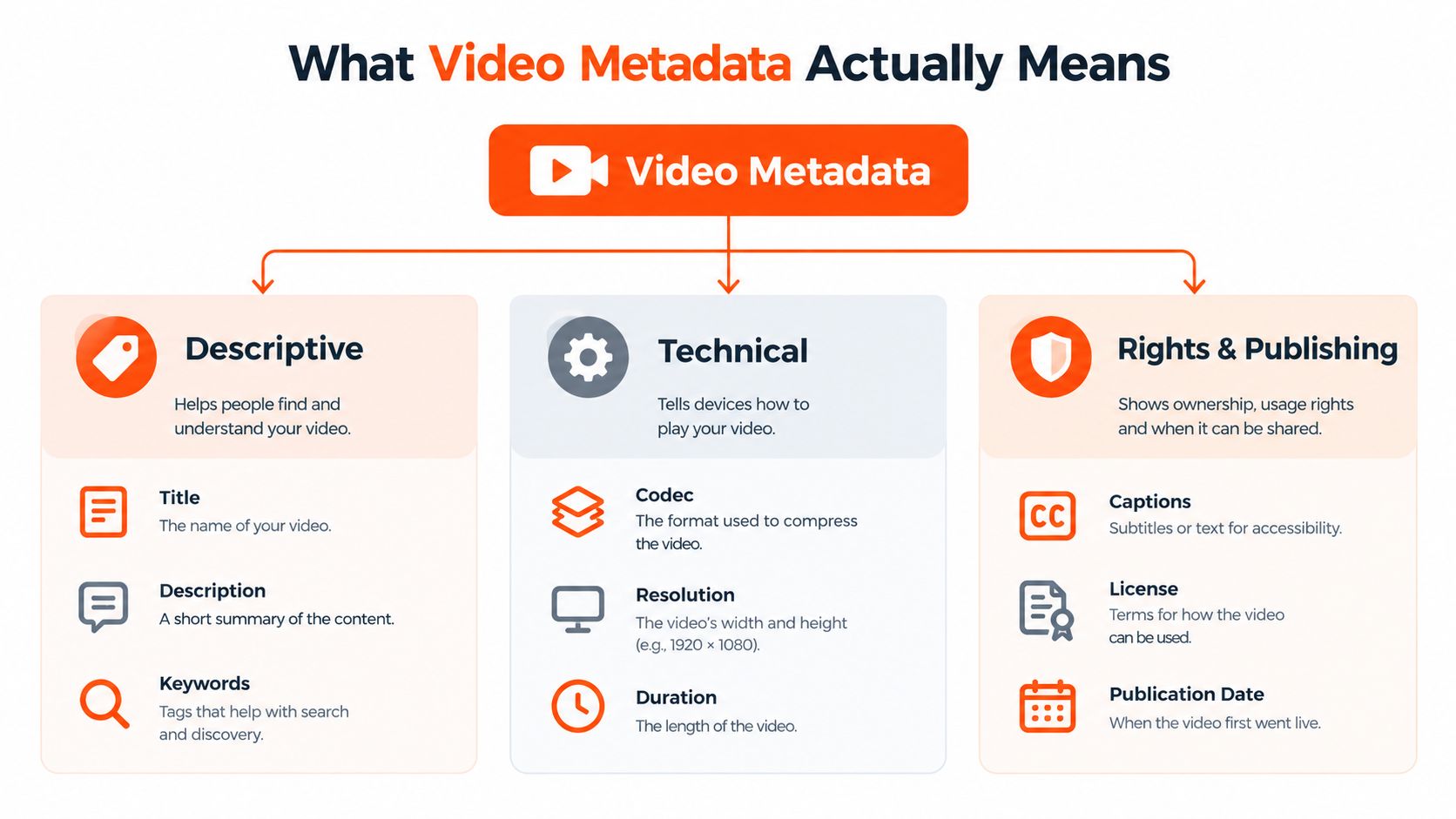
Video metadata is structured information attached to a video file, its hosting platform, or the web page where the video appears. It tells humans and machines what the video is about, how it should be handled, who can use it, when it was published, and which parts deserve attention.
A filing cabinet makes the idea easier to remember. The video is the document. The title is the label on the drawer. The description is the summary sheet. The transcript is the full text inside the folder. Technical details describe the document's format, while rights and publishing fields explain whether it can be distributed and how it should appear.
A practical hierarchy looks like this:
Descriptive fields
These include the title, description, tags, keywords, chapters, and series context. People can see many of these fields directly, while crawlers use them to classify the subject and match it with relevant searches.
Technical fields
These describe the asset itself, including duration, format, codec, resolution, thumbnail location, and file relationships. A viewer may never care about the codec. A publishing system certainly might.
Rights and publishing fields
These cover captions, transcripts, language, license, publication date, and distribution rules. They help teams publish responsibly and help platforms understand where and how the content should be shown.
The modern standardization story shows why shared structures matter. The IPTC formed its Video Metadata Working Group in late 2014, and presented the first Video Metadata Hub Recommendation on 25 October 2016. The hub was designed to address interoperability across compression standards, file formats, and metadata schemas, with properties expressible in XMP, EBU Core, and JSON. By 2025, the recommendation had reached version 1.7, demonstrating continued development over nearly a decade of work in the IPTC Video Metadata Hub.
Long before modern AI search, institutions were building formal schemas. The Library of Congress AudioMD and VideoMD schemas originated between 2000 and 2003, received extensive improvements in 2009-2010, and moved into Library of Congress maintenance in 2011. The current release is AudioMD and VideoMD 2.0. MPEG-7 also helped establish machine-interpretable audiovisual description, with its first version developed from 1996 to 2001 and standardized in 2002, as documented by the Library of Congress AudioMD and VideoMD standards.
For a marketing team, the lesson isn't that every producer needs to become a standards historian. The lesson is that a video needs a clear information layer. Production quality earns trust after the click. Metadata helps earn the click in the first place.
An example from a professional services firm makes the distinction clear. “Webinar recording” describes a file. “How CFOs Can Prepare for New Revenue Recognition Reviews” describes a business asset. The second version gives a buyer, a search engine, and a sales representative a much better starting point.
For teams turning long recordings into notes, study materials, or internal resources, a video summarization resource for students can also illustrate how a transcript becomes useful beyond the original viewing experience.
Why Video Metadata Is the B2B Pipeline Lever
A B2B video usually has several jobs. It must be discoverable, understandable, credible, and useful at the moment a buyer is researching or a salesperson is following up. Metadata supports each job, often before anyone presses play.
Discovery
Search engines need crawlable signals to identify a video asset. Titles, descriptions, captions, sitemap entries, thumbnail locations, and structured data give crawlers the information required to interpret the page and the media. Google supports video structured data, video sitemaps, and Open Graph, and its guidance requires a thumbnail location in a video sitemap. A missing thumbnail tag can prevent compliant video sitemap indexing, which makes a small field feel surprisingly powerful. The relevant mechanics are covered in Google's video SEO documentation.
A SaaS company publishing a product walkthrough on its resource center shouldn't rely on the embedded player alone. The page needs a descriptive heading, visible context, a transcript or caption source, a crawlable thumbnail, and valid VideoObject markup where appropriate.
Presentation
Structured metadata can help search engines understand the video's duration, thumbnail, upload details, and key moments. That understanding can support richer presentation in search, although no markup guarantees a particular result appearance.
For a professional services firm, chapters can expose the segment about “implementation risks” rather than forcing every buyer to start at the introduction. A prospect comparing vendors may reach the relevant section faster, which makes the video more useful and the page more aligned with commercial intent.
Conversion
Metadata also supports conversion by pre-qualifying attention. A description that names the audience, problem, and outcome helps a buyer decide whether the recording is worth watching. Chapters can point a sales representative to the exact segment needed in a follow-up email, while a transcript can turn the same discussion into a page section, quote review, or internal enablement resource.
Teams handling spoken-word content may find a video transcription buyer's guide useful when deciding how to create and review the text layer.
Metadata Job | Fields That Power It | B2B Outcome | Risk If Missing
Discovery | Title, description, captions, sitemap entry, thumbnail URL | Search engines can classify and surface the asset | The video may remain difficult to crawl or match
Presentation | VideoObject data, duration, chapters, key moments | The result can communicate relevance before the click | Buyers see a thin or unclear search result
Conversion | Chapters, transcript, CTA links, audience language | Sales and marketing can route buyers to useful moments | The recording creates viewing without a clear next step
A site-hosted video also needs a page that does more than hold an iframe. A useful page gives the asset a subject, an audience, a reason to watch, and a next action. Guidance on generating leads from YouTube can help connect that viewing experience to a broader acquisition path.
The Seven Core Components Explained
The seven components work as a stack rather than seven unrelated boxes. Each field answers a different question, and the answer may live in a different place depending on whether the video sits on YouTube or a company website.
Title
The title should state the buyer's problem and the video's value without sounding like a filing system invented by a robot. For a SaaS demo, “How Revenue Teams Find Stalled Deals in Salesforce” is more useful than “Platform Demo Recording.”
YouTube uses the uploaded title as a visible discovery and recommendation signal. On a site-hosted player, the page title and heading also matter because Google indexes the surrounding page, not just the player interface.
Description
The opening lines should identify the audience, problem, and outcome. A longer description can include chapter labels, related resources, speaker information, and a next step.
YouTube stores the description with the video. A site-hosted page should repeat the essential context in crawlable HTML, rather than hiding every useful detail inside a player script.
Tags and hashtags
Tags can clarify alternate spellings, product names, and related terminology. They shouldn't carry the entire strategy. A professional services video about procurement transformation might include the firm's preferred phrase alongside terms buyers typically use, but a tag cloud isn't a substitute for a clear transcript.
YouTube provides tag fields and hashtags. A site-hosted player may ignore platform tags entirely, so topical relevance must appear in the page copy, headings, captions, and structured data.
Timestamps and chapters
Chapters help a buyer jump to “security review,” “implementation timeline,” or “pricing model.” A product marketing team can use the same timestamps in a follow-up email, a sales enablement document, and a clipped social post.
YouTube can display chapters when timestamps and labels are formatted correctly. On a website, the player and page need their own chapter implementation, and structured data can describe clips or key moments where supported.
Thumbnail
A thumbnail is a visual promise. It should show the subject clearly at small sizes, use readable contrast, and avoid a frame where the presenter appears to be negotiating with gravity.
YouTube supports a custom thumbnail choice. A site-hosted page needs a stable, crawlable thumbnail URL that is also represented correctly in the relevant page markup or sitemap. A beautiful thumbnail that a crawler can't access is just an art project with a tragic distribution plan.
Closed captions and transcripts
Captions support viewers watching without sound and create a text layer that machines can interpret. Transcripts also help teams find quotes, identify clip candidates, and localize a recording.
YouTube can ingest caption files and display them with the video. A site-hosted player can use WebVTT for timed captions, while the page can expose a readable transcript for people and crawlers. Caption accuracy matters, especially for product names, acronyms, customer names, and technical terms. Guidance on searchable video explains why captions and transcripts have value beyond compliance.
Structured data
VideoObject JSON-LD tells search engines what the page's video represents. Typical properties include the name, description, thumbnail URL, upload date, duration, and content or embed location, with the exact implementation depending on the page and asset.
YouTube supplies much of its own platform metadata. A company page embedding a YouTube video still needs accurate page context and may benefit from valid VideoObject markup for the embedded asset. Teams working across schemas can use examples of structured data for e-commerce SEO as a broader introduction to machine-readable page information.
Metadata Component | YouTube Treatment | Site-Hosted Player Treatment
Title | Entered in the upload interface and shown on the watch page | Lives in the page heading, title tag, player configuration, or all three
Description | Stored with the video and displayed beneath it | Should appear in crawlable page content as well as player settings
Tags | Platform field with limited contextual value | Usually handled through page copy and structured signals
Chapters | Added through timestamps in the description | Configured in the player and reflected in page or clip markup
Thumbnail | Custom image or platform-selected frame | Stable image URL required for the page and discovery systems
Captions and transcript | Caption tracks can be uploaded or generated | WebVTT, accessible transcript, and language attributes can be managed directly
Structured data | Platform controls much of the markup | Site owner controls VideoObject JSON-LD and page relationships
The stack starts with accurate spoken text, adds human-facing context, and finishes with machine-readable relationships. If the foundation is wrong, schema gives search engines a very tidy description of the wrong thing.
Ready to Use Templates and Field Configs
A publishing team needs more than principles. It needs fields that can be completed before the upload button becomes a point of no return.
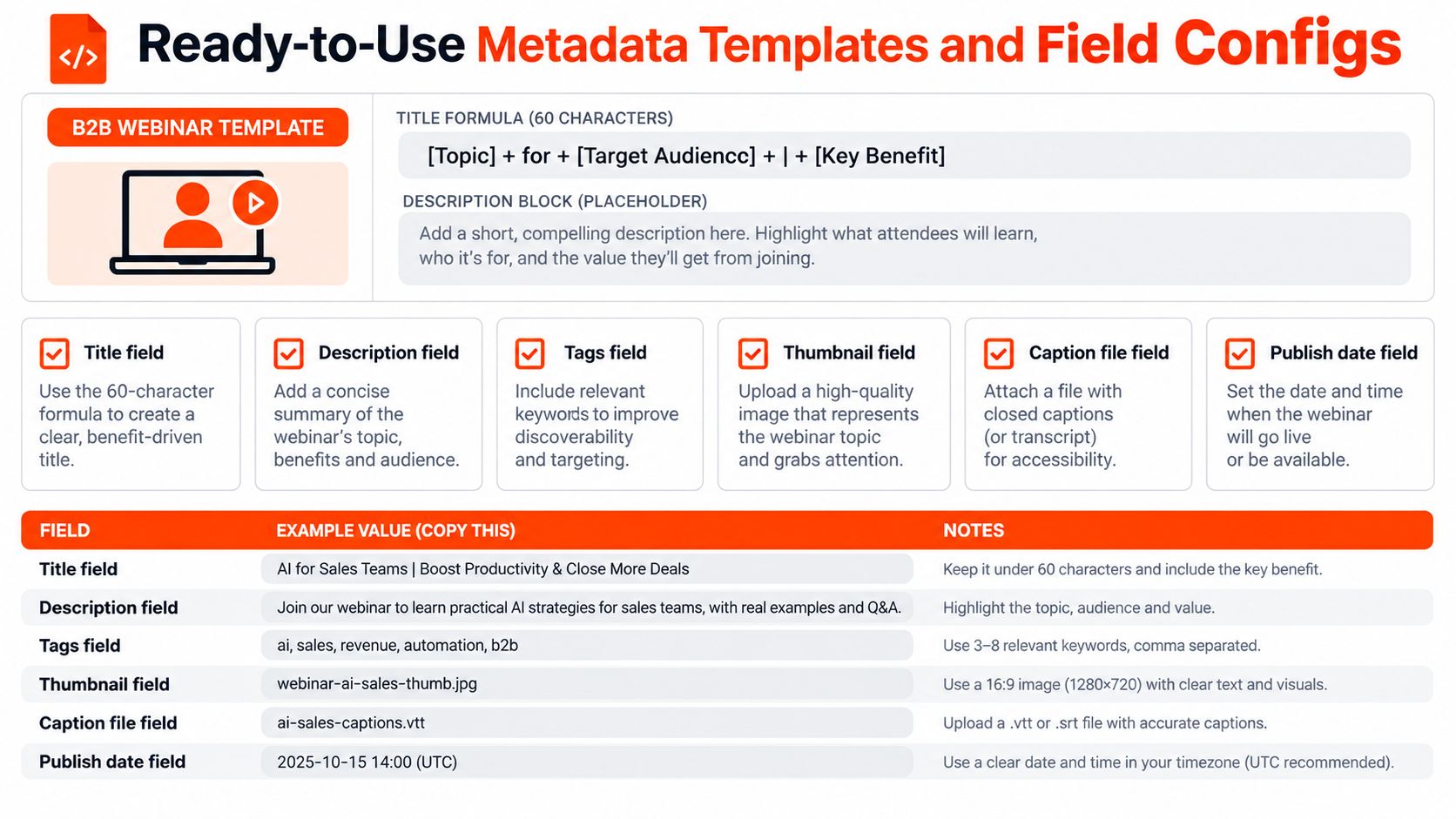
Webinar template
Title formula: [Audience problem] + [practical outcome] | [event or speaker context]
A team can keep the title close to 60 characters as a working editorial limit when it wants the main promise to remain visible in search interfaces. That's a recommendation for concise writing, not a guarantee that every search display will behave identically.
Description template:
This B2B webinar explains how [audience] can address [specific problem]. [Speaker name and role] covers [major topic], [practical method], and [decision point].
Chapters: 00:00 Introduction 00:00 The problem 00:00 The operating model 00:00 Common risks 00:00 Practical next steps
Related resource: [relevant page] Next action: [demo, consultation, report, or newsletter]
The timestamps above are placeholders, not fabricated runtime data. The publishing owner should replace them after reviewing the final recording.
A webinar field checklist should include:
Title: Audience, problem, and outcome are clear.
Description: The opening explains why the intended buyer should watch.
Tags: Product terms, approved alternatives, and adjacent topics are covered.
Thumbnail: Text remains readable on a small mobile screen.
Caption file: A reviewed WebVTT file is attached.
Publish date: The date matches the live page and structured data.
Schema: VideoObject includes the available identity, thumbnail, duration, upload, and location fields.
Transcript: Speaker names, product terms, and technical phrases have been checked.
Product demo template
Title: [Product category] workflow for [buyer role]
Description opening: “See how [buyer role] uses [product] to manage [workflow], with attention to [feature or business outcome].”
The demo page should place the primary action near the player, name the product category in plain language, and link to a deeper technical or commercial page. Shorter demos need especially clear first lines because the viewer may decide whether to continue before the product appears on screen.
Customer story template
Title: [Customer type] solves [business problem] with [approach]
Description opening: “This customer story follows how a [customer type] addressed [problem], evaluated [decision criteria], and changed [workflow or process].”
The customer name, approval status, industry, speaker role, and permitted usage should be recorded in the publishing system. Trust metadata is still metadata. A customer quote without provenance creates more legal work than demand.
Field | YouTube Configuration | Site-Hosted Configuration | Common B2B Pitfall
Title | Search-led title in the upload form | Matching page heading and title tag | Internal project name replaces buyer language
Description | Summary, chapters, links, and CTA | Crawlable summary plus player context | The page contains only an iframe
Tags | Topic and product variations | Page topics and schema relationships | Teams expect tags to fix weak positioning
Thumbnail | Custom platform image | Stable, accessible image URL | Auto-generated frame becomes the permanent brand image
Captions | Uploaded caption track | WebVTT plus readable transcript | Machine captions remain unreviewed
Publish date | Platform publication date | Page date and schema date align | Dates conflict across systems
Schema | Mostly platform-managed | VideoObject JSON-LD on the page | Markup describes a different asset
A description generator can help a team create a first draft, but a subject-matter reviewer must correct claims, names, chapters, and calls to action. A YouTube description generator can fit into that drafting stage without replacing editorial review.
Scaling Metadata Across Clips and Languages
A master webinar shouldn't remain trapped in one long recording. A SaaS marketing team can extract a short segment about implementation risk, give it a new title for a vertical feed, create a mobile-friendly thumbnail, and publish it as a distinct asset with its own page relationship.
The clip needs its own metadata, not a shortened copy of the parent recording. The title should fit the clip's audience and promise, the description should explain the isolated context, and the canonical URL should point to the clip's own page. VideoObject markup should identify the derivative asset, including its own upload date and thumbnail.
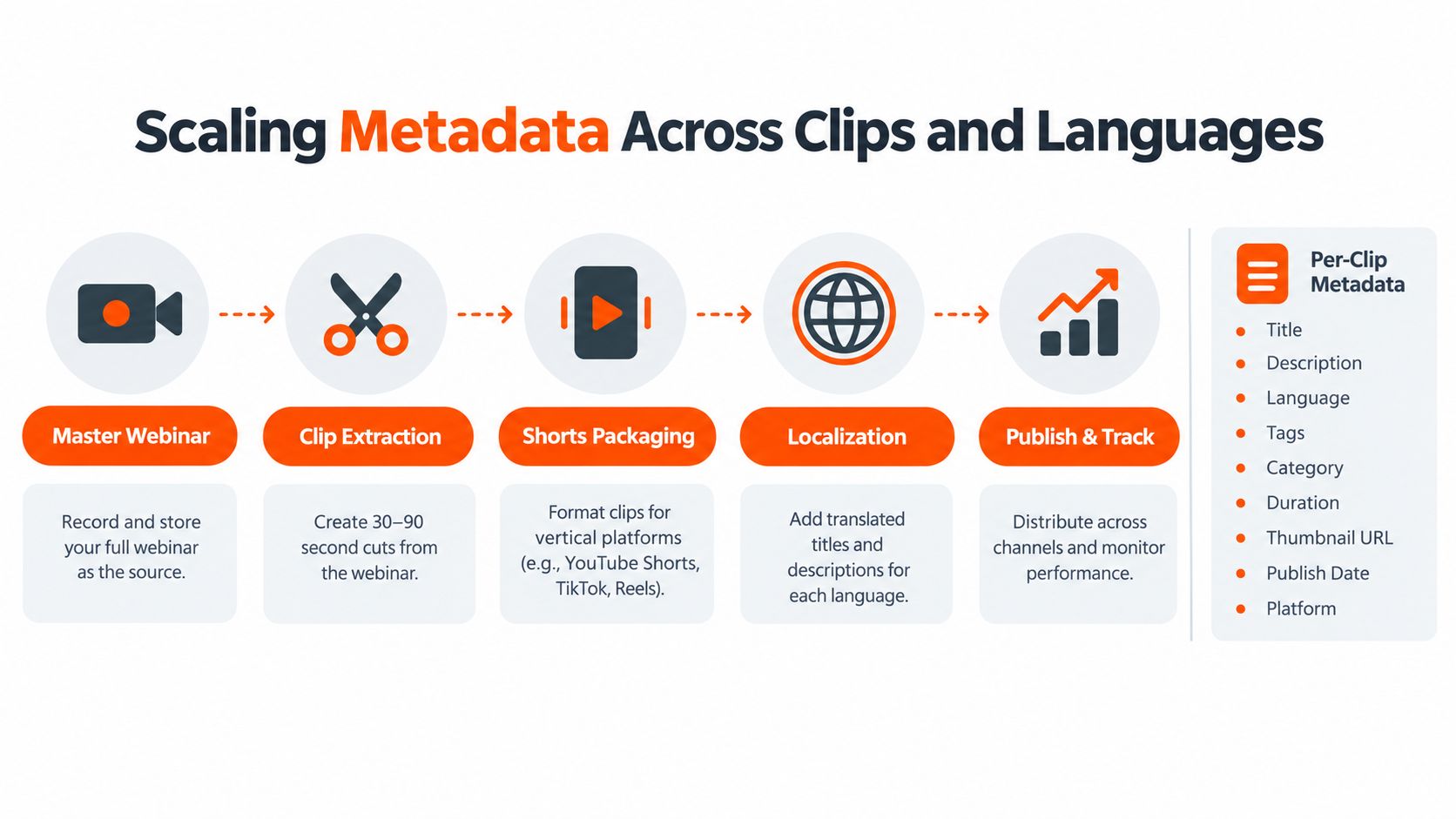
One recording, several discovery surfaces
The transcript provides the common text base. Editors can use it to locate strong moments, subject-matter experts can verify terminology, and SEO teams can map each clip to a distinct query or buyer question. AI search systems also need clear relationships between the spoken content, the page, the clip, and the structured fields.
Recent guidance for the 2026 search environment emphasizes chapters, clip start and end points, series context, VideoObject markup, Clip markup, transcript quality, and alignment between the metadata and the actual content. That direction is discussed in current video metadata guidance for AI search. It doesn't mean a team can force an AI answer to quote a clip. It means the team can make the asset easier for systems to interpret.
Language is part of the asset
For multilingual campaigns, each language version needs more than translated subtitles pasted onto the original page. A careful workflow includes:
Translated human-facing fields: Localized titles and descriptions should reflect how buyers in that market search.
Locale-specific captions: Captions should preserve names, product terms, and culturally relevant phrasing.
Language metadata: The page and caption track should identify the correct language.
Page relationships: Hreflang can connect language variants when the site architecture supports it.
Independent discovery: Each locale can have its own crawlable page and video sitemap entry.
A French caption track attached to an English-only page may help a viewer, but it doesn't automatically create a complete French discovery experience. Governance keeps the original transcript, translations, schema, thumbnail, and page versions tied to the same asset record.
Three B2B Video SEO Myths Worth Killing
Myth one, tags drive ranking
Tags can help with alternate spellings and narrow clarification, but they shouldn't receive the largest share of the production team's attention. A SaaS team gains more from an accurate title, useful description, reviewed transcript, and clear chapters than from inventing a heroic pile of near-duplicate tags.
The replacement action is simple: build the topic around the buyer's language and let tags support it. Tag strategy shouldn't become the digital equivalent of adding more herbs to a meal that needs cooking.
Myth two, captions are only for accessibility
Captions support accessibility, but they also create searchable text and help machines connect spoken language with the page topic. A professional services firm that reviews its transcript can find the exact phrase a buyer might search, identify a clip for LinkedIn, and catch a speaker's accidental transformation of a client acronym into a new species.
The useful action is to treat captions as an SEO and repurposing asset. Human review matters because inaccurate product names and industry terms weaken every derivative use.
Myth three, schema is optional polish
On a site-hosted video page, VideoObject markup helps describe the asset to search engines. Without it, a page can offer a player while giving crawlers less structured information about the thumbnail, duration, upload details, and video location.
The 2026-ready action is to ship valid schema with every relevant embed and test it after publication. Markup isn't a ranking spell. It is a clear label on the box.
Myth | Why Teams Still Believe It | What Actually Moves the Needle
Tags drive ranking | Upload forms make tags feel central | Query-aligned titles, descriptions, captions, and page context
Captions are only for compliance | Accessibility work gets separated from SEO | Reviewed captions, transcripts, language data, and clip extraction
Schema is optional polish | The player still works without markup | Valid VideoObject data, crawlable thumbnails, and consistent page fields
Teams reviewing broader implementation can use this SEO video optimisation guide as a companion reference, while keeping the actual publishing decisions grounded in the video's audience and content.
Your Metadata Pipeline and Quick FAQ
A workable pipeline is easy to remember: capture, transcribe, tag, schema, syndicate.
The producer captures the topic, audience, speakers, rights, and intended channels. The editor creates and reviews the transcript. The SEO owner assigns the title, description, tags, chapters, thumbnail, and language fields. The web owner adds VideoObject data and checks the page. Distribution owners then publish the master recording, clips, social versions, and localized pages with matching asset IDs.
How long should a video title be?
A concise title that keeps the main topic and audience visible works for both YouTube and site embeds. A working range of 50 to 60 characters can help teams write tightly, but display length varies by interface.
Do AI-generated descriptions hurt rankings?
AI assistance isn't automatically harmful. A description becomes a problem when it contains inaccurate claims, generic filler, missing context, or language that doesn't match the recording.
What schema fields does Google require for a VideoObject rich result?
Google's documentation defines the required and recommended properties for eligibility, so the publishing owner should check the current requirements before release. The implementation should at least maintain accurate identity, description, thumbnail, upload details, and video location fields.
How often should metadata be audited?
A launch audit should confirm that the page, player, captions, thumbnail, sitemap, and schema agree. Further reviews should happen when the recording changes, a translation is added, a page moves, or search presentation changes.
Bookmark the webinar template above and turn it into a required publishing record before the next B2B recording goes live.
ContentBuck helps B2B teams plan, produce, edit, caption, optimize, and repurpose videos into search-ready acquisition assets. Visit ContentBuck to connect video production with a metadata workflow built for YouTube, websites, ads, podcasts, and short-form distribution.
Parth Jasrapuria
Founder at ContentBuck
Building video systems for B2B businesses. Obsessed with YouTube growth, creative strategy, and organic SEO.