Monthly Video Editing Service: How It Works and Costs
Parth Jasrapuria
Founder
A finished webinar that never gets published doesn't help anyone. It just sits in a folder, looking expensive. A monthly video editing service turns that pile of raw recordings into a steady flow of ready to post videos, clips and ads, for one flat fee each month.
Why Monthly Video Editing Became a Business Habit
Priya leads marketing at a software company. Her 45-minute product webinar has sat unedited on a hard drive for three weeks. Everyone agrees it's important. Nobody owns it. Sales wants clips, social wants captions, and the file is still called Final_v3_REAL.mp4.
Priya's problem is normal now because video isn't a special project anymore. It's a weekly job. HubSpot's summary of Wyzowl's 2025 research reports that 89% of businesses use video marketing, while 93% of marketers say video delivers a strong return on investment.
Why teams still get stuck
The same research gives three honest reasons. 37% of marketers haven't adopted video because they don't know where to start, 26% cite lack of time and 16% cite uncertainty about ROI. None of those problems is fixed by buying another piece of software and hoping for the best.
A monthly editing service works like a meal-prep subscription instead of hiring a new chef for every party. The team supplies raw footage and business priorities. The editor handles cutting, captions, formatting and delivery, week after week. Teams that still want to edit in-house can compare tools first in Tutorial AI's video editor roundup, which helps separate a software gap from a time gap.

By the end, a reader should have three clear things: what's included, how the workflow runs, and a fair way to judge value without being dazzled by a low sticker price.
What a Monthly Editing Plan Actually Includes
Think of a plan as booked production capacity, not a magic button. ContentBuck's Unlimited Video Editing service edits any video fast on a flat monthly subscription, which is the basic shape of most plans like it.
The usual deliverables
Long-form edits: Webinars, product demos, podcast episodes and presentations, cleaned up and structured.
Short vertical clips:15 to 60 second cuts for LinkedIn, YouTube Shorts, TikTok and paid social.
Captions and subtitles: Caption files plus burned-in captions where a platform needs them.
Aspect-ratio versions:16:9 for YouTube, 9:16 for vertical feeds and 1:1 for square placements.
Brand polish: Intro and outro cards, lower thirds with names and titles, and basic motion graphics.
Revisions: A set number of change rounds, or unlimited revisions on some tiers.
Three limits decide real value more than any feature list. First, how many videos arrive each month. Second, how many requests run at the same time. Third, how fast the first cut arrives.
Think of active requests like ovens in a bakery. Three ovens means three loaves baking at once. A fourth loaf isn't forgotten, it just waits its turn.
Example plan tiers from one provider
Plan | Short-form videos a month | Long-form videos a month | Active requests at once | Turnaround
Individual | 20 | 0 | 1 | 24 hours
Growth | 40 | 5 | 2 | 24 hours
Pro | 80 | 10 | 3 | 12-hour priority
The Growth tier adds advanced editing with motion graphics, a dedicated video editor, unlimited revisions and Slack and Email support. The Pro tier adds premium editing with custom animations, a dedicated editor and project manager, plus strategy calls.
Before comparing any two plans, a marketing lead should write down real monthly counts first. Four webinars and twenty clips is a different purchase from two podcasts and sixty ad variants, even if both teams say they need "more video."
How the Monthly Editing Workflow Runs, Step by Step
The flow below shows the four broad stages, from upload to delivery.
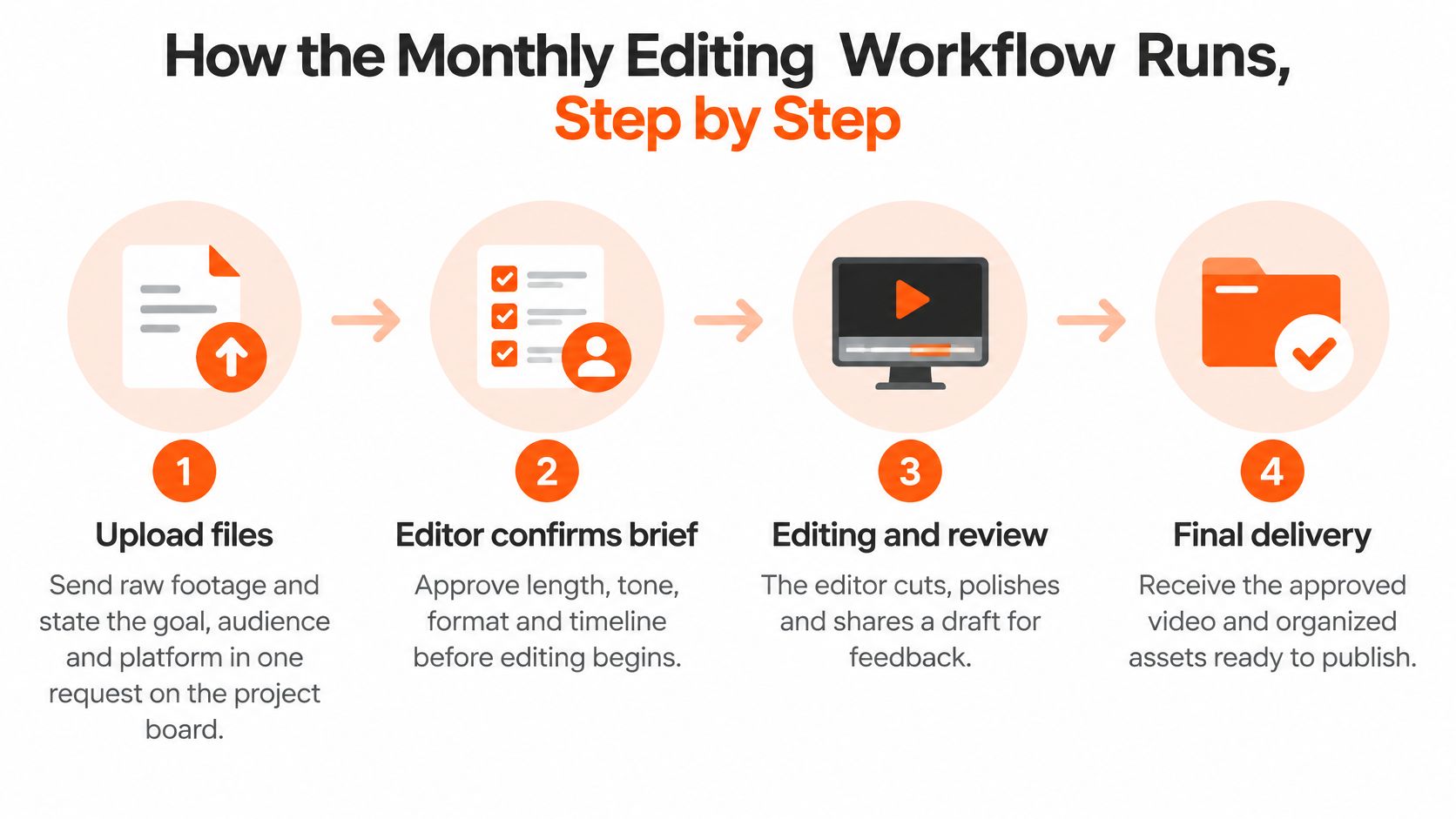
In daily practice, those stages break into eight smaller steps.
Upload and brief: Raw files go up with the goal, audience and platform stated in one request. Customers submit any video editing request through the ContentBuck project board, which keeps briefs out of scattered email threads.
Confirm the brief: The editor checks length, tone and must-include product terms before cutting. Five minutes here saves a revision round later.
Build the rough cut: Dead air, false starts and repeated points come out. The story should make sense before any polish goes on.
Add captions and on-screen text: Speaker names, captions and graphics are added and corrected against a glossary.
Review in one round: The client sends notes together, ideally with time stamps, so the editor isn't chasing five separate opinions.
Export every format: One recording becomes a full episode, a 30-second vertical clip and a square ad, each framed properly.
Deliver: Every video edit is delivered within 24 business hours, and revisions are also turned around within 24 hours.
Review the month: The team checks which clips performed best and adjusts the next batch, instead of repeating a weak format out of habit.
Teams setting this up for the first time can follow a structured guide to onboarding an unlimited video editing service so folders, brand files and approval owners are sorted before the first upload.
A Tuesday webinar, start to finish
Say a webinar is recorded Tuesday and uploaded that morning. The full cut lands Wednesday, notes come back Wednesday afternoon, and three short clips are scheduled for the following week. That's the rhythm a monthly plan is really selling.
The short video below walks through the same upload to delivery rhythm visually.
Delays usually come from late files, missing product names or unclear approvals, not from the editing itself. Teams with heavy export and rendering needs can also read about automating video workflows with RenderIO to see which repetitive steps software can safely absorb.
Quality Checks That Keep Every Edit Accessible
A software demo speaker says "SSO" clearly. The automatic transcript writes a random word instead. A buyer watching on mute now thinks the company can't spell its own product. Funny for about two seconds, then just costly.
Captions aren't decoration added at the end. The World Wide Web Consortium's Web Content Accessibility Guidelines state that captions must be provided for prerecorded audio content in synchronized media under Success Criterion 1.2.2, except where the media is clearly labelled as a text alternative. In plain words, meaningful speech in a finished video needs accurate captions.
A checklist worth copying
Speaker names: Names and titles are spelled right and change when the speaker changes.
Technical terms: Product names, acronyms like API and SSO, and customer names match an approved glossary.
Timing: Captions appear with the speech, not two seconds after the joke landed.
Important sound: Applause, laughter or an alert tone is marked when it carries meaning.
Phone readability: On-screen text stays readable on a small screen, inside safe margins.
Caption tracks: Files attach correctly on YouTube, LinkedIn and each ad platform.
Repurposing is where good intentions shrink. Text that's perfectly readable on a laptop can turn into ant-sized print in a vertical clip. A simple test helps: hold a phone at arm's length and try to read every caption line without squinting.
Length needs the same practical eye. Short cuts work well for discovery, while full-length webinars and demos still earn their place when a buyer wants depth before a sales call. Cutting everything to thirty seconds is like serving only appetizers and calling it dinner.
Rule of thumb: If a clip can't be understood with the sound off, it isn't finished yet.
Assessing Fit Across In-House, Freelancer and Monthly Service
Volume decides this purchase. Start there, not with price pages.
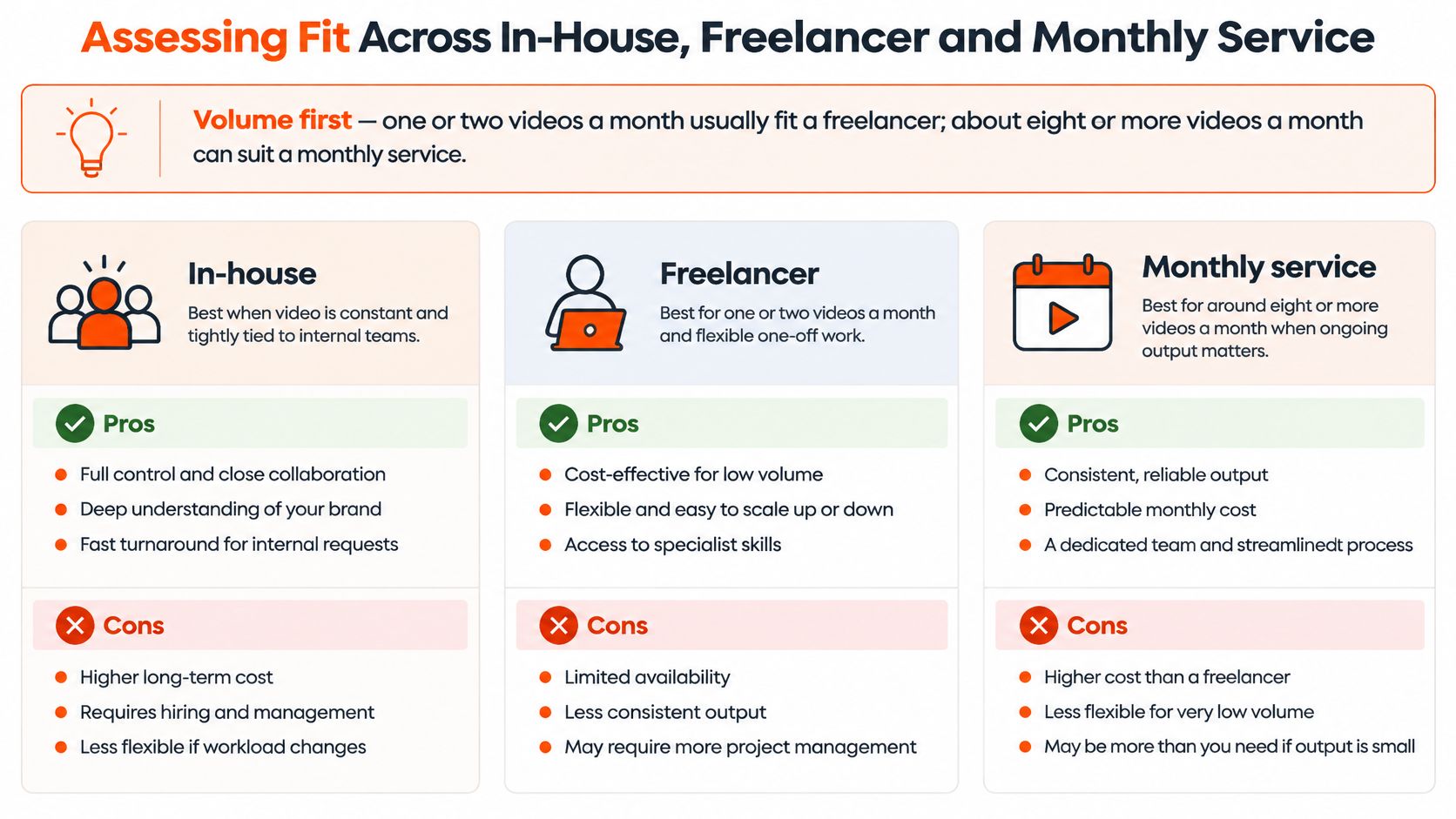
A team making one or two videos a month usually does better with a freelancer, because a monthly plan would sit half-used, like a gym membership in February. The unlimited editing subscription is not recommended for companies that only need 1-2 videos edited per month, because a freelancer would be more cost-effective for them. At the other end, the subscription fits IT services teams that produce 8 or more raw video assets per month that need editing, arriving steadily rather than in one annual burst.
Three ways to get video edited compared
Option | Best when | Speed | Cost pattern | Management load
In-house editor | Steady, full-time workload | Fast once trained | Salary and tools paid every month | High: hiring, training and reviews
Freelancer per project | One or two videos a month | Set by the freelancer's calendar | Pay per project | Medium: a brief and deadline for each job
Monthly editing service | About eight or more raw assets a month | Typically 24 hours | Flat monthly fee | Low: one queue and one contact
An in-house editor learns the brand and turns work fast once trained. The trade-off is fixed cost in quiet months, plus hiring time before the first edit exists. A freelancer keeps costs flexible, but every job needs a fresh brief, a deadline and the occasional polite chase. A monthly service gives one queue and one contact, with one clear risk: paying for capacity that goes unused.
Say a three-person team records one webinar a month. A freelancer fits. Another team publishes a weekly podcast, clips from every episode and two ads a month. That steady pile suits a subscription. A deeper side-by-side in this comparison of video editing subscriptions and freelancers helps teams near the borderline.
Performance marketers weighing ad volume can also find Meta ads tools for agencies to judge whether the bottleneck is editing capacity or campaign management. Final fit questions stay simple: does the provider handle the right platforms, can both sides talk during shared working hours, how are files stored, and who owns project files at exit?
Measuring Value Without Counting Views Alone
Start with one honest division sum. A $2,400 monthly plan that delivers 16 finished videos costs $150 per finished video. If that same month produces 40 clips, the cost drops to $60 per clip. That number, cost per usable asset, tells a marketing lead far more than a headline fee.
Views alone mislead because they ignore intent. A clip with 5,000 views and no call to action can be worth less than a 400-view clip linked to a demo page. The smaller audience may contain the exact buyers a sales team wants, nodding along.
Why short-form earns its budget line
HubSpot's 2025 marketing data reports that 21.02% of marketers identify short-form video as the format delivering the highest return on investment, making it the leading format in that survey. The same source reports that nearly 30% of marketers planned to increase investment in YouTube during 2025.
Say a podcast episode produces a 45-second clip built around one sharp customer objection. That clip points to a consultation form through a tracked link. The full episode builds trust on YouTube, while the clip does the pointing. Both jobs matter, only one shows up in a view count.
A useful monthly report separates reach from revenue influence. Applause is nice. Demo requests pay salaries.
Track qualified leads: Tag form fills that arrive from video pages and clips.
Track demo requests: Note which asset a prospect watched before booking.
Track assisted deals: Use UTM links and CRM notes so video gets credit for helping, not just closing.
For comparison, a one-off Premium SaaS explainer video costs $3,999 for a single project of up to 3 minutes. A monthly plan spreads a similar budget across many assets instead. Low-risk trials exist too: a single video trial costs $60, and a 5-video bundle costs $300, with unlimited revisions included. Unlimited Video Editing itself is a flat monthly fee with no contracts. A fuller breakdown of video editing costs helps teams place those figures against freelancer quotes. Every price in these examples is illustrative, not a market rate, so each figure should be checked against real provider quotes before a decision.
Red Flags and Common Mistakes in Monthly Editing
"Unlimited" is the most misunderstood word in this market. It sounds like infinite editors appearing from a cupboard. It isn't.
Unlimited means submissions, not simultaneity: ContentBuck offers unlimited video editing on a flat monthly subscription with no cap on the number of submissions, but requests still move through a queue. Ask how many run at once and how they're ordered.
Editing isn't strategy: Full ad strategy and creative direction are provided through ContentBuck's Ad Creatives service, not the unlimited video editing subscription. An edit-only plan won't invent hooks or campaign angles.
AI captions without human review: Product names and accents break automated captions regularly. Ask who checks them before publishing.
Volume mistaken for results: Doubling output while every clip lacks a call to action can keep leads perfectly flat.
No owner for brand rules: Without a glossary and approved claims, every batch needs the same corrections, forever.
Say a team jumps from 20 to 60 clips in one quarter and feels wonderfully busy. Then demo requests turn out unchanged, because the clips had no link, no offer and captions nobody could read on a phone with the sound off. Busyness wore a very convincing costume.
Contract terms deserve the same clear eye. Check notice periods before signing, not during a breakup. Confirm what happens to raw files and project files at exit, and whether revisions are capped per video or per month. Small print is boring right up until the day it isn't.
Confirm the Order Before You Sign Up
Three steps keep this decision calm. Step one: count real monthly assets, including webinars, podcast episodes, demos and ad variants, then apply the volume rule where about eight or more steady raw assets point toward a monthly plan. Step two: pick one metric for the first 30 days, such as qualified leads tagged to video or cost per published asset. Step three: run a pilot with one real request, record turnaround and revision rounds, and only then commit.
Six questions belong in that pilot conversation: how the queue works, what counts as a revision, who checks captions and technical terms, how data is stored and whether it's used for training, what the monthly report contains, and how to exit. For Meridian Advisory, ContentBuck ran a keyword audit, built a 3-month content calendar of 12 videos, and published one scripted, SEO-optimised video every week, which shows how a pilot can grow into a planned calendar.
Say a three-person team pilots one 45-minute webinar, tracks two weeks of turnaround and checks demo requests before signing. That's evidence, not vibes. ContentBuck's free discovery calls have limited spots each month, so teams near a decision should book early.
Frequently Asked Questions About Monthly Video Editing Services
How much does a monthly video editing service cost
Flat plans vary widely, so cost per finished asset is the fair comparison. The illustrative example of $2,400 a month for 16 finished videos works out to roughly $150 each.
How many videos should a team order each month
Start from a real count of raw assets, not a wish list. About eight or more steady assets a month is where a flat plan usually pays off, while one or two videos suit a freelancer.
Do automatic captions need checking
Yes. Automatic captions often miss product names, acronyms and speaker changes. A person should correct technical terms against a glossary before anything is published.
Does a monthly service handle strategy as well as editing
Usually not. Many providers sell editing only, so scripts, hooks and ad direction may be a separate service. Ask before assuming, because disappointment loves an assumption.
How fast is the first cut
Plans commonly quote 24-hour turnaround for a first cut. The higher tier in the example plans offers 12-hour priority turnaround for urgent requests.
What should be measured first
Pick one metric for the first 30 days, such as qualified leads tagged to video or cost per published asset. One clear number beats a dashboard nobody opens.
ContentBuck's monthly video editing service gives B2B teams a dedicated editor, a simple request queue and 24-hour delivery for webinars, demos, podcasts and short clips, all on one flat fee with no contracts. Teams sitting on unedited recordings can start with a single trial video, measure the result, and scale only when the numbers behave. Visit ContentBuck to book a free discovery call and turn that hard drive of good intentions into published video.
Parth Jasrapuria
Founder at ContentBuck
Building video systems for B2B businesses. Obsessed with YouTube growth, creative strategy, and organic SEO.