How to Turn a B2B YouTube Channel Into a Lead Source
Parth Jasrapuria
Founder
The marketing team has published product demos, uploaded a webinar, and celebrated a promising view count. Sales still can't name a lead that came from the channel. Meanwhile, the company's best expert is asking whether another recording session is really necessary.
The missing piece usually isn't a better camera. Learning how to turn a B2B YouTube channel into a lead source starts with a simpler system: one buyer question, one useful answer, and one measurable next step. The channel should help buyers make decisions, not become an expensive cupboard for old webinars.
The Lead Path at a Glance
Video types, buyer questions and next steps
Video type | Buyer question | Funnel stage | Next step
How-to walkthrough | How do we set this up? | Early research | Checklist download
Comparison video | Which option fits a team our size? | Shortlisting | Comparison guide and demo request
Customer proof story | Has this worked for companies like ours? | Evaluation | Case study page
Objection answer | Is it secure, and how long does migration take? | Late evaluation | Consultation booking
Podcast clip | What does this expert think about this problem? | Discovery | Full episode or newsletter signup
These formats aren't interchangeable. A buyer learning setup basics may welcome a checklist but resist a sales meeting. Someone comparing migration risks may need a specialist conversation rather than another beginner's guide.
Search brings strangers in. Useful answers earn trust. A relevant next step turns that trust into an identifiable lead. A YouTube channel is a shop window that stays lit at night, but only a sign on the door tells people where to walk in. A beautifully lit window without directions mostly attracts people checking their reflection.
Match the offer to the decision
Consider a payroll software company. A walkthrough about importing employee records can lead to an import checklist that helps the viewer prepare the file. Sending that viewer to a generic homepage forces another search, this time through the company's navigation.
A customer proof story has a different job. Its case study page should explain the customer's starting problem, implementation choices, and documented outcome. The viewer needs enough detail to judge whether the situation resembles their own.
Not every step needs an email gate. A public case study can support evaluation, while a newsletter signup creates an ongoing relationship. The distinction matters because a click is progress, but it isn't automatically a qualified lead.
Practical rule: Choose the next step before recording. If the team can't name a useful destination, the topic probably needs sharpening.
Broad educational content still has a place, especially when introducing an unfamiliar category. But a video without a next step is entertainment, not a lead source. Even excellent entertainment needs directions to the sales desk.
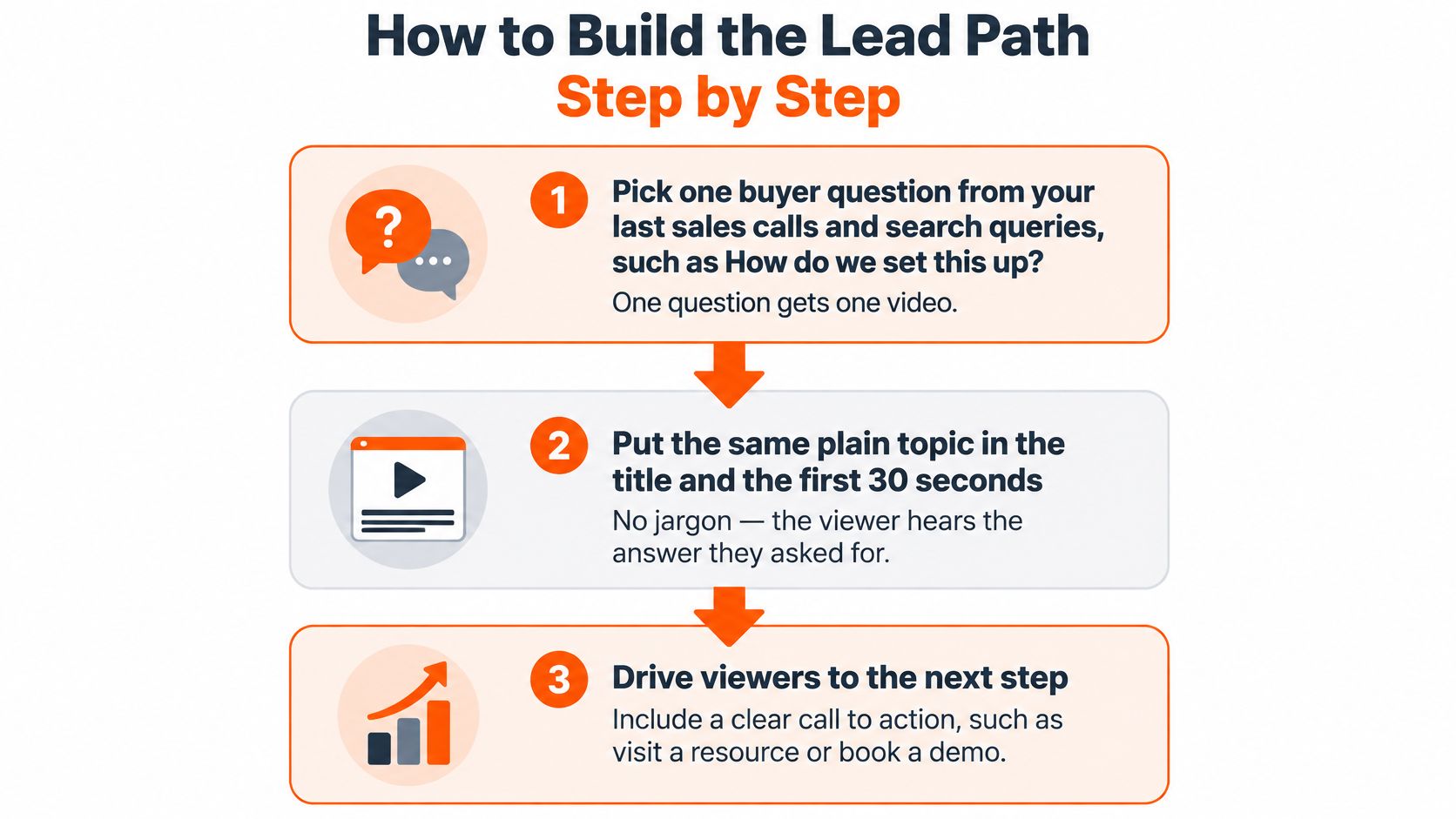
How to Build the Lead Path Step by Step
Pick one buyer question. Review sales-call notes and search queries for problems close to a buying decision, such as setting up an integration. ContentBuck researches the exact YouTube searches that CTOs and IT directors make and builds a content calendar around them. The common slip is squeezing unrelated questions into one video, then attaching a generic demo button.
Match the title and opening. Use a plain topic such as How to Reduce SaaS Churn, then address it in the first 30 seconds as an editorial target. YouTube's search guidance identifies relevance, engagement, and quality, including the match between queries, titles, descriptions, tags, and spoken content. Our Secret Growth Trick hides the subject. A sales pitch before the answer creates the same problem.
Build the matching destination. A migration video should lead to a migration checklist or assessment, not the homepage. The guidance on using videos on landing pages helps connect the explanation with the conversion experience. For teams also selling online, Crescade's resource on video marketing built for ecommerce growth offers an adjacent commercial context, though B2B qualification needs its own approach. The slip is making every destination another demo form.
Place one clear next step. Use the description, a pinned comment, and an end card with a clear instruction. Add an external end-screen link only where the channel is eligible; otherwise, direct viewers to the description. Competing offers create unnecessary decisions.
Tag the links. Use UTM parameters for source, medium, campaign, and a stable video identifier in utm_content. Capture these in hidden form fields and pass them into the CRM. The common slip is recording only YouTube as the source, leaving sales unable to identify the topic.
Set review dates before publishing. Use a 30-day checkpoint to inspect the hook and CTA, then a 90-day checkpoint to assess qualified leads and deal influence. These are operating checkpoints, not promised results. The slip is declaring success from views before checking buyer quality.
The process is easier to manage when the question, destination, and measurement are planned together.
Set an honest runway
ContentBuck states that YouTube is a 3-6 month investment and isn't suited to clients who need leads within a week. A working path should eventually show relevant viewing, landing-page visits, and tagged submissions appearing together. Rising views without onward activity call for diagnosis, not confetti.
The embedded video provides an additional viewing resource alongside the workflow.
Editing a Podcast Episode Into Lead-Ready Videos
Consider a hypothetical 40-minute episode with a CFO explaining budget approval. The useful output isn't a recording with the silences removed. It's a full answer, supported by clips that help the right people find it.
Build the edit around the buyer's problem
Record separate audio tracks and at least two camera angles. This recommended setup gives the editor room to clean individual voices and cover cuts without awkward visual jumps.
Cut the main episode around the budget-approval question. Move useful side stories into standalone clips. The guest's cat can remain a beloved family member without becoming a procurement expert.
Write a problem-and-promise opening. Aim to establish the value within 30-60 seconds, rather than beginning with an extended biography.
Add captions, a lower-third identifying the guest's role, and an end card pointing to the budget-planning resource.
Export for the destination. Use 16:9 for the full YouTube episode and a reframed 9:16 version for vertical platforms. Check faces, slides, and captions after reframing.
Plan three to seven clips of 30-60 seconds as an editing package, each with its own hook and pointer to the full episode.
Write timestamped show notes and include the matching landing-page link.
These are production recommendations, not universal performance benchmarks. The deliverables below form a practical editing menu.
Podcast deliverables and their lead-path jobs
Deliverable | Typical length | Best platform | Job in the lead path
Full-length YouTube episode | 20-45 minutes | YouTube | Answers one buyer question in depth and links to the offer
Short clips and vertical reels | 30-60 seconds each | YouTube Shorts, LinkedIn, Reels, TikTok | Pull new viewers back to the full episode
Show notes with timestamps | Text only | YouTube description, blog | Earn search traffic and carry the landing-page link
Thumbnail | One image | YouTube | Lift click-through from search and suggestions
Captions | Full transcript | All platforms | Help viewers watch without sound and improve accessibility
Give every clip a destination
In 2024, 63% of B2B buyers surveyed in the United States, United Kingdom, and India said short-form social video helps inform their buying decisions, according to LinkedIn's commissioned GWI research of more than 1,700 buyers.
Anya's LinkedIn testimonial describes ContentBuck turning a single recording into a full-length YouTube video, five captioned LinkedIn clips, and polished timestamped show notes. The B2B podcast repurposing workflow explains how those pieces can operate together.
Use description links and available related-video features to connect clips to the episode. Compare which topics send engaged viewers onward, then commission more conversations around those problems. Subscribers become a useful by-product, rather than the entire business case.
Making Videos Useful for the Whole Buying Group
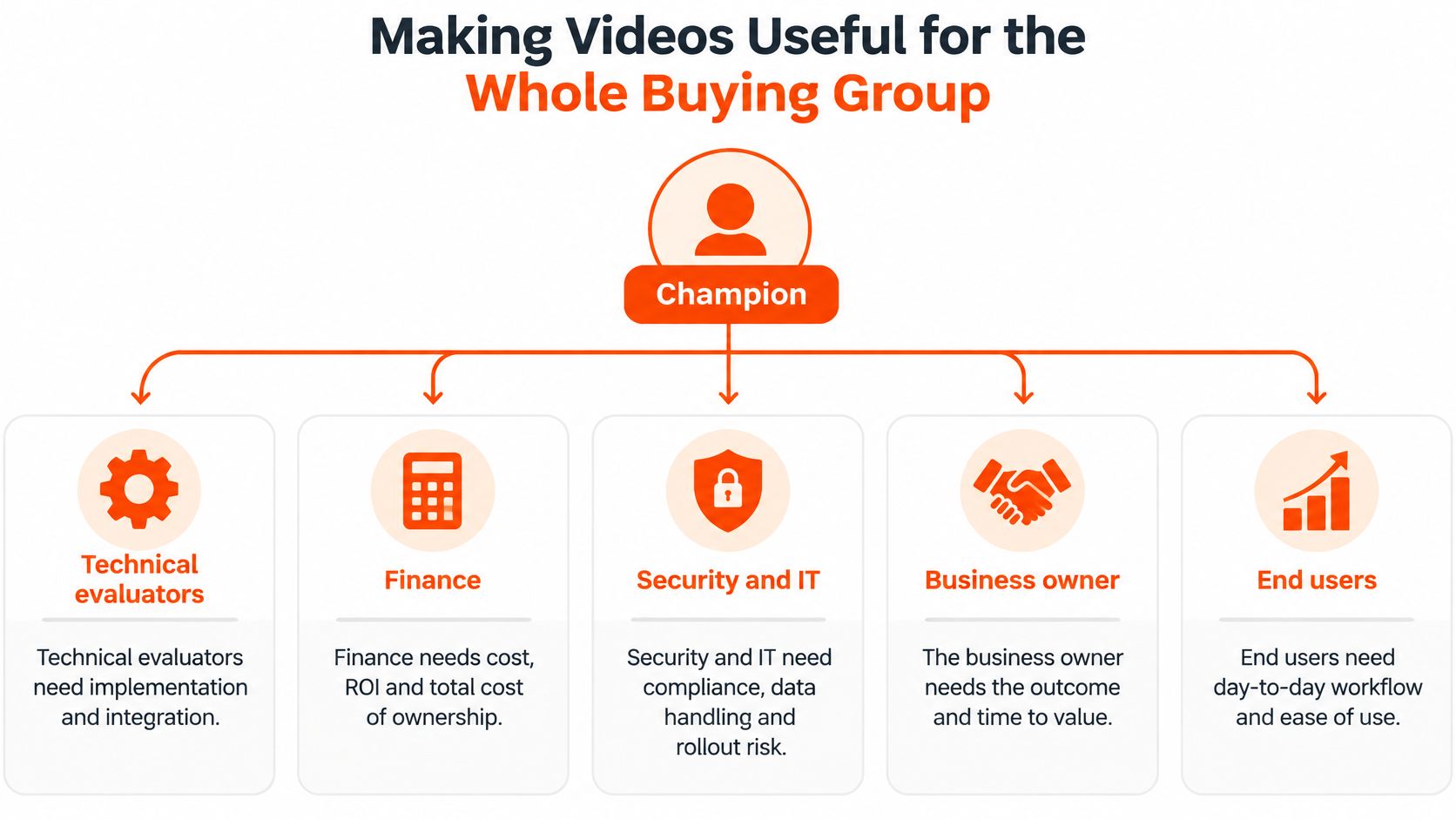
The viewer may be a champion, not the final decision-maker. A product manager can love a demonstration and still need approval from finance, security, and procurement. A channel built only for that first viewer leaves the champion doing the rest of the explaining.
The practical answer is a forwardable evidence library. Each asset should help a particular stakeholder make a particular decision.
Match evidence to the stakeholder
Technical evaluators need implementation and integration walkthroughs. Show dependencies, configuration choices, and failure points. Link to technical documentation or a scoped technical discussion.
Finance needs a quantified business case. Explain assumptions, total cost, and potential savings using defensible customer or product evidence. Provide a worksheet instead of an unsupported ROI claim.
Security and compliance approvers need clear risk answers. Describe data handling, access controls, and review procedures accurately. Route them to relevant documentation.
Procurement needs comparison and migration content. Explain scope, responsibilities, trade-offs, and contractual questions without pretending every alternative is terrible.
Budget owners need a short executive summary. State the business problem, expected outcome, and conditions required for success.
The diagram shows how a champion can distribute clear explanations across the wider buying group.
Make internal forwarding easy
As an illustrative scenario, an HR software team could publish a problem-led video titled Why Your B2B Sales Cycle Is Longer Than It Should Be. A manager could forward it to a boss with a short note identifying the relevant issue. That forwarding scenario illustrates the mechanism, not a measured result.
Separately, a B2B HR SaaS video made by ContentBuck with that title booked 320+ demos. That result isn't a forecast for another company.
A useful production recommendation is a 60-second summary clip with a clear takeaway, supporting evidence, and a stakeholder-specific destination. The champion should be able to forward it without writing an accompanying dissertation.
A video that reaches the right CFO twice can be more useful than one that reaches a million students. Students rarely approve enterprise software budgets.
Measure influenced opportunities, identifiable stakeholder engagement inside target accounts, sales-content usage, and fewer repeated objection questions. Anonymous public views can't establish stakeholder reach on their own.
Measuring Leads Instead of Views
Start by separating traffic sources. YouTube Analytics distinguishes YouTube Search, suggested videos, browse features, external links, playlists, and paid advertising, while retention reporting shows where viewers stop watching.
These reports answer different questions. Search traffic can reveal demand around a specific problem; recommendation traffic may introduce the company to a broader audience. Neither proves lead quality without website and CRM outcomes.
Diagnose the break in the path
If viewers leave before the problem statement, inspect the opening and pacing. If they stay but don't continue to the landing page, inspect the offer, spoken CTA, description placement, and pinned comment. Retention suggests where to investigate; it doesn't prove why someone left.
Lead path metrics and what they tell you
Metric | What it tells you | Healthy sign
Retention at 30 seconds | Whether the opening hooks the buyer | Most viewers still watching after the problem statement
Landing-page clicks per 1,000 viewers | Whether the video sends buyers onward | Rising month over month against the channel's baseline
Qualified leads per 1,000 unique viewers | Lead quality from each video | Higher for commercial topics than broad topics
Opportunity rate by source video | Whether video-sourced leads reach sales | Opportunities created from that video's leads
Pipeline value per 1,000 qualified viewers | Revenue impact of each video | Compared across videos to choose the next topic
These are internal comparison rules, not industry benchmarks. Define “qualified viewer” explicitly if using it as a denominator; YouTube doesn't automatically identify every viewer's buying suitability.
Google's conversion-tracking guidance recommends the Google tag and enhanced conversions to support measurement accuracy. Separate micro-conversions, such as pricing-page visits and downloads, from primary conversions, such as qualified meetings. Preserve consent, deduplicate submissions, and align sales and marketing on what counts as a qualified lead.
Compare commercial outcomes
In a hypothetical comparison, Video A receives 40,000 views and 12 qualified leads, while Video B receives 3,000 views and 30 qualified leads. Video B wins on qualified-lead production, assuming the leads are comparably valuable and production costs are similar. The bigger audience doesn't rescue Video A's weaker outcome.
Track what the CRM can establish, then label the rest as influence rather than pretending every deal has a perfectly traceable origin.
Buyers can evaluate a vendor before contacting sales. Ask recently closed customers which videos helped, and retain those answers alongside tracked attribution. Teams needing account-level reporting can use Docket to compare Dreamdata alternatives, checking CRM compatibility and attribution assumptions.
Each month, review the metrics, refresh the weakest hook or CTA, and use opportunity outcomes to choose adjacent topics.
Frequently Asked Questions About YouTube Lead Generation
How long does a B2B YouTube channel take to produce leads?
ContentBuck recommends planning for a 3-6 month investment. That's a planning horizon, not a guaranteed delivery date for leads. A channel isn't an appropriate emergency fix for a sales team that needs new conversations this week.
Are lots of subscribers necessary to get leads?
No. A narrowly relevant video can attract a suitable buyer without a large subscriber base. The useful test is whether the topic attracts potential customers and helps them take a commercially relevant next step.
How many clips should come from one podcast episode?
A practical editing recommendation is three to seven clips of 30-60 seconds, provided the conversation contains enough standalone answers. Each needs a distinct hook and a route to the full episode. Weak material shouldn't be stretched to meet a clip quota.
Should every video have a form?
No. Every high-intent video needs a useful next step, but that destination can be an ungated case study or technical guide. Forms belong where an exchange of information supports a download, assessment, or consultation.
Which metric deserves attention first?
Start with onward landing-page activity, then examine qualified-lead production relative to audience size. This separates a weak offer from weak lead quality. Views alone can't make that distinction.
Does FAQ schema help search?
FAQPage markup identifies questions and accepted answers in a machine-readable structure. The marked-up text should match the visible page, as this FAQ does. It doesn't guarantee higher rankings or a special search appearance.
Pick One Buyer Question and Publish It This Month
The first move is a sales-call review, not a studio booking. As a practical starting exercise, the marketer can pull the last ten calls and list the questions buyers asked before saying yes or no. The strongest opening topic is a recurring question the company can answer with specific evidence.
Build a video around that question, a matching landing page, and a short form. For a CRM migration question, demonstrate the preparation process and offer the checklist. For a B2B YouTube audit question, explain what an audit examines and provide an audit request destination.
Remove unnecessary distance
According to LinkedIn's internal data from 2025, advertisers combining Video Ads with Lead Gen Forms saw 1.6 times higher Lead Gen Form open rates than advertisers using other approaches. That's a LinkedIn finding, not a YouTube conversion benchmark, but it supports testing a shorter route from useful video to relevant form.
Keep the form focused on work email, company, role, and the problem being solved. Every extra field is another tiny toll booth on the road to a lead. Ask for information that changes qualification or follow-up, not information that merely looks impressive in a spreadsheet.
Click-through rate indicates whether the offer earns interest.
Form-start and completion rates reveal friction after the click.
Marketing-qualified leads show whether the audience fits.
Sales-qualified opportunities show whether interest becomes a real buying conversation.
The commitment should be small enough to execute and clear enough to evaluate: publish one buyer-question video this month and review its qualified leads and deal influence after 90 days. The promise isn't instant pipeline. It's a measurable test that helps the team decide what deserves another recording session.
ContentBuck offers a Free YouTube Audit to help teams examine whether their channel connects buyer questions with useful content and clear next steps. Visit ContentBuck to request an audit and identify a practical starting point for turning the channel into a lead source.
Parth Jasrapuria
Founder at ContentBuck
Building video systems for B2B businesses. Obsessed with YouTube growth, creative strategy, and organic SEO.