Outsource YouTube Video Editing: Costs, Steps and Partners
Parth Jasrapuria
Founder
A founder records a sharp product demo on Monday. The raw file then sits in a shared drive for two weeks because nobody has time to cut silences, fix audio, add captions, and make a thumbnail. That's not a content problem. It's a production bottleneck, and it's exactly where teams decide to outsource YouTube video editing or keep struggling in-house. The recording was the fun part. Editing is the dishes after dinner, necessary, repetitive, and somehow always waiting. This guide treats outsourced editing as production infrastructure, judged by cost per publishable asset and review time, not by the sticker price of one edit.
Is Outsourcing YouTube Editing Worth It for Your Channel
Short answer: outsourcing pays off when editing time, not ideas, is the bottleneck. If recordings pile up while publishing slips, the channel doesn't need more brainstorming. It needs a repeatable way to turn raw files into finished videos. If only one simple video appears each month, a freelancer or a careful DIY edit is usually cheaper.
The table below gives a quick verdict. Readers should find the row that looks most familiar, then check whether the reason matches their own week.
Your situation | Outsource? | Why
1-2 videos a month, editor on staff | No | Handoff time costs more than the editing saves
Weekly long-form, no editor | Yes | A repeatable workflow beats occasional uploads
One recording, five or more clips needed | Yes | Clip cutting is repetitive and easy to hand off
Expert presenter, no time to edit | Partly | The expert keeps the script, the editor handles assembly
Confidential product or regulated topics | Partly | Only with access controls and approval steps
Edits take three weeks or more | Yes | The delay is costing publishing frequency
A Simple Decision Rule
Two or more yes rows usually justify a paid trial. One yes may justify a single test project. Mostly no answers point to keeping editing close, at least until volume rises. The point isn't to outsource because everyone else does. It's to remove the specific delay that's stopping good recordings from reaching buyers.
Volume alone doesn't decide it, either. News teams offer a useful parallel, because fast turnaround matters more than fancy effects. The way remote video editors for Florida newsrooms support deadline-driven publishing shows the same logic. When speed protects relevance, outside editing capacity becomes operational support, not a luxury.
Run a Quick Self-Check
Before contacting anyone, count three things. First, count raw videos per month, including webinars, podcasts, demos, and interviews. Second, count the hours spent editing inside the team, including caption fixes and export chores. Third, name who signs off on each cut. If nobody can answer that last one, outsourcing will just create a faster pile of almost-finished videos. A clear owner turns editing from a group chat adventure into a workflow.
What Editing Services You Can Actually Buy
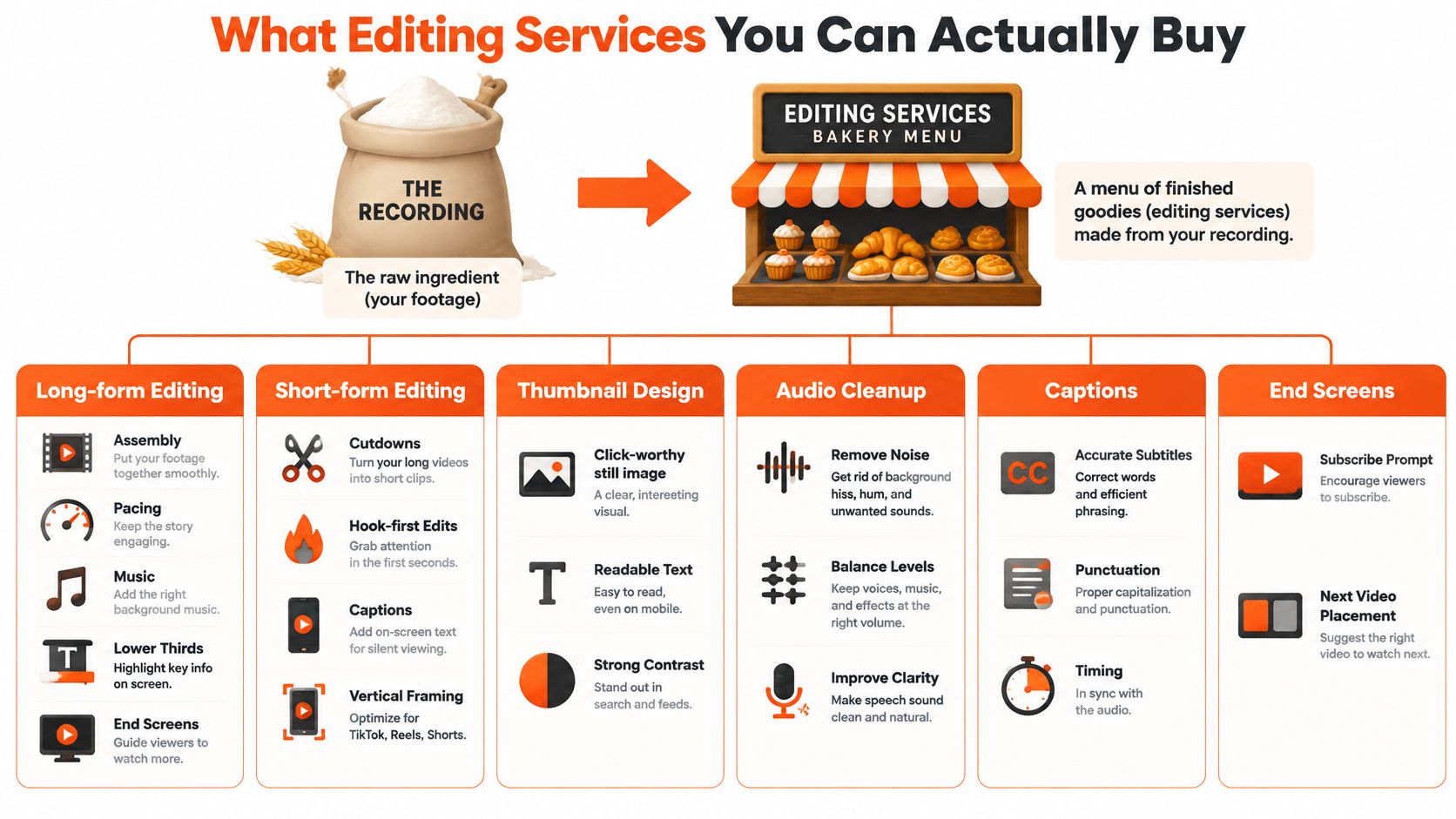
Think of a bakery. The recording is the flour. Editing services are the menu, and not every channel needs a three-tier cake for a Tuesday product update. Buyers who outsource YouTube video editing can order one item, a bundle, or a steady monthly menu.
The Main Menu
Long-form editing: Assembly, pacing, music, lower thirds, and end screens for the main YouTube video.
Short-form clips: Hook-first cutdowns with vertical framing and captions, pulled from one long recording.
Podcast post-production: Audio cleanup, intro and outro, speaker balance, and show notes support.
Thumbnail design: A click-worthy still image with readable text and strong contrast.
Captions and subtitles: Accurate text, punctuation, and timing for silent viewing and accessibility.
Motion graphics: Simple diagrams, callouts, and animated points that clarify a demo.
Ad cutdowns: Short 15 and 30 second versions shaped for paid placements.
Say a small cybersecurity firm records one expert webinar. A sensible order returns the full episode, five clips, corrected captions, and one thumbnail. The expert supplied the knowledge once. The editor turns it into several usable assets, so prospects don't have to dig through an hour of raw talk with a tiny digital shovel.
Buy clear pacing and accurate captions before fancy animation. Viewers notice a boring first minute long before they admire a spinning logo.
Clips Are Not Automatically Original
A clip cut from the client's own recording, framed by the presenter's explanation, is different from a stitched compilation of borrowed material. According to YouTube's reused content policy, a channel can lose monetization when it republishes material without significant original commentary, meaningful changes, or clear educational or entertainment value, and the rule applies to the entire channel. Permission to use footage doesn't by itself fix that problem, because the policy sits separately from copyright.
The safe brief gives the editor original recordings, brand commentary, and a clear story to build. Editors comparing software help for rough assembly can also compare Invideo with other AI tools before deciding what still needs a human editor. Tools can speed up assembly, but they don't supply the client's judgment. That judgment is the ingredient that makes repurposed material feel like an original video, not leftovers in a nicer bowl.
Pricing Models and Turnaround You Can Expect
Pricing only makes sense when it's tied to volume, revision limits, and speed. Ranges shift by region, skill, and tools, so the table works best as a planning map for buyers who outsource YouTube video editing, not as a promise from every provider.
Model | Typical turnaround | Best fit
Freelance editor, hourly | 3-7 days per video | Occasional one-off edits
Per-video project, 10-15 min long-form | 3-10 days | Fixed scope with a set revision limit
Short clips, per clip | 1-3 days | Cheap per unit, watch the total volume
Monthly retainer, one dedicated editor | 24-72 hours | Steady, predictable volume
Flat-fee unlimited subscription | Often 24 hours per request | Teams with 8 or more raw videos a month
Buyers comparing hourly quotes can compare freelancer rates before treating the lowest number as the best deal. A low hourly rate with vague scope can cost more than a fixed project price. Nobody saves money by buying confusion at a discount.
The Per-Finished-Minute Trap
A cheap rate based on raw minutes can hide long revision loops. For example, say one 12-minute long-form video costs 150 dollars and three shorts cost 25 dollars each. That's 225 dollars a week, or about 900 dollars a month, before extra revisions. The useful question isn't what one minute cost. It's what each approved, publishable asset cost after all the back and forth.
A plain breakdown of video editing costs helps separate the edit fee from the extras around it. Those extras matter because they often arrive unexpectedly, like relatives who said they'd only stay for tea.
Costs People Forget
Extra revision rounds: Work beyond the included limit may be billed or pushed to the back of the queue.
Rush fees: A webinar that must go live this week costs more to turn around than one with a relaxed deadline.
Stock music licences: A track used in ads or multiple formats may need proper licensing.
File storage: Large raw files, project files, and masters need organized storage that both sides can access.
Speed has a price because an editor must move other work aside. A 24-hour promise suits launches, timely commentary, and recorded events that lose value fast. A five-day window is fine for evergreen tutorials. The smart move is simple. Divide total monthly spend by approved finished videos, not by hours billed. Hours are an input. Finished assets are what the channel can publish, promote, and sell with.
How to Choose an Editing Partner That Fits Your Brand
A polished portfolio reel proves an editor can make someone else's footage look good. It doesn't prove the editor understands a B2B product, a regulated claim, or an executive who hates sounding like a brochure. The selection process should test fit with the client's own material.
Copy-Ready Checklist
Paid test edit: Can the provider edit one real video from the channel, using the actual brief and deadline?
Style guide: Will the editor follow example videos, fonts, colors, pacing rules, and banned phrases?
Sector references: Can two clients in a similar field confirm accuracy, communication, and delivery?
Revision limit: How many rounds are included, and what counts as one round?
Turnaround in writing: Is the delivery window for the first cut, revisions, and final master stated clearly?
Dedicated or rotating editor: Will one person learn the brand, or will a pool share the work?
Project file ownership: Who keeps the editable project, fonts, graphics, and master files?
A dedicated editor usually learns names, product terms, and presenter habits faster. A rotating pool may offer more capacity, but the client repeats context more often. The trade-off matters for teams deciding to outsource YouTube video editing for technical content, where one wrong word can change the meaning of a demo.
Set an Editor Access Protocol
Good outside help still needs boundaries. Guidance discussed by Vidpros on outsourcing video editing supports an editor access protocol with least-privilege file permissions, separate storage for sensitive product material, approved terminology and claims libraries, retained project file ownership, and an escalation path for uncertain edits. That structure protects unreleased features, customer data, and precise executive wording.
Editorial authority needs the same clarity. The editor can improve pacing, remove dead air, and clarify structure. The editor cannot invent product claims, alter technical meaning, or cut a legally material caveat without approval. In other words, the editor can tighten the suit. The editor shouldn't redesign the person wearing it.
Practical rule: Agree on the scorecard before the first invoice, including factual errors, review time, and first-pass acceptance.
Teams weighing a subscription against a freelancer can use the video editing subscription vs freelancer comparison to match capacity with volume. The best partner isn't always the most creative one. It's the one whose process reduces internal review while keeping the brand voice intact.
How the Outsourcing Workflow Runs From Brief to Publish
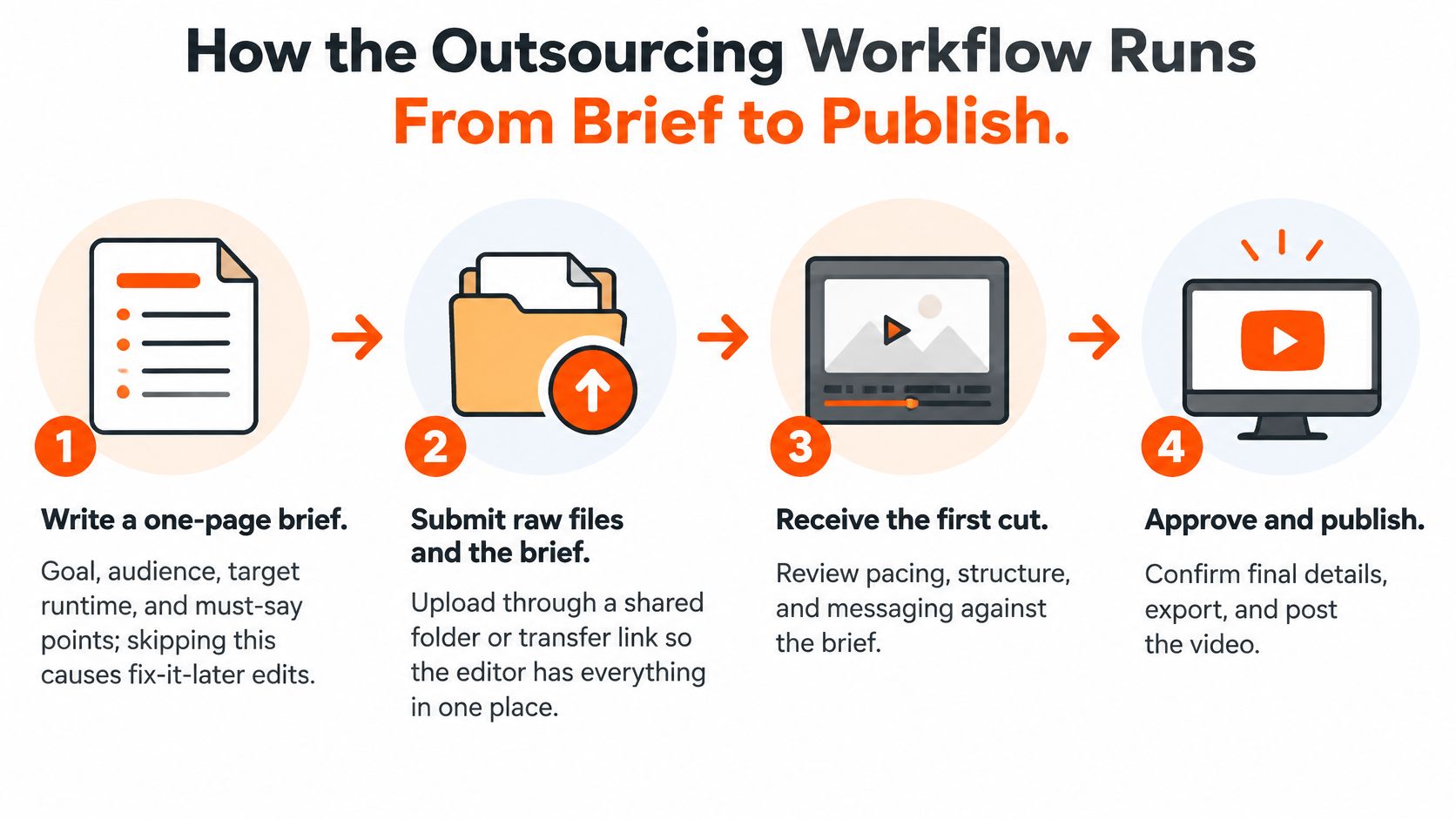
A smooth workflow feels boring in the best way. Files arrive in one place, notes come back once, and the final video doesn't need detective work. These eight steps keep teams that outsource YouTube video editing from fixing preventable problems at the end.
From Brief to Rough Cut
Write a one-page brief. Include the goal, audience, target runtime, must-say points, and one example video. The common slip is skipping the brief, then trying to steer the edit after the editor has already driven across town.
Submit files through one shared board. Customers submit any video editing request through the ContentBuck project board, which keeps the brief, raw files, and notes together. Any shared system works if requests don't live in private inboxes.
Agree on the delivery spec first. Specify progressive video, the source frame rate, export format, captions, thumbnail needs, and file naming before editing starts.
Receive the rough cut. The editor delivers within the agreed turnaround, with structure and pacing ready for review before final polish.
For the export, YouTube's recommended upload encoding settings call for an H.264 export at about 8 Mbps for 1080p at 24-30 fps and 12 Mbps for 1080p at 48-60 fps. Keeping the same frame rate as the source reduces judder and duplicated frames. Dense software screens may justify 1440p or 4K, so small interface text stays readable after YouTube recompression.
From Notes to Published Master
Send one consolidated round of notes. Use timecodes and gather comments from every reviewer before replying. Five separate emails from five people turn revision into a relay race where everyone drops the baton.
Correct captions with a human pass. Run automatic transcription for speed, then check names, numbers, acronyms, negations, and speaker changes against the final audio.
Quality-check a sample. Play sections with small on-screen text, fast motion, skin tones, transitions, and audio-video sync. A two-minute check can save a public correction later.
Approve, publish, then cut shorts. Keep a high-quality master and make Shorts, vertical ads, and clips from that approved version. Editing from an already compressed upload is like photocopying a photocopy and wondering why faces look haunted.
One brief, one board, one set of notes, one master. That dull little chain prevents most outsourcing drama.
The workflow also needs a named approver on the client side. Editors can move fast, but they can't publish around an absent decision-maker. When brief, spec, notes, and approval each have an owner, turnaround becomes predictable. Predictability is the product. The video is just the visible part.
Quality Risks That Can Cost Trust or Reach
Small errors carry outsized weight in B2B video. A prospect may forgive a plain background, but a wrong product claim or caption can make the whole company look careless.
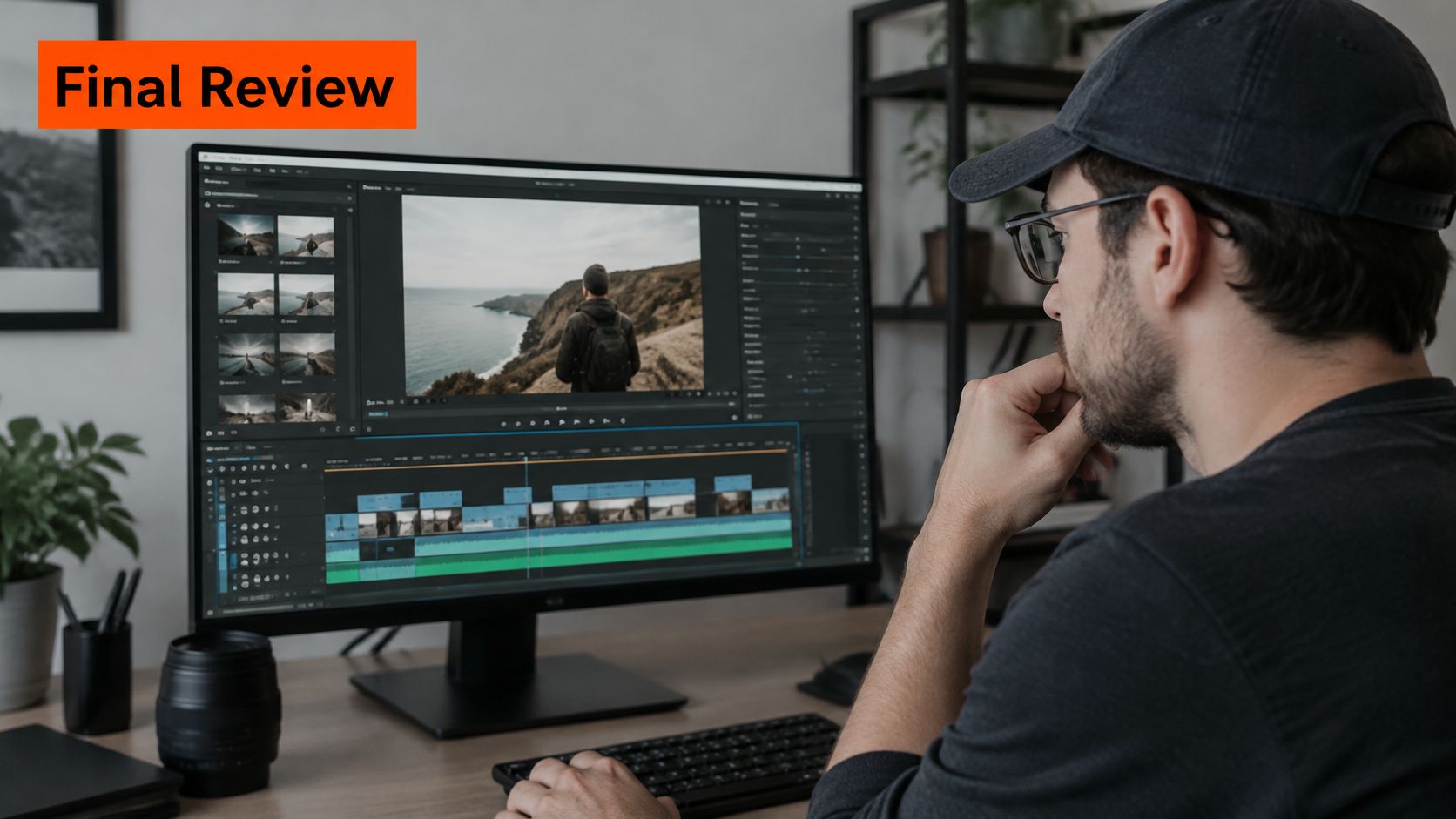
The editor in this image shows the detailed review stage where those small errors should be caught.
Caption meaning flips: "Cannot" becoming "can" reverses the message. Check every negation against the audio.
Names and product terms: A misspelled feature reads like a bigger failure. Check against the approved terminology library.
Numbers and acronyms: A wrong on-screen figure sticks in memory. Check each one against the source.
Timing at shot cuts: Late captions make demos harder to follow. Play every cut boundary during quality control.
Captions over graphics: Text can hide lower thirds or interface buttons. Keep captions inside a visual safe area.
Format drift: Shorts and ad cuts can wander off-brand. Compare each version with the style guide.
Missing transcript: Clips and chapters then repeat terminology work. Require an editable transcript and synchronized caption file.
The W3C captions guidance defines captions as dialogue, needed speaker identification, and meaningful sounds, and notes they help in loud or silent settings. Treat them as editorial control, not decoration.
The short video below gives a visual sense of the review mindset before final delivery.
Name one client-side reviewer and keep a correction log. The next edit gets better only if the last mistake is written down somewhere other than a frustrated chat thread.
Measuring Whether Outsourced Editing Pays Off
The right question isn't "How cheap was that edit?" It's "What did each publishable asset cost, and how much internal time did it consume?" A cheap video that needs heavy fact-checking can be expensive. A pricier edit that arrives clean and ready may be the bargain wearing a nicer jacket.
Measure | How to calculate it | Starting target
Cost per publishable asset | Total spend divided by approved assets | Falling each month
Review minutes per finished minute | Internal review time divided by finished runtime | Under 15 minutes
Factual-error rate | Errors found after publish divided by videos published | Zero critical errors
First-pass acceptance | Edits approved without changes divided by edits delivered | Above 60 percent
30-second retention | Share of viewers still watching at 30 seconds | Beat your own baseline
Qualified sessions from video | Visits from video-linked pages with buyer intent | Rising over 3 months
Work the Numbers Once a Month
For example, a 2,000 dollar monthly retainer producing 12 approved assets gives a cost of about 167 dollars per publishable asset. If the same spend produces 16 assets next month, the cost falls to 125 dollars. Nothing magical happened. The team got more finished, usable output from the same production system.
Review time tells the other half of the story. If an internal reviewer spends 30 minutes checking a 10-minute finished video, that ratio deserves attention. High review time may mean weak briefs, poor product knowledge, or too many approvers. Outsourcing hasn't saved much if the marketing lead still rebuilds every edit by hand.
Test Before Scaling
Run a controlled test. Compare an internally edited baseline with outsourced versions while holding topic, thumbnail quality, distribution, and promotion as steady as possible. The 2025 Voices of Creator Economy survey found creators who don't work solo are split fairly evenly between using agents and occasionally outsourcing work, but B2B teams still need their own outcome measures.
Track assisted conversions, qualified sessions, and sales usage, not just views. A demo watched by the right operations manager can matter more than a cheerful crowd of people who'll never buy. A broader YouTube channel growth strategy should connect those viewing signals to pipeline. After three months, keep the partner if cost falls and quality holds. Change the brief or switch if review time and errors stay stubbornly high.
Frequently Asked Questions About Outsourcing YouTube Editing
Is outsourcing cheaper than editing in-house
Often not for one or two videos a month. It wins when editing hours, not ideas, are the bottleneck and recordings keep waiting.
What does a typical edit cost
Cost depends on the model. Per-video pricing suits fixed long-form projects, per-clip pricing suits shorts, and a retainer suits steady monthly volume.
How long does turnaround take
Project-based long-form commonly needs several days. Retainer work is usually faster because the editor already knows the brand, files, and approval process.
Can outsourced editing get a channel demonetized
Yes, if borrowed clips are stitched together without a new narrative. Every cut should carry the client's own commentary, analysis, or teaching structure.
Who owns the project files
The client should agree ownership in writing before the first invoice. That includes editable projects, graphics, captions, masters, and future reuse rights.
How can confidential footage stay protected
Use least-privilege permissions, separate sensitive product material, and limit access to named people. Uncertain claims should follow an approval path before editing continues.
How can success be measured
Divide total monthly spend by approved finished assets. Track review time, factual errors, first-pass acceptance, retention, and qualified sessions for three months.
Confirm the Order Before You Hire an Editor
Before signing anything, confirm the order in four steps. First, count raw videos per month and match that volume to the pricing model that fits. ContentBuck does not recommend its unlimited editing subscription for companies needing only 1-2 videos per month, because a freelancer would be more cost-effective. The same subscription fits IT services teams producing 8 or more raw video assets per month that need editing.
Second, get turnaround in writing. ContentBuck delivers every video edit within 24 business hours, and revisions are also turned around within 24 hours. Third, run a three-video paid pilot with the access protocol signed before footage moves. Fourth, review the scorecard after three months and keep, adjust, or switch.
The final check below keeps the decision grounded in two numbers, monthly raw-video count and current turnaround time.

Write those two numbers down today. They decide the model, the partner, and whether outsourcing will feel like relief or just a new inbox.
For B2B teams with steady recordings and slow publishing, ContentBuck offers flat monthly video editing with a dedicated editor, fast turnaround, captions, and short-form repurposing built around a repeatable workflow. That setup helps teams outsource YouTube video editing without losing control of claims, brand voice, or approval. Visit ContentBuck to review the service and start with the monthly raw-video count already written down.
Parth Jasrapuria
Founder at ContentBuck
Building video systems for B2B businesses. Obsessed with YouTube growth, creative strategy, and organic SEO.