SaaS Explainer Video Production That Converts
Parth Jasrapuria
Founder
Your product page has every feature, integration, and security badge a buyer could want. It also reads like someone emptied a product requirements document into a blender. The prospect scrolls, squints at “multi-tenant orchestration,” opens another tab, and disappears.
That's the operational problem SaaS explainer video production should solve. A useful explainer isn't a decorative launch asset. It's a modular sales and marketing tool that turns a complicated workflow into a clear story, then travels across landing pages, ads, sales calls, onboarding, and support.
Explainer videos have become a mainstream way to learn about software. Wyzowl-referenced 2026 data reports that 96% of people have watched an explainer video to learn about a product or service, while 85% say a video has convinced them to make a purchase decision. The question isn't whether video can explain SaaS. The question is whether the production process creates an asset that earns attention and supports pipeline.
Why Your Complex SaaS Needs a Visual Translator
A prospect reaches your pricing page after a full day of meetings. The copy promises “unified workflow intelligence across distributed environments,” followed by integrations, compliance badges, permissions, and pricing tiers.
Now the buyer must choose between booking a call to admit the product is unclear and leaving for a vendor with simpler wording. A technically accurate page can still lose the sale if the buyer cannot see how the software changes their work.
Text handles detail, comparison, and search visibility well. It becomes harder to follow when the buyer must understand sequence, relationships, and outcomes together. A feature list can say that the platform collects data, applies rules, routes tasks, and reports results. A visual story can show that flow, while keeping the user and business outcome visible at each stage.

The buyer needs a story, not a software museum
A useful explainer follows a clear path:
Start with the pain: Show the broken process, delay, risk, or manual work the audience already recognises.
Make the cost understandable: Connect that problem to wasted time, poor visibility, operational friction, or missed opportunities.
Show the product in context: Demonstrate the changed workflow instead of displaying isolated buttons like interface fossils in a glass case.
End with one next step: Ask viewers to book a demo, start a trial, or see the product in action. Choose one.
A 60-to-90-second explainer gives the producer room to establish the problem, demonstrate the solution, and deliver a CTA without turning the homepage into a feature documentary. Published benchmark examples report that pages with explainer videos can convert 86% better than pages without video, including one example that moved from 2.9% to 4.8% after video was added. Treat those figures as examples, not promises. Test the page, message, and video as one conversion system.
Practical rule: If viewers cannot explain the product's basic value after one viewing, fix the message before refining the animation.
Production planning should also treat the video as a reusable asset, not a one-off art project. Define which scenes can become sales snippets, onboarding clips, paid-social cuts, or support visuals before storyboards lock. That scope protects the budget from late requests that turn a short explainer into four productions wearing one invoice. The Image Studio product video guide offers a useful way to assess product education, visual proof, and distribution. For animation-specific planning, review this animated explainer video resource.
Writing Scripts That Do Not Sound Like Corporate Funerals
A polished animation with a weak script is an expensive screensaver. The script must decide what the viewer understands, feels, and does before anyone draws a character, records a voice, or animates a dashboard.
The first discipline is scope. A product may support dozens of use cases, but the primary explainer needs one audience, one central problem, and one CTA. The script can mention supporting capabilities, but it shouldn't attempt to give every department a speaking role. That's how a 90-second video becomes a crowded conference panel where nobody gets to finish a sentence.
Build the narrative around the buyer's problem
A dependable structure is problem, agitation, solution:
Problem: Name a situation the audience knows well.
Agitation: Show why the current process creates friction or risk.
Solution: Introduce the product as the practical change, then demonstrate the result.
Consider the difference.
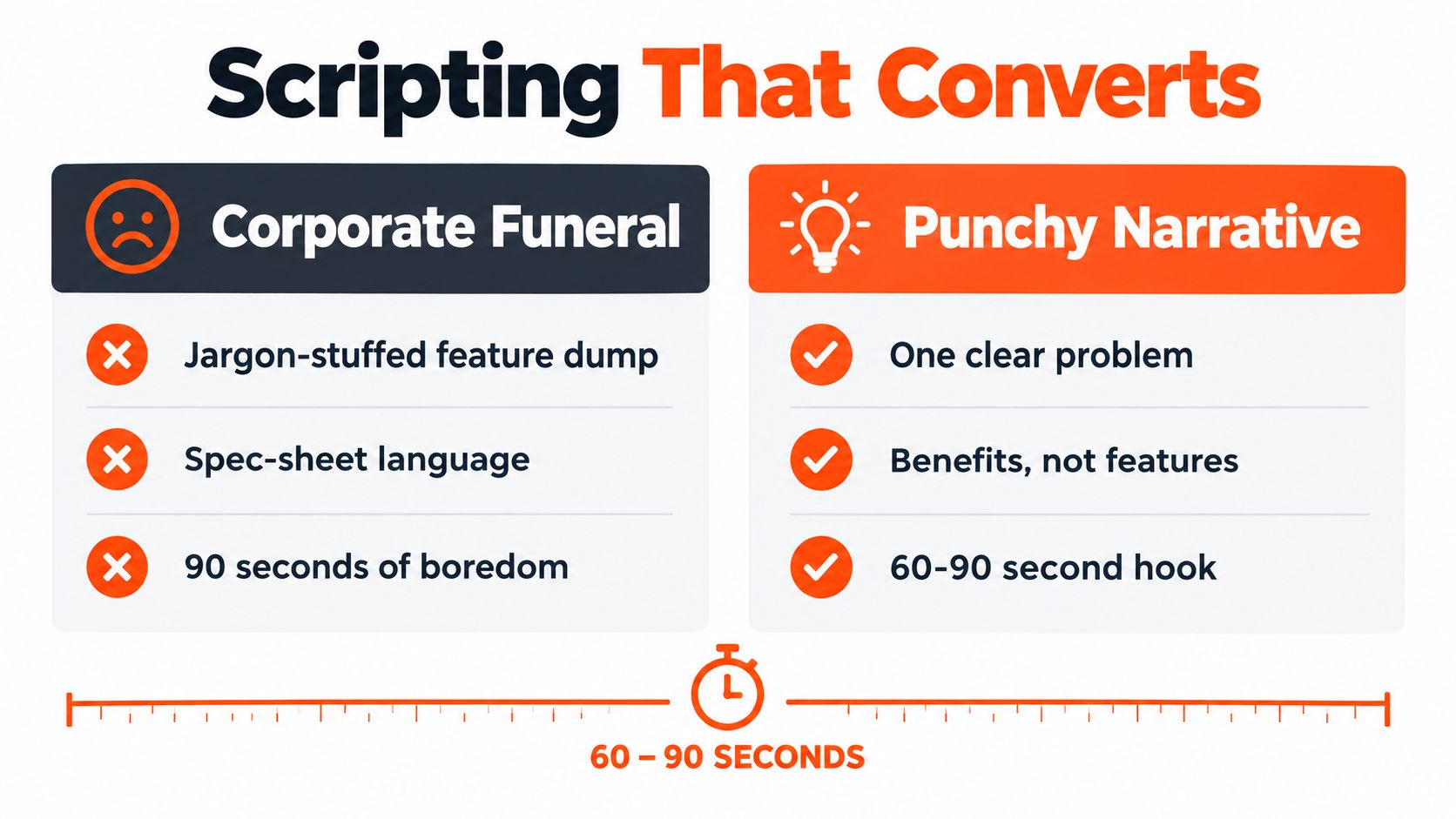
Corporate funeral version:
“Our unified, cloud-native platform leverages advanced orchestration capabilities to empower organisations with scalable, secure, cross-functional workflow optimisation across multiple operational environments.”
That sentence has plenty of syllables and almost no oxygen.
Punchier version:
“Your teams are tracking work in five places, chasing updates in chat, and discovering delays after the deadline. The platform brings those tasks into one workflow, routes each step automatically, and gives managers a clear view of what needs attention.”
The second version doesn't make fewer claims by accident. It chooses claims a buyer can picture. The visuals can show scattered tools, a delayed task, a central workflow, and a useful status view. The narration and animation now work as a team instead of competing for custody of the viewer's attention.
The guide to writing a video script can help teams turn product knowledge into a tighter narrative, but internal product experts still need to answer the hard questions. Who is the viewer? What problem brought them here? What must they believe before clicking the CTA?
Lock the message before animation starts
A production team should approve these items before visual production begins:
Primary audience: For example, operations leaders at growing software companies.
Primary pain: For example, disconnected approval workflows.
Core promise: The specific change the product makes easier.
Proof: A real interface, process detail, customer evidence, or credible demonstration.
CTA: One action that matches buying intent.
Excluded material: Features that belong in another video.
Humour belongs in the script when it reveals a recognisable pain point. A character drowning in spreadsheet tabs can work. A joke about a security product casually losing sensitive data probably won't build trust. The humour should make the viewer feel understood, not make the product look unserious.
A HubSpot roundup of humorous brand videos includes an Aldi campaign that reached 3.3 million TikTok views, demonstrating how comedy can support attention and sharing when it connects to a familiar situation. In B2B, Column Five's examples point to a Snowflake video that uses humour by putting two departments against each other. The lesson isn't “make every SaaS video a sitcom.” It's “professional buyers still respond to a human observation.”
The final script should leave room for the visuals to explain the product. If narration says “the dashboard improves visibility” while the screen shows a tiny dashboard behind a wall of text, the viewer receives a contradiction. Short sentences, purposeful pauses, and clear visual instructions give the editor something usable.
Choosing the Right Animation Style and Voiceover
A security buyer sees a polished animation about “connected intelligence” and still wants to know where permissions, alerts, and audit trails appear. That reaction should shape the production plan. Choose the visual language from the product, audience, and buying risk, then scope reusable scenes and interface moments for the other formats you will need. A playful character sequence can make a collaboration tool approachable, while the same treatment may weaken an enterprise security platform's first impression.
Production style | Works well for | Main risk
2D motion graphics | Abstract workflows, data movement, integrations, and category education | Floating icons can make every scene look interchangeable
Screen capture | Product-led growth, feature education, and interface proof | Raw footage may feel slow or expose confusing UX
Hybrid video | Products needing conceptual clarity and real interface evidence | Design, capture, and animation require tighter coordination
Character animation | Relatable business problems and human-centred stories | A childish visual language can weaken enterprise credibility
Match visuals to the buying situation
A cybersecurity company selling to technical evaluators should show accurate flows, permissions, alerts, and product evidence. Motion graphics can explain the architecture, while screen capture or carefully designed interface scenes demonstrate that the product exists beyond attractive diagrams.
A finance platform selling to executives may need a different balance. The buyer may care about approval speed, reporting clarity, and control rather than every API call. Animation can show those outcomes quickly, then bring in interface footage where it strengthens trust.
The 2026 analysis of 1,000+ SaaS videos reported that 48% used motion graphics and 27% used screen-capture demos. It also reported that videos under 90 seconds retained 74% of viewers through the 60-second value-proposition mark. The findings appear in coverage of SaaS video trends. Treat them as directional signals, not instructions to force every product into one template.
Choose the voice for trust and speed
A human voice actor brings interpretation, warmth, and control over emphasis. That matters for a homepage video supporting a major launch, a high-value enterprise product, or a brand that depends on confidence. The director can adjust pronunciation, pace, and tone until the narration sounds like a credible guide rather than an announcement from a lift.
A high-quality AI voice suits rapid ad testing, internal drafts, product updates, and modular clips that require frequent changes. It can also help teams test different hooks before committing to a final performance. Editorial review remains necessary. Check pronunciation, pauses, emphasis, and whether the script sounds natural when spoken aloud.
For talking presenters or synchronised dialogue, research on lipsync expert provides useful context for evaluating lip-sync quality and production choices. Voice technology can speed up output, but it cannot repair vague positioning or inaccurate product claims. Scope the voice, visual system, reusable scenes, and export versions together, or the supposedly small follow-up requests will slowly turn one explainer into several unplanned productions.
Navigating Timelines and Production Pricing Models
Production pricing becomes painful when the brief is vague and every stakeholder can request “one small change.” That phrase has funded many mysterious afternoons in post-production.
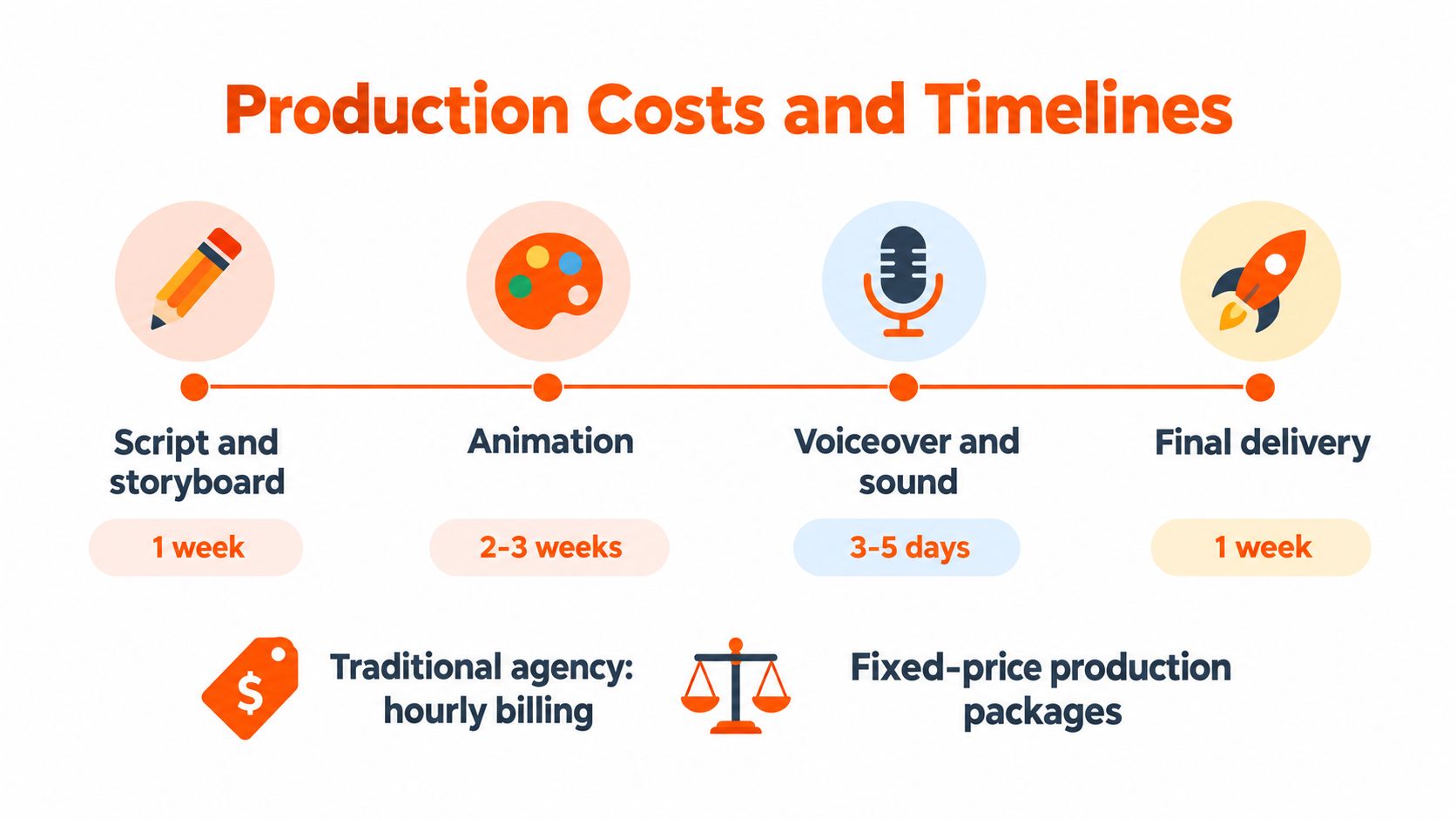
Hourly agency billing can suit exploratory work where the scope is still unknown. It also transfers more risk to the buyer, because rounds of feedback, project management, additional animation, and technical revisions keep adding time. Fixed-price packages or retainers work better when the deliverables, approval points, formats, and revision policy are explicit.
A workable production sequence
A typical structured schedule can look like this:
Script and storyboard, 1 week: The team confirms the audience, narrative, visual plan, and CTA.
Animation, 2 to 3 weeks: Designers build scenes, transitions, interface moments, and brand elements.
Voiceover and sound, 3 to 5 days: The team records or generates narration, then adds music and sound design.
Final delivery, 1 week: Editors complete exports, captions, aspect ratios, quality checks, and handoff files.
The timeline shown in the production plan is a useful reference point, but approvals often create the delay. A legal reviewer, product marketer, founder, sales leader, and security specialist can each spot a different concern. If those people review independently and late, the production team may need to rebuild approved scenes.
A fixed scope should define the number of core scenes, the primary runtime, the voice approach, included formats, source assets, approval owners, and what counts as a new direction. “Unlimited revisions” is valuable only when the provider also explains how feedback is collected and how the launch date is protected.
Keep budget bloat visible
The production brief should separate creative revisions from scope changes. Correcting a typo or adjusting a transition belongs in normal review. Adding a new audience, product workflow, language, character, or CTA changes the brief and should trigger a clear conversation before work continues.
A retainer or credit-based model can help a lean team turn one approved explainer into related assets without starting a new procurement process each time. That approach is practical when the marketing calendar includes launches, paid variations, onboarding clips, and sales enablement. A guide to shooting and audio post-production can also help teams prepare cleaner source material and reduce avoidable finishing work.
For broader production support, animated video production services can be evaluated against the same criteria, scope clarity, approval ownership, included deliverables, turnaround, and revision handling. A cheap quote with unclear boundaries is often just an expensive quote wearing a fake moustache.
Formatting Deliverables for Multi-Channel Distribution
A 16:9 master file is a starting point, not a distribution strategy. The same explainer may appear on a homepage, a LinkedIn feed, a paid retargeting placement, YouTube, a sales deck, and a help centre. Each environment changes how much text fits, where the viewer looks, and how quickly the hook must land.
The production brief should identify those destinations before storyboarding. Otherwise, the editor may place critical labels at the edge of the frame, build a wide interface scene that collapses in vertical format, or create a beautiful CTA that disappears beneath platform controls.
Design the master for reuse
A modular explainer usually has a core narrative plus scenes that can stand alone. A problem scene can become a paid-social hook. A product workflow can become a sales clip. An objection about integrations, security, onboarding, or time to value can become a targeted follow-up asset.
The team should plan:
Orientation master: Use for website pages, YouTube, sales presentations, and broad product education.
Square cut: Build for feed environments where a compact frame needs readable captions and a strong central composition.
Vertical cut: Recompose scenes for mobile-first placements, not merely crop the wide version and hope for mercy.
Short clips: Give each clip one idea, one opening line, and one action.
Captioned versions: Keep the message understandable when sound isn't available.
Hook variations: Change the first scene or first spoken line for different audiences and retargeting stages.
Protect the safe zones
Designers should keep faces, interface labels, logos, and key text inside a central safe area. A scene built around a wide dashboard may need a separate vertical composition, especially when several panels compete for attention.
Text overlays should use short phrases rather than miniature paragraphs. Captions need enough contrast and size for mobile viewing. Product footage should be captured at a high enough resolution to survive cropping, but the editor still needs to remove dead clicks, loading delays, and cursor wandering. Nobody wants to watch a mouse search for a settings menu like a small, anxious animal.
The best modular plans preserve the original meaning while adapting the emphasis. A homepage video can explain the category and product. A retargeting clip can answer one objection. A sales clip can focus on proof and next steps. Those assets should share visual language, but they shouldn't all repeat the same introduction.
Production economics and creative strategy meet here. A single script can serve several channels when the storyboard is built with reusable scenes, safe composition, separate audio stems, editable captions, and clear source files. Without that planning, repurposing becomes a rushed editing exercise that produces many versions of one awkward video.
Frequently Asked Questions About SaaS Video Production
Should a SaaS explainer stay as one video?
A core 60-to-90-second asset is a useful starting point for a homepage or campaign. Modular chapters make more sense when the product has distinct objections or audiences, such as security, integrations, onboarding, or time to value. The decision should follow the distribution plan, not a desire to create more files.
How should teams measure conversion impact?
Compare a page with the video against a control page, while keeping the CTA, audience, offer, and surrounding page experience as consistent as possible. Landing-page benchmark coverage reports a 3.8% median conversion rate for SaaS pages and cites video-inclusive pages as converting 86% better in benchmark comparisons. Those figures vary by sample and method, so the team should measure play rate, completion, CTA clicks, qualified actions, and page conversion rather than treating a benchmark as a forecast.
Who should approve the script?
One person should own final approval, with structured input from product, sales, legal, and customer-facing teams. Stakeholders can leave comments during a defined review window, but the project needs one decision-maker to resolve contradictions. Five equal approvers create five competing definitions of “clear.”
When should an existing video be updated?
Update the existing asset when the core promise, audience, visual system, and CTA remain valid, but a screen, phrase, or feature has changed. Start again when the positioning, product workflow, target buyer, or business objective has changed enough that patching scenes would make the story feel stitched together.
Is AI production suitable for SaaS explainers?
AI can accelerate drafting, voice tests, visual variations, captions, and repurposing. Human review remains essential for positioning, product accuracy, proof, pronunciation, and brand judgement. Recent industry coverage describes hybrid animation and AI-assisted workflows as growing production practices, while industry discussion of SaaS explainer production reports that hybrid live-action and 2D approaches can reduce production costs by 30% to 40%. The right question is not whether AI can make a video quickly. It's whether the finished asset makes the product easier to trust and buy.
What length should the production brief target?
A 60-to-90-second core explainer is a practical target. SaaS explainer benchmark guidance notes that completion rates drop sharply as videos exceed two minutes, and reports that 71% of marketers place the best explainer length between 30 seconds and two minutes. A single message and one CTA will usually outperform an ambitious tour of every feature.
ContentBuck helps B2B teams plan and produce SaaS explainers with scripting, animation, professional voiceover, multiple aspect ratios, and ongoing editing support. Visit ContentBuck to turn one clear product story into a practical video system for landing pages, ads, sales, and ongoing distribution.
Parth Jasrapuria
Founder at ContentBuck
Building video systems for B2B businesses. Obsessed with YouTube growth, creative strategy, and organic SEO.