Social Video Editing: Formats, Workflows, and Tools
Parth Jasrapuria
Founder
A webinar ends at 4:00 p.m. The marketing manager still needs a useful clip for LinkedIn, a vertical cut for YouTube Shorts, and something punchy for Instagram Reels before the day is over. The footage is good, but the edit queue is full, the captions need checking, and someone has named the master file final_final_v7_reallyfinal.mp4.
That scene captures the problem with social video editing. It isn't only about trimming footage or adding flashy transitions. It's an operating system for turning one B2B conversation into platform-native content without losing the message, the brand, or the team's remaining patience. The teams that build a repeatable system publish more consistently. The teams that treat every clip as a custom emergency eventually lose distribution, not just polish.
Why Social Video Editing Is Eating Every B2B Marketing Plan
A B2B marketer might start the morning with a product demo, move to a LinkedIn thought-leadership clip, and finish by reviewing a YouTube Short. Meanwhile, a sales team wants a customer quote, a founder wants the podcast excerpted, and a paid media manager wants five new ad hooks. The camera may have stopped recording, but the production work has barely started.
Short-form video became central through a clear platform sequence. Vine popularized 6-second looping clips in 2013. Musical.ly expanded lip-sync videos to up to 60 seconds in 2014. TikTok launched worldwide in 2018 after ByteDance merged Musical.ly and Douyin, and Instagram and Facebook introduced Reels in 2020 as TikTok grew. That history, summarized by ZipDo's overview of video editing industry trends, explains why today's workflow looks very different from desktop video trimming.
A B2B team now has to edit for the feed, not merely for the timeline. A strong webinar recording can become a short answer to one buyer question, a founder opinion, a product demonstration, and a paid-social variation. Each version needs its own opening, crop, captions, pacing, and call to action. The source footage stays the same, but the editorial job multiplies.
Operational reality: A content team that can't turn useful footage into several usable edits will struggle to keep up, even when its underlying ideas are excellent.
The pressure is measurable. One 2026 industry summary estimated the global video editing software market at $15.2 billion in 2023, projected a 10.4% CAGR through 2030, and reported that short-form content represented 42% of all video content created in 2023. The same summary reported that 82% of TikTok videos were edited with CapCut and 82% of creators used cloud-based editing tools. Those figures from Wifitalents' video editing industry summary point to a production environment built around volume, speed, and browser-based collaboration.
The answer isn't asking every marketer to become a senior editor. It's deciding which work deserves human judgment, which work can be automated, and which production model can keep the queue moving when campaigns overlap.
What Social Video Editing Actually Means in 2026
Social video editing means shaping footage for the way people consume content inside a social feed. The editor isn't preparing a general-purpose master and hoping each platform behaves kindly. The editor is building a clip around a clear hook, fast comprehension, visible captions, mobile composition, and a specific publishing context.
That definition separates social editing from long-form post-production. A conference film may value atmosphere, continuity, and complete explanations. A social clip often needs the central point immediately, with pauses removed and visual information reinforced on screen. The edit has to work for a viewer who may be scrolling quickly, watching with the sound off, or joining halfway through.
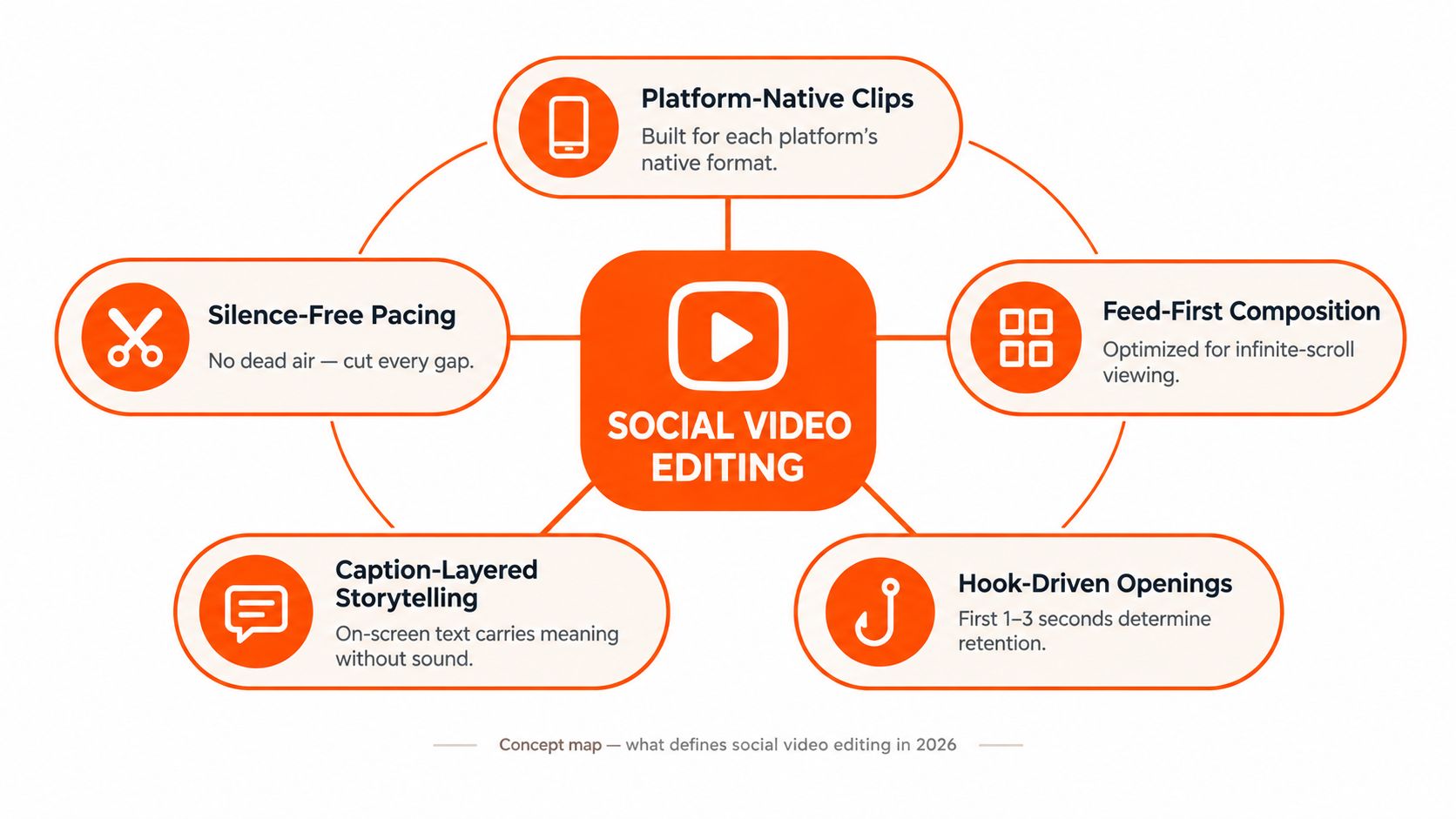
The core editing disciplines
A practical workflow usually includes:
Rough cut: Remove false starts, repeated phrases, long pauses, and answers that wander.
Hook rewrite: Find the strongest claim and move it to the opening instead of preserving the original conversation order.
Captioning: Add readable text that carries meaning when the audio is muted.
B-roll layering: Use product screens, diagrams, hands-on footage, or relevant motion to prevent a talking head from becoming visual wallpaper.
Sound design: Clean dialogue, balance music, and add restrained effects where they clarify an action.
Thumbnail selection: Choose a frame or designed cover that communicates the topic before playback.
Multi-aspect export: Reframe the same idea for vertical, square, and horizontal placements.
Shooting and editing are now closely connected. A subject who leaves space around the face gives the editor more options for vertical crops. A presenter who answers in concise thought units creates cleaner clips. Strategy still decides who the video is for and what action matters, while editing decides how quickly that message becomes understandable.
A short example makes the distinction clear. A product leader may record a ten-minute explanation of a reporting feature. Strategy identifies the buyer problem, shooting captures the explanation, and editing turns one section into a direct answer, adds the relevant interface recording, removes the throat-clearing, and exports a version that fits the target feed.
For a visual walkthrough of the editing mindset, this embedded video offers a useful companion:
The best social edits don't feel compressed for the sake of being short. They feel intentional, because every frame has a job.
Aspect Ratios and Platform Specs Editors Must Master
A social video can contain the right message and still fail because the crop hides the speaker, the captions sit under interface controls, or a desktop recording becomes a tiny postage stamp in a vertical frame. Editors should plan the composition before cutting, not after the first export looks like a hostage video recorded through a mail slot.
Three ratios cover most B2B distribution:
9:16 vertical: Full-screen mobile feeds, especially Reels, TikTok, and YouTube Shorts. A speaker should sit inside the safe area, with enough headroom for platform controls and enough lower-frame space for captions.
1:1 square: Useful for in-feed placements where a balanced crop matters more than full-screen immersion. It can preserve a centered product demo or a speaker with supporting text.
16:9 horizontal: Standard for YouTube long-form, website embeds, and desktop viewing. It gives screen recordings and two-person interviews room to breathe.
The practical baseline for vertical delivery is 1080×1920 pixels in a 9:16 frame, with safe-zone planning to avoid interface overlap, according to KokoConvert's vertical video guide. The same guide lists Instagram Reels at up to 90 seconds, describes TikTok feeds as commonly optimized around 15 to 60 seconds despite higher limits, and lists YouTube Shorts at up to 60 seconds.
Platform | Primary Aspect Ratio | Recommended Resolution | Max Length
YouTube Shorts | 9:16 | 1080×1920 px | 60 seconds
Instagram Reels | 9:16 or 4:5 | 1080×1920 px for vertical | 90 seconds
TikTok | 9:16 | 1080×1920 px | 10 minutes
LinkedIn | 16:9 | 1920×1080 px | 10 minutes
The platform limits in this planning table are summarized by Captions' 2026 beginner video editing guide. Export settings still need checking inside the publishing tool, because platform interfaces and processing rules can change.
The crop trap
Letterboxing a horizontal interview into a vertical canvas is fast, but it often wastes the available screen. A better approach uses a punch-in, speaker tracking, split-screen layout, or a deliberately designed background. For a software demo, the editor might keep the presenter in the upper half and place a readable product crop below. For a two-person interview, the editor may switch between faces instead of shrinking both into the middle.
A team should batch exports from a composition map. Mark the master, vertical, square, and any platform-specific versions before editing begins. That simple decision prevents the editor from discovering at the end that the opening text works in 16:9 but disappears beneath the Reels interface.
For teams combining social clips with broader corporate animated video production, the same principle applies. Design the important visual information for every intended placement before animation or editing locks the composition.
The Editing Workflow That Scales Without Burning Out Your Team
A repeatable pipeline turns editing from a sequence of favours into a production service. Without one, every request arrives with a different folder, a different naming habit, and a different interpretation of “make it pop.” With one, an editor can open a brief and understand what must be delivered.
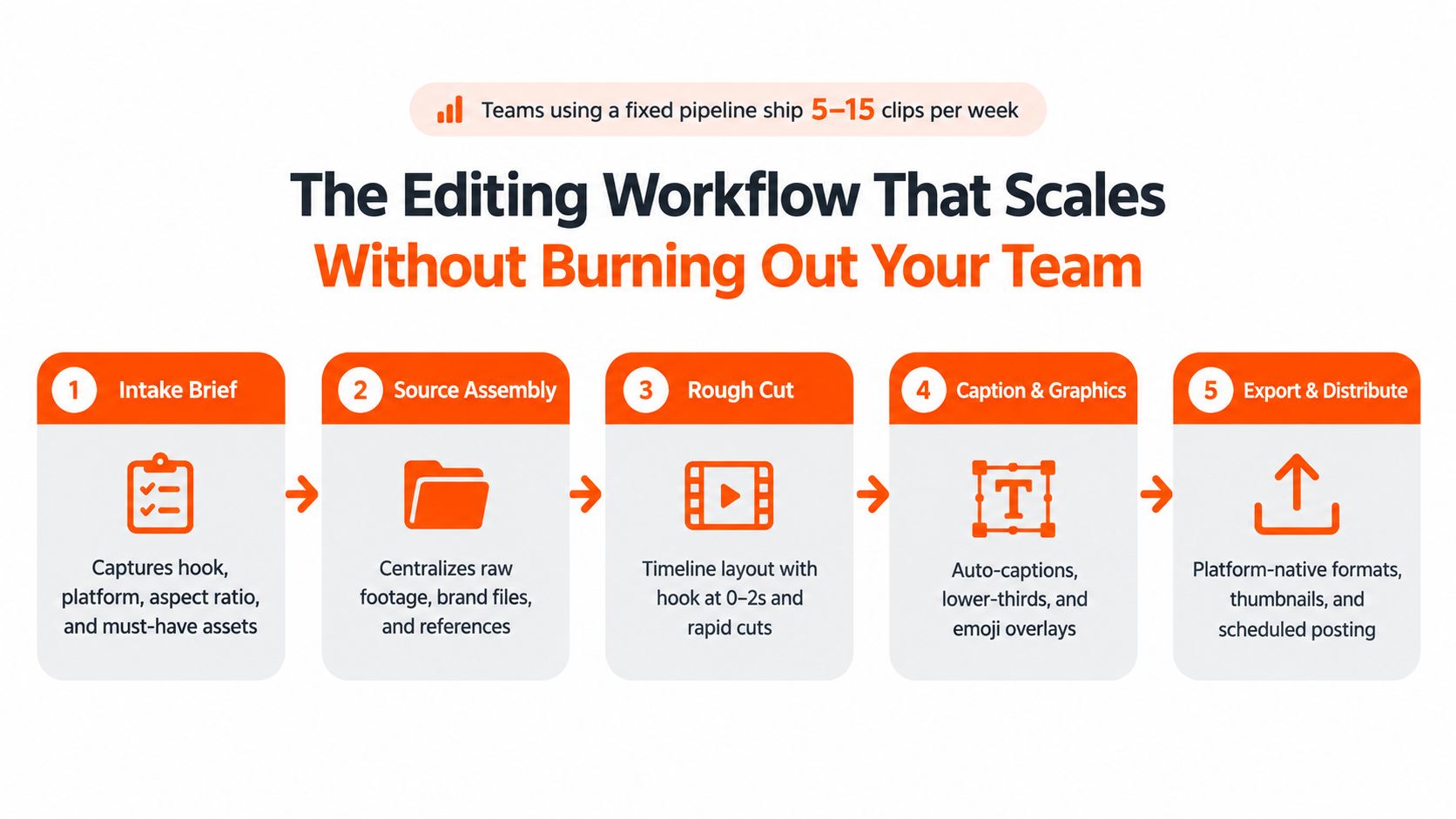
Start with a useful intake
The brief should capture the hook, platform, aspect ratio, deadline, CTA, source footage, brand assets, and approval owner. It should also identify the audience and the one point the viewer must remember. “Make a clip from the webinar” isn't a brief. “Create a vertical LinkedIn clip for demand-generation leaders, opening with the reporting mistake at 0 to 2 seconds, ending with the demo CTA” is.
Source assembly follows. Raw footage, logos, music references, screenshots, fonts, and prior examples belong in a shared project space. Editors should flag usable takes during triage, ideally in a quick first pass, before spending time polishing weak material.
Build, then inspect
Assembly usually moves through this order:
Transcript-based rough cut: Select the cleanest answer and remove repetition.
Hook pass: Lead with the strongest tension, result, or objection.
Caption pass: Generate captions, then correct names, product terms, and punctuation.
B-roll and graphics: Add interface footage, diagrams, lower-thirds, and restrained motion.
Sound and colour: Clean dialogue, balance music, and normalize the visual treatment.
QA: Check safe zones, caption accuracy, audio, CTA timing, thumbnail frame, and export settings.
QA needs its own owner or stage. A clip can look excellent in the editing window and still ship with a misspelled customer name, captions under a button, or a product screen too small to read. Those errors are cheap to prevent and expensive to explain after publishing.
A naming convention should describe the campaign and version, not the editor's mood. Q3-Reporting-Webinar-LinkedIn-Vertical-v03 is useful. final2_newnew is a cry for help.
Teams managing many creative variations can also borrow the intake and handoff logic from this bulk ad launch workflow guide, especially when paid and organic production share assets.
A shared library with version control keeps the system alive when someone is away. For B2B teams that need a queue-based model, unlimited video editing services can provide a defined submission process instead of adding every request to an already crowded internal sprint.
In-House vs Agency vs Unlimited Editing Services
No editing model wins in every situation. The right choice depends on how often the team publishes, how much creative judgment the content needs, and whether demand stays steady enough to support dedicated capacity.
Model | Typical Cost | Turnaround | Best Fit
In-house | Salary and employment overhead | Fast when capacity is available | Teams with steady weekly video demand and deep product context
Agency | Retainer or project fee | Often slower because of review layers | Strategic campaigns, hero videos, and broader creative direction
Unlimited editing services | Flat monthly fee or plan-based cost | Often built around queue-based delivery | High-volume, repeatable clips and ongoing social output
In-house editing
An internal editor learns the product language, customer objections, brand boundaries, and stakeholder personalities. Feedback can move quickly because the editor already knows why a particular phrase matters.
The weak point is capacity. Slow weeks can leave a specialist underused, while launch weeks create a queue no single person can clear. A resignation or holiday can also turn a functioning workflow into a stalled one. In-house works best when video is tied closely to revenue and the team has enough recurring work to justify the role.
Agency production
An agency brings creative range, senior direction, and experience with larger productions. That makes it useful for a flagship launch film, a complex animated explainer, or a campaign where the concept matters as much as the output count.
The trade-off is process overhead. Retainers may include minimum commitments, account management, and multiple review layers. An agency can produce excellent work, but a team seeking daily clips may find the model too heavy for repetitive requests.
Unlimited services
An unlimited editing service sits between internal capacity and project-based agency work. It suits teams with a steady stream of webinars, demos, podcasts, founder clips, and ad variants that follow a repeatable brief. The buyer gets a queue, a defined workflow, and predictable planning rather than a new quote for every small cut.
Quality varies, so a test matters. Send one campaign with representative footage, a clear brand kit, and a realistic revision cycle. Judge the partner on hook judgment, caption accuracy, visual consistency, response speed, and how much correction the internal team must provide.
Decision rule: Keep high-stakes creative direction in-house or with an agency. Send repeatable, high-volume social production to a service built for throughput.
Many B2B teams use a hybrid model. Internal staff shape the message and approve the final brand expression, an agency handles hero campaigns, and an unlimited editing partner turns the ongoing footage supply into daily distribution.
Where AI and Automation Actually Help and Where They Hurt
AI editing is a collection of tasks, not a single capability. Auto-transcription, caption generation, reframing, audio cleanup, colour correction, b-roll selection, hook writing, and full auto-cutting all have different risk levels.
Recent creator coverage reports that 71% of creators have used AI video generation or editing tools, 58% use AI for editing, and 56% save over 30 minutes per video. Those figures appear in Adobe Express' overview of AI video tools, but they don't answer the more important operational question: which saved minutes improve the finished clip, and which move quality control downstream?
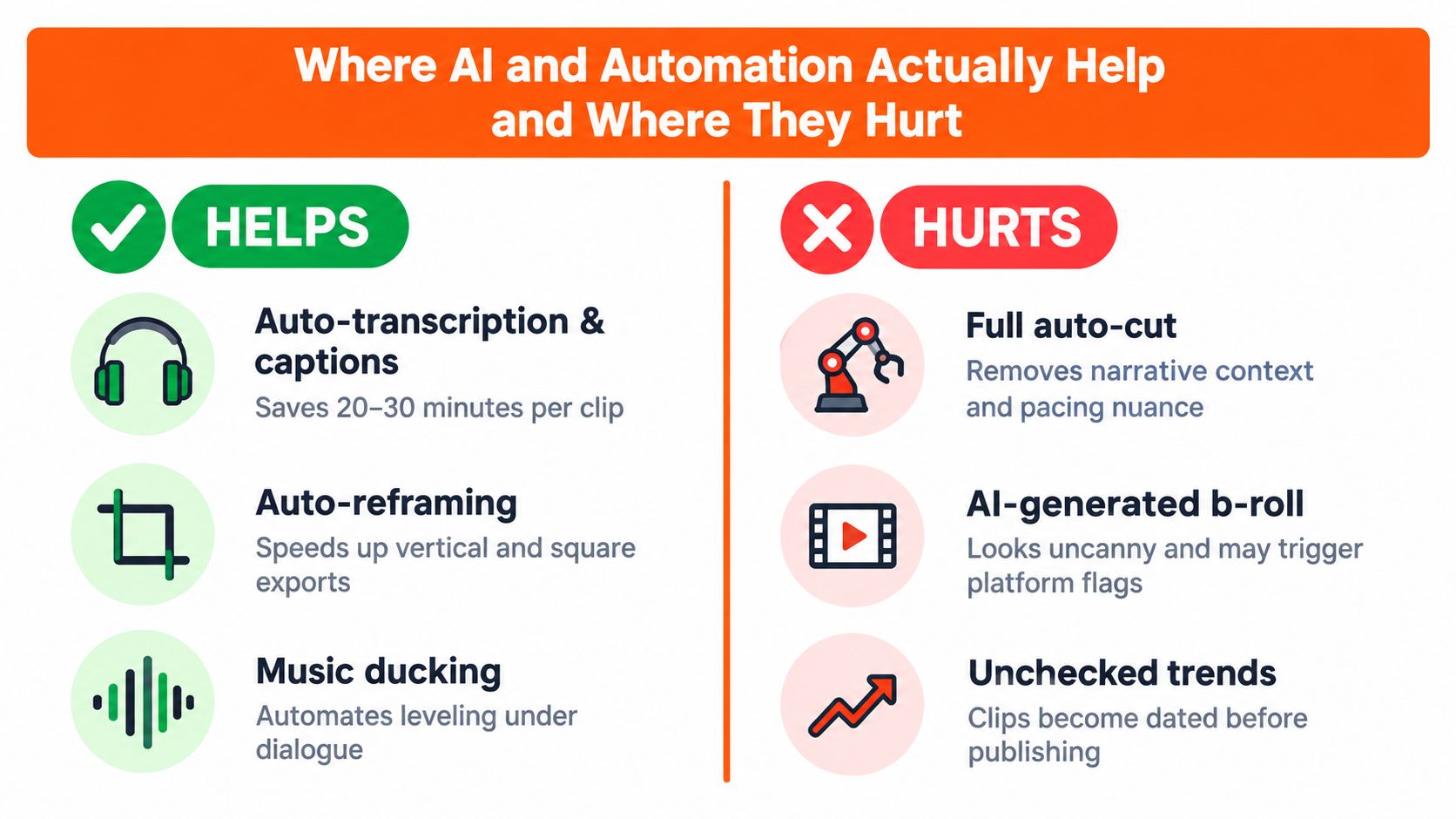
Automate the chores
Auto-transcription and caption generation are usually safe starting points. They remove repetitive work, but a human still needs to correct product names, acronyms, speaker labels, and timing. Caption readability matters because many social videos play without sound by default, and Runway's social editing guidance recommends captions that are large, readable on a phone, and synchronized with speech.
Smart reframing works well when one subject stays near the centre. It struggles with group discussions, rapid movement, screen recordings, and shots where the important detail sits at the edge. Auto-colour and audio cleanup are useful assembly accelerators, especially for remote recordings with uneven lighting or room noise.
Subtitle tools deserve a deliberate comparison because accuracy, styling, language support, and export control differ. A practical Keptbits subtitle comparison can help teams evaluate those trade-offs before standardizing a caption workflow.
Protect the editorial decisions
AI-generated b-roll often looks acceptable in a general explainer and oddly artificial in customer-facing content. A stock suggestion may show a smiling office worker while the narration discusses a painful data migration. The edit becomes technically complete and emotionally wrong.
Full auto-cutting has a similar weakness. It can remove pauses, but it doesn't know which pause creates emphasis, which objection needs context, or which sentence positions the product against a competitor. Hook selection, narrative order, audience relevance, and final brand review need a human owner.
For B2B teams evaluating tools, this guide to the best AI video tools for B2B marketing is a useful starting point. The strongest setup treats AI as a fast junior editor. It handles repetitive work without complaint, while a human controls the cut, the hook, and the final pass.
Real B2B Results From Consistent Social Video Editing
These illustrative case sketches, based on the supplied published examples, show how the editing choice can matter as much as posting frequency. They are scenarios for comparison, not universal performance guarantees.
Company Type | Source Footage | Edit Decision | Platform | Illustrative Result
SaaS demand-generation team | One webinar | Cut nine focused clips | LinkedIn | Social sourced 31% of MQLs that quarter in the supplied case sketch
Cybersecurity startup | Founder talking-head recordings | Published two edited videos weekly for 90 days | Social video against paid search | Demo booking rate lifted 2.4x against paid search in the supplied case sketch
Dev-tools company | Webinar recap | Replaced the recap with a 60-second vertical cut | Instagram Reels | Thumbstop rate tripled in the supplied case sketch
The SaaS scenario worked because the team treated the webinar as a source library, not a shortened asset. Each clip answered a separate buyer question and had a clear job in the distribution plan.
The cybersecurity team used recurring founder recordings as a dependable production input. That choice supported a regular publishing cadence without requiring a large shoot for every batch.
The dev-tools example shows why the same source can perform differently after a platform-specific cut. A 60-second vertical edit presents the point quickly and uses the feed's available screen area instead of shrinking a horizontal presentation.
The practical pattern is clear: consistent cadence plus native editing beats occasional polished production when a B2B team needs ongoing mid-funnel distribution. Automation can make that cadence affordable, while human review still determines whether each clip earns attention.
Checklist and FAQs Before You Pick Your Editing Setup
A buying decision should start with the workflow, not the tool logo. This twelve-point checklist gives the team something concrete to inspect before signing up.
Cadence targets: Define clips per week.
Aspect ratios: Plan vertical 9:16, square 1:1, and horizontal 16:9.
Asset handoff: Standardize cloud links, names, and folders.
Turnaround SLA: Agree on standard and review delivery windows.
Revision limits: Set a maximum number of review rounds.
Brand safety: Supply fonts, banned words, colours, and examples.
Analytics loop: Connect views and retention feedback to editing decisions.
Caption style: Decide between automatic and custom treatments.
Music licensing: Use approved libraries and sync rights.
Export presets: Save platform-native settings.
Team scalability: Define collaboration and file-lock rules.
Support and training: Confirm onboarding and help documentation.
Teams comparing mobile tools can also use Trendy's reviews of editing apps to understand where lightweight app workflows fit and where a managed production queue makes more sense.
Frequently asked questions
What does social video editing cost? In-house editing carries salary and employment overhead. Agencies usually charge retainers or project fees. Unlimited services use a flat monthly or plan-based model. The correct comparison is cost against required volume, revision time, and the value of internal capacity released.
How should a team test an unlimited editing partner? Run one representative campaign. Include ordinary footage, brand kit, the actual CTA, and the expected approval process. Review the first cuts for hook quality, caption accuracy, framing, and how much internal correction they require.
What belongs in a creative brief? Include the audience, platform, aspect ratio, hook, key message, CTA, source files, visual references, banned treatments, deadline, and approval owner. Those details prevent most avoidable revision cycles.
How long does onboarding take? Onboarding is complete when the partner has the brand kit, folder structure, naming convention, platform presets, examples, and approval route. A small test campaign exposes missing information faster than a long kickoff meeting.
Do AI tools replace an editor? They speed up transcription, captions, reframing, cleanup, and repetitive assembly. They don't reliably replace judgment about hooks, narrative context, audience objections, pacing, or brand fit.
What volume justifies dedicated editing support? Dedicated support becomes sensible when editing regularly competes with strategy, publishing, or campaign work. The exact threshold depends on clip complexity, revision load, and how many platforms require separate versions.
A simple decision rule remains useful. Keep strategic and hero content close to the internal team or an agency. Use a scalable editing service when the queue is repetitive, the footage is steady, and the marketing team needs reliable output without adding another full-time bottleneck.
ContentBuck plans, produces, and scales B2B video systems, including webinar cuts, product demos, podcast clips, YouTube content, ads, captions, thumbnails, and multi-platform repurposing. Teams that need a dependable social video editing queue can review the workflow and request support through ContentBuck.
Parth Jasrapuria
Founder at ContentBuck
Building video systems for B2B businesses. Obsessed with YouTube growth, creative strategy, and organic SEO.