Video Production for Marketing: Costs, Steps and Formats
Parth Jasrapuria
Founder
A marketing lead opens the homepage, watches a visitor read three lines about a complex product, then leave. Sales says prospects arrive on calls asking what the product does. Leadership asks for video, finance asks for a price, and nobody agrees whether the team needs a camera crew, an animator, or just a good screen recording. That's the normal starting point for video production for marketing, and it's fixable. The fix isn't buying a fancier tripod. It's giving every video one funnel job and one metric, then planning one recording to feed many useful assets instead of one expensive film that gets watched at the launch meeting and forgotten by Friday.
Video Production Costs and Timelines by Format
A single B2B video can cost under $500 for a short clip or $5,000 to $15,000 for a custom animated explainer, and teams should plan for three to six weeks for anything involving animation or a shoot. The ranges below are typical USD planning figures for 2026, not quotes. A quote without a script, format, and revision limit is mostly polite guessing.
Typical Cost and Turnaround by Video Format
Format | Typical cost | Typical turnaround | Crew needed
Screen-recorded product demo | $500 to $2,500 | 1 to 2 weeks | 1 editor and 1 product expert
Animated explainer (60 to 90 seconds) | $5,000 to $15,000 | 3 to 6 weeks | Scriptwriter, animator, voice actor
Live-action B2B interview or customer story | $4,000 to $12,000 | 3 to 5 weeks | Director, camera operator, editor, lighting
Webinar or podcast episode edit (per episode) | $300 to $1,500 | 3 to 7 days | Editor
Short-form clip (15 to 60 seconds, per clip) | Under $500 | 1 to 3 days | Editor
Paid ad variant batch (5 to 10 versions) | $1,500 to $5,000 | 5 to 10 days | Copywriter and editor
YouTube long-form episode (per episode) | $800 to $3,000 | About 1 week | Host, editor, thumbnail designer
Four things move the price. Scripting depth matters because technical products need expert review, not just cheerful voiceover. Number of on-camera people adds scheduling, lighting, and retakes. Animation complexity rises fast when every screen, character, and diagram is custom. Revision rounds are the quiet budget eater, especially when six stakeholders review in sequence and each one discovers a new opinion.
Freelancers usually quote below agencies. That saving shrinks if the freelancer doesn't include script review, captions, thumbnails, or versioning, and the internal team ends up project managing at midnight. A video cost calculator helps turn format, length, and extras into a planning range before anyone promises a launch date.
Say a cybersecurity firm pays for one 75-second explainer and records expert interviews on the same day. That work can also produce six short clips, two ad cuts, and one YouTube episode, so the cost per asset falls sharply even though the headline project price looks serious. That's now the standard way to budget. HubSpot's 2024 Video Marketing Report, based on a survey of more than 500 video marketers, found that 73% considered video effective or very effective for achieving business goals, while 52% described video's return on investment as high and another 47% described it as average.
Read the table from the funnel job backwards. Pick the format that answers the buyer's current question, check the turnaround, then count the derivative assets the same material can feed. A cheap video with no job is expensive. A well-planned recording with ten jobs can be a bargain.
Matching Video Formats to Each Funnel Stage
A video asked to create awareness, explain the product, prove ROI, handle objections, and close the deal will usually do all five badly. It becomes the Swiss Army knife of marketing, impressive in theory and awkward for every real task. Give each asset one primary job, then judge it by the metric that matches that job.
Video Format by Funnel Stage
Funnel stage | Buyer question | Format to make | Metric to judge
Awareness | Do I even have this problem? | YouTube episode and short clips | Returning viewers and qualified views
Understanding | What exactly is this product? | 60 to 90 second explainer | Average view duration and scroll depth
Evaluation | Does it work for companies like mine? | Product demo and customer story | Demo requests and page-to-meeting rate
Conversion | Is it worth booking a call? | Proof-led ad variants and a short sales video | Cost per lead and cost per acquisition
Retention and expansion | How do I get more from it? | Tutorial and webinar replay | Feature activation and support tickets avoided
At awareness, the buyer needs a useful point of view, not a feature tour. At understanding, short demonstrations, diagrams, screen recordings, captions, and plain voiceover reduce mental effort. At evaluation, proof needs to appear early, before the viewer wanders off to make tea. At conversion, one clear outcome and one next step beat a friendly montage. After purchase, tutorials earn their keep by helping customers succeed without opening another support ticket.
Wyzowl's video marketing statistics report that 93% of video marketers say video improves understanding of their product or service, 85% say it generates leads, 83% say it directly increases sales, and 82% say it keeps visitors on websites longer. Those are different jobs, so they shouldn't share one scoreboard.
Say a payroll software company puts a 60-second explainer on the homepage, a customer story on an evaluation page, and two proof-led ad variants into retargeting. The explainer is judged on view duration and scroll depth, the story on demo requests, and the ads on cost per lead. Total views would hide which asset worked. For teams refining that mix, FOMOchat's actionable video production tips offer useful production checks to apply before each format goes live.
Write the funnel job on the brief before the title, the style, or the music. If nobody can name the job, nobody can judge the result.
The Five Stages of Video Production Workflow
Video projects rarely fail during filming. They fail without warning at the start, when the message is fuzzy, then noisily at the end, when everyone tries to fix the script inside the edit. A simple five-stage workflow prevents that expensive little drama.
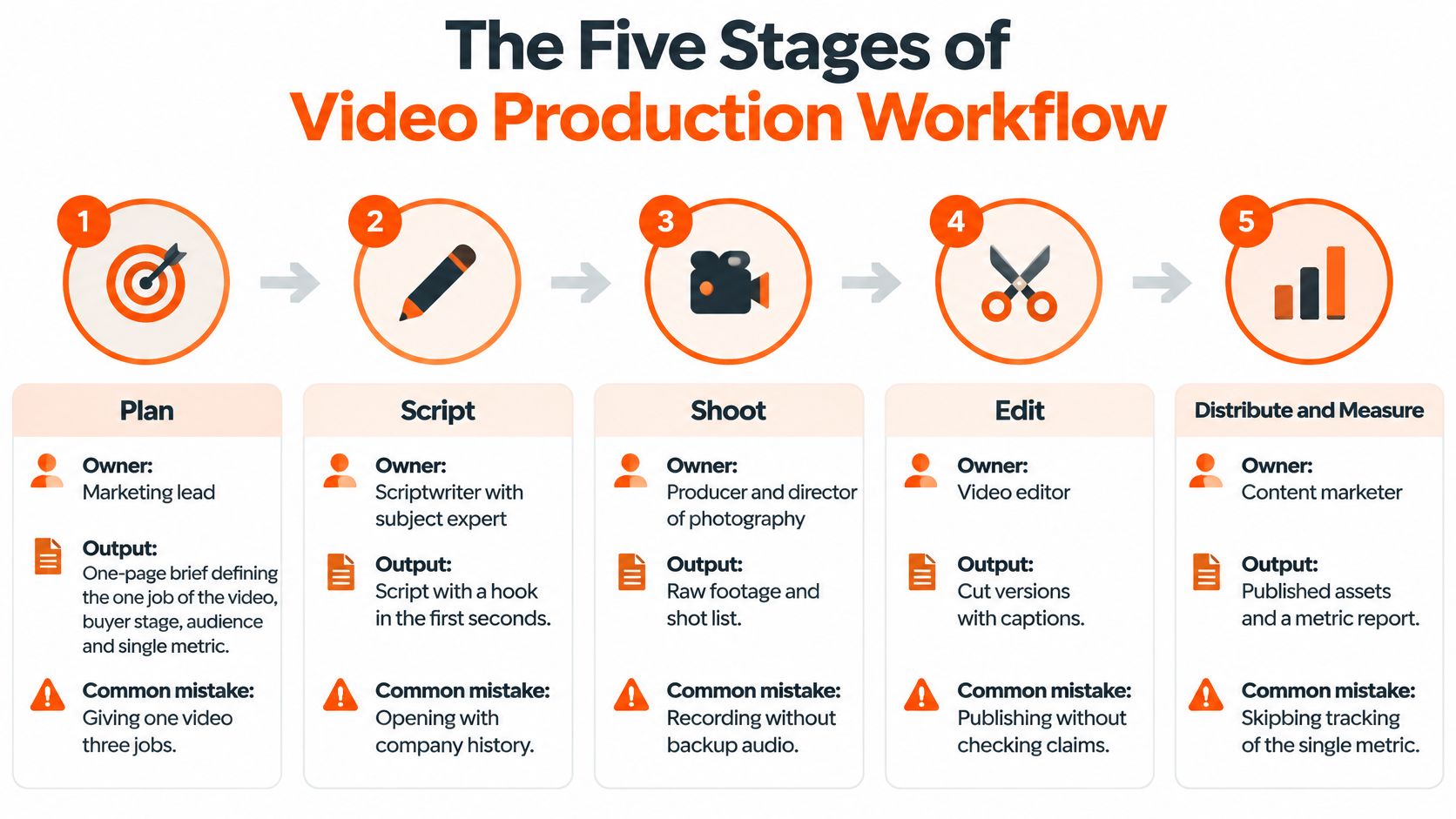
The Five Stages
Plan, owner marketing lead: Define the one job, buyer stage, audience, and single metric. The output is a one-page brief. The common mistake is giving one video three jobs and hoping editing will perform magic.
Script, owner scriptwriter with subject expert: Put the hook in the first five seconds, then problem, proof, and one call to action. Read it aloud and time it, because a script that looks short on paper can sound like a documentary. The output is a locked script.
Produce, owner producer: Record screen flows, voice, interviews, and b-roll, plus extra takes of the opening hook. Backup audio isn't glamorous, but neither is rebooking a customer because a laptop fan became the star.
Edit, owner editor: Cut hard, add captions, and build 16:9, 9:16, and 1:1 versions where needed. Run one approval gate with the subject expert for claims, product screens, and terminology.
Distribute, owner content marketer: Publish on an indexable page with a transcript, upload to YouTube, cut social clips, and send ad variants to paid channels with tracking in place.
For customer stories, Bragly's guidance on scripting authentic customer video testimonials is a helpful reference for keeping questions natural while still capturing usable proof. Authentic doesn't mean unplanned. It means the customer sounds like a person, not a press release wearing a headset.
A typical time split is planning 15%, scripting 15%, production 20%, editing 35%, and distribution 15%. Editing takes the largest share because captions, versions, revisions, thumbnails, and exports all live there. Teams that budget only for shoot day are usually surprised, and not in a birthday-party way.
Say a payroll software team skips planning, shoots for three days, then spends two weeks rewriting the message in the edit room. The footage may be lovely, but the editor is now doing strategy with a timeline and a deadline. That's why "the message will be figured out on set" is one of the most expensive sentences in marketing.
Scripting Hooks That Hold B2B Attention
A buyer scrolling through vendor videos between meetings decides quickly whether one deserves more time. An opening like “Founded in 2012 with a passion for innovation” gives little reason to stay. Lead with the buyer's problem instead, and make the first line specific enough to distinguish this video from the next.
Plan the opening before the camera rolls. A video is a funnel asset with one job, so write its hook and call to action for that job, whether it is earning a demo request or encouraging a guide download.

Google's ABCD framework offers a practical creative checklist: Attract attention immediately, bring in the Brand early and naturally, Connect through relevant storytelling or emotion, then Direct viewers with one clear call to action. Google's analysis of video advertising ROI on YouTube reports that creative accounted for almost 50% of advertising ROI in its analysis of thousands of ads. The same page cites Nielsen research finding ads that followed these principles generated a 30% higher sales lift than ads that did not.
Core point: Creative contributes substantially to advertising return. A polished film cannot make a vague script persuasive.
Test the hook as its own variable. Keep the audience, offer, placement, and budget controlled so the opening is what changes. For accounting software, one version might say “Close your books faster,” another might show the dashboard immediately, and a third might ask, “Still reconciling spreadsheets by hand?” Keep the rest of the video consistent; otherwise, the result cannot tell you which opening worked.
For a practical look at how openings are built and revised, watch the example with the sound on and a timer nearby.
Give the script one concrete business outcome to prove, rather than racing through a dozen features. A compliance tool, for example, could introduce its brand earlier and lead with the audit problem buyers already fear. Make clear who is speaking and why the problem matters, then offer one next step. Booking a demo and downloading a technical guide are competing invitations, not one call to action.
Use a simple structure: hook, problem, product in one line, proof, one call to action. Keep each line plain and specific. A strong shoot can also supply alternate openings and cutdowns for later placements, so the script gives one video a defined job while leaving useful material for the content calendar.
Using AI in Video Without Losing Buyer Trust
Faster isn't automatically better. AI can cut editing time sharply, but a polished explainer with one wrong number can cost a deal, especially when the buyer works in finance, healthcare, security, or another field where accuracy is the product.
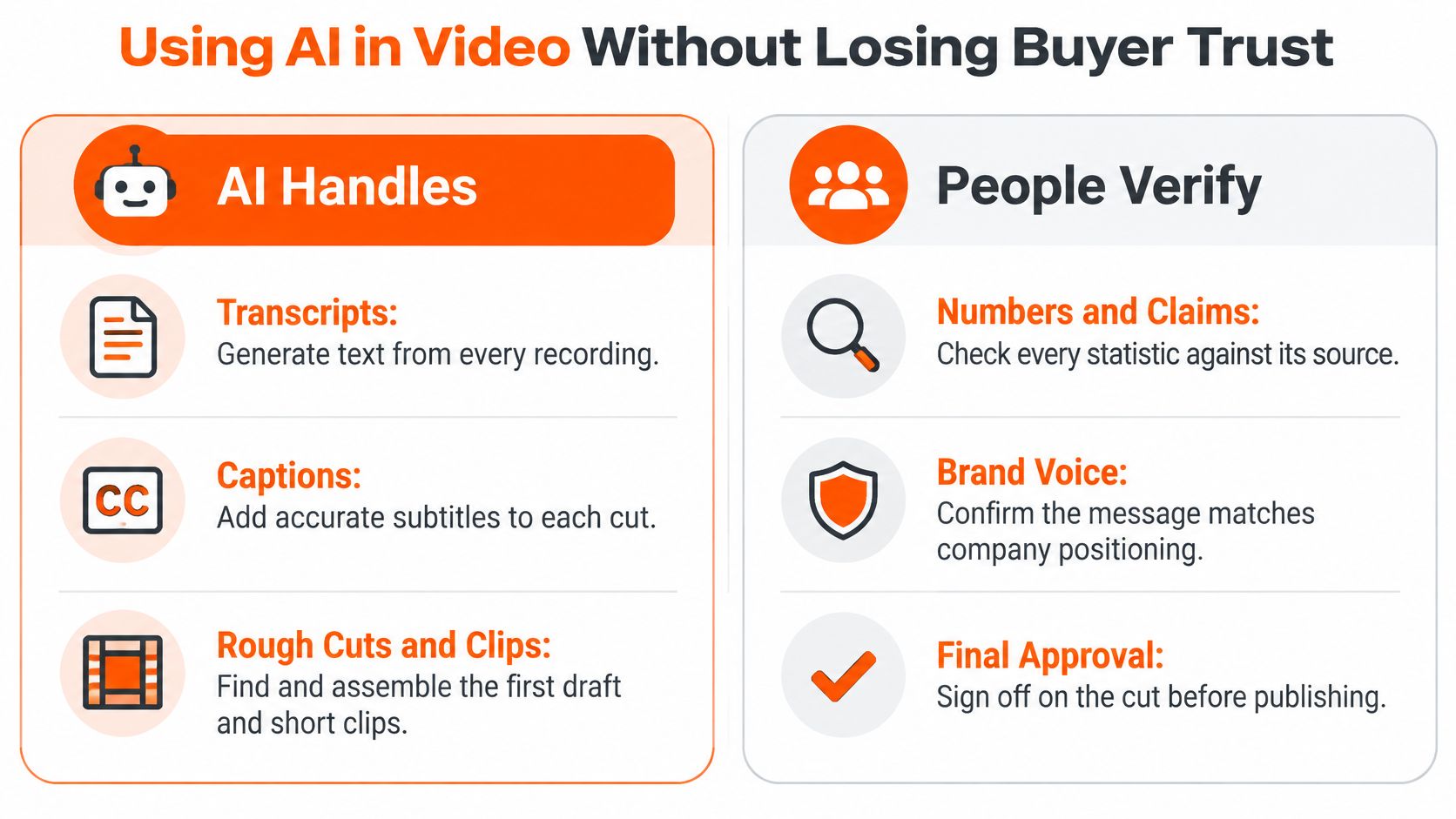
The useful split is simple. AI handles transcripts, captions, rough cuts, clip finding, and first-draft voiceovers well because those tasks are repetitive and easy to check. People should lead positioning, product claims, customer stories, legal wording, and the final script, because those carry credibility and accountability.
Adoption alone doesn't prove readiness. Goldcast's survey of 500 B2B marketers on AI video marketing reports that 91% of surveyed B2B marketers reported using AI in video workflows, while 88% used it for automated editing, transcription/captions, or clip generation. Output can rise while distinctiveness slowly falls, until every vendor sounds like the same confident robot.
Five Checks Before Publishing
Human approval gate: A named person signs off the final cut before release.
Source verification: Every number, date, comparison, and product claim is checked against its source.
Consent and likeness: Written permission covers any synthetic voice, face, or customer likeness.
Synthetic-media label: Synthetic footage or voice is labelled clearly where required.
Message-quality test: A salesperson or subject expert flags claims buyers will challenge.
Say an AI voiceover for a regulated fintech explainer states a compliance deadline one year too early. The error sounds professional, which makes it worse. A reviewer comparing the script with the source document catches it before prospects do. Regulated industries and complex SaaS products carry the highest risk, so governance isn't paperwork for its own sake. It's how speed stays usable.
Scaling One Shoot Into a Year of Content
Record one strong 45-minute webinar once, then treat it like raw material rather than a finished event. It can become one YouTube episode, six short clips for LinkedIn and YouTube Shorts, three ad variants with different hooks, a 75-second explainer cut, and a transcript-based article. One recording suddenly feeds months of distribution, which is much better than filming fresh panic every week.
The editing setup matters because repurposing starts with clean text and searchable sections.

A step-by-step video transcription workflow from iScribe Live Transcribe helps teams turn recordings into accurate transcripts for captions, clips, articles, and search. Editors can then find quotable moments quickly instead of scrubbing timelines like archaeologists. A content repurposing calculator can also estimate how many derivative assets one recording should produce before production begins.
Keep the offer and audience stable during testing. Change one variable at a time, such as the hook, opening visual, proof point, or call to action, and judge paid variants by cost per acquisition, not by who argued loudest in the review room.
Video Production Models Compared
Production model | How costs are charged | Output pattern | Best for
In-house team (one to two people plus tools) | Fixed salaries and software | Steady, limited by staff time | Teams that ship video every day
Freelancers per project | Quoted per video | Irregular, depends on availability | One-off launches and small pilots
Agency project | Quoted per campaign batch | Set batch, then stops | Single campaigns with a fixed deadline
Monthly retainer | Flat monthly fee | Steady weekly or bi-weekly output | Ongoing acquisition programmes
Credit-based projects | Credits drawn down per video | Flexible, drawn when needed | Teams with uneven video needs
Retainers suit steady weekly output but waste money in quiet months. Per-project buying suits one launch but restarts procurement every time. Credits suit uneven demand, while in-house hiring only pays off when the queue stays full. Say a logistics software team uses a retainer heavily for four months, then launches drop to two per year, so credits become the calmer financial choice.
The deciding question is direct. How many assets must one recording feed, and how often must new ones ship? Answer that before comparing day rates.
Measuring Whether Video Brings Pipeline
Say a product video gets 4,000 views and gets called a flop in the weekly meeting. Later, three target accounts that watched it during evaluation book meetings. Suddenly the flop has a much better story, and the view count looks like a weak narrator.
Views are a starting point, not an endpoint. Buyers watch anonymously, forward links in dark social, involve several stakeholders, and convert weeks later through search, outbound, or a direct visit. Last-click attribution misses much of that journey. Demandbase's State of B2B Marketing 2025 supports combining impression-level metrics with account engagement, branded-search lift, self-reported attribution, content-assisted opportunity rates, and holdout or geo tests where feasible.
A Practical Measurement Toolkit
Branded-search lift: Track branded searches in the weeks after each major launch.
Self-reported attribution: Add "Where did you first hear about us?" to forms, with video and YouTube options.
Content-assisted opportunities: Count CRM deals where a video was viewed before the first meeting.
Holdout or geo test: Pause video ads in one suitable region for four weeks and compare pipeline movement carefully.
A modest-reach video that influences high-fit accounts can be worth more than a viral clip watched by students, competitors, and someone's cousin. Report confidence levels instead of presenting every correlation as revenue causation. Finance teams trust honest ranges more than heroic certainty.
A video ROI calculator can structure production cost, conversion assumptions, and influenced pipeline in one place. Lean teams defending recurring budgets should report three numbers each month, the primary metric, the confidence level, and the pipeline influenced. That's enough to make a decision without turning the meeting into an attribution courtroom drama.
Pick One Video and Confirm Its Job
Start smaller than leadership expects and clearer than marketing usually writes. One video, aimed at one buyer stage, answering one question, gives the team a result that can be reviewed. A grand video programme launched before the first asset works is just a larger place to hide uncertainty.
A One-Week Starting Sequence
Choose the buyer stage: Pick one stage and write the single question the video must answer.
Pick the format: Check cost and turnaround, then add a 20% buffer for revisions and stakeholder calendars.
Write the one-page brief: Include the hook, proof, one call to action, owner, and metric.
Set the baseline: Record the current metric before publishing and choose the review date now.
Plan derivatives: Book two or three clips or ad variants into the same production plan.
Reuse that same one-page brief for the next asset instead of inventing a fresh document each time. Consistency makes costs easier to compare and stops every project becoming a creative archaeology dig.
Outside help makes sense when the team needs more than one video a month, when the topic is technical, or when nobody in-house has time to edit properly. ContentBuck is one B2B partner that handles strategy, scripting, editing, and distribution end to end for teams that want that work managed under one roof. Internal ownership of the brief and metric still matters, because no supplier can guess the funnel job from a vague kickoff call.
One video, one job, one metric, reviewed on schedule.
Video Production for Marketing FAQs
How Much Does Video Production for Marketing Cost
Short clips can cost under $500, while custom animated explainers commonly sit between $5,000 and $15,000. Scripting, animation, people on camera, and revision rounds move the final price.
How Long Does a Marketing Video Take
Animation or a live shoot usually takes three to six weeks. A short clip cut from existing footage can take one to three days when the message and approvals are ready.
Is a Full Crew Needed for a B2B Video
Often, no. One editor and one product expert can record a clear screen demo. Customer stories and multi-person shoots need more crew because sound, light, and scheduling get harder.
Which Format Should Be Made First
Start where the funnel needs most help. For many B2B teams, that's a 60 to 90 second explainer that answers what the product is and who it helps.
How Can Pipeline Impact Be Measured
Track branded-search lift, self-reported attribution, and content-assisted opportunities in the CRM. Views alone can't show whether high-fit accounts moved closer to a meeting.
Is AI Safe for B2B Video
AI is safe when humans verify claims, approve the final cut, secure consent for likeness or voice, and label synthetic media where required. A good script still can't be fixed by a good tripod.
ContentBuck plans, scripts, edits, and distributes B2B videos built around one funnel job and one measurable outcome, from explainers and YouTube episodes to ad variants and repurposed clips. Teams that want that system handled end to end can visit ContentBuck to choose the first video worth making properly.
Parth Jasrapuria
Founder at ContentBuck
Building video systems for B2B businesses. Obsessed with YouTube growth, creative strategy, and organic SEO.