YouTube Video Editing Service Explained for B2B Growth
Parth Jasrapuria
Founder
A lot of B2B teams are sitting on the same digital junk drawer. There's a webinar recording from last month. Three founder interviews from the quarter before. A product demo that sales loved. A podcast episode with strong talking points. All of it is useful, and none of it is live on YouTube.
The reason usually isn't lack of ideas. It's the editing bottleneck. Raw footage piles up, feedback gets messy, thumbnails become an afterthought, and the upload step somehow turns into a small office tragedy. By the time the team is ready to publish, the topic already feels stale.
That's where a YouTube video editing service stops being a creative favor and starts acting like an acquisition system. For B2B companies, editing isn't just trimming pauses and adding zooms. It's the work that turns a rambling recording into a clear asset that teaches buyers, earns trust, and gives sales something useful to send.
The challenge is that most advice online treats YouTube editing like a creator hobby. It talks about flashy intros, vague pricing, and "good vibes" workflows. B2B teams need a more boring and much more valuable answer. They need to know what the service includes, how volume changes the economics, what turnaround promises matter, and which red flags signal future headaches.
That's what this guide covers in plain language, with practical examples and a few jokes to keep things from sounding like a procurement spreadsheet in a trench coat.
Introduction Why B2B Teams Need Help With YouTube
A common scene plays out inside SaaS and service businesses. Marketing has strong subject matter experts. Sales wants more content. Leadership wants “more YouTube presence.” Then someone opens a folder named Final_Final_UseThisOne and discovers six recordings, three intros, mismatched logos, and zero published videos.
The problem isn't effort. The problem is workflow drift.
The backlog that quietly kills momentum
Take a simple B2B example. A company runs one customer webinar each month and records founder interviews every few weeks. On paper, that should be a healthy YouTube pipeline. In practice, the webinar needs cleanup, the founder rambles for ten minutes before saying the useful part, nobody agrees on captions, and upload copy gets written five minutes before lunch.
Soon the team stops asking, “What should be published next?” and starts asking, “Who even has the latest version?”
Practical rule: If a team has valuable footage but no repeatable path from recording to publish, the problem usually isn't content creation. It's post-production operations.
That's why many B2B teams look for outside help. Not because editing software is impossible to use, but because YouTube publishing requires consistency. One missed week isn't a disaster. Ten missed weeks turns the channel into a ghost town wearing a company logo.
Why internal teams get stuck
Most in-house marketers can brief a campaign, write copy, and manage stakeholders. Fewer can also handle pacing, audio cleanup, subtitle timing, thumbnail production, and YouTube packaging while keeping normal work alive. That's a lot to ask from one person who already has fifteen Slack messages blinking like a slot machine.
A YouTube video editing service helps when the company needs output without chaos. That can mean turning a founder interview into a polished long-form video, slicing a webinar into Shorts, or standardizing recurring content so every upload doesn't feel like a fresh emergency.
For teams that also need scheduling discipline, tools that auto-publish YouTube content can help connect approved videos to a cleaner publishing rhythm. That doesn't replace editing. It prevents the finished files from gathering dust like gym equipment bought in January.
What good looks like for B2B teams
A useful partner doesn't just “make it look nice.” A useful partner gives the team a system:
Clear intake: Raw footage, notes, brand assets, and goals land in one place.
Predictable editing: Rough cuts arrive on schedule, not whenever Mercury is in retrograde.
Repeatable packaging: Captions, thumbnails, metadata, and exports follow standards.
Volume support: One recording can become a long-form video plus multiple smaller assets.
By the end of the buying process, a team should know whether outsourcing makes sense, what deliverables to expect, and how to spot a service that will help instead of creating a second layer of confusion.
What a YouTube Video Editing Service Really Does
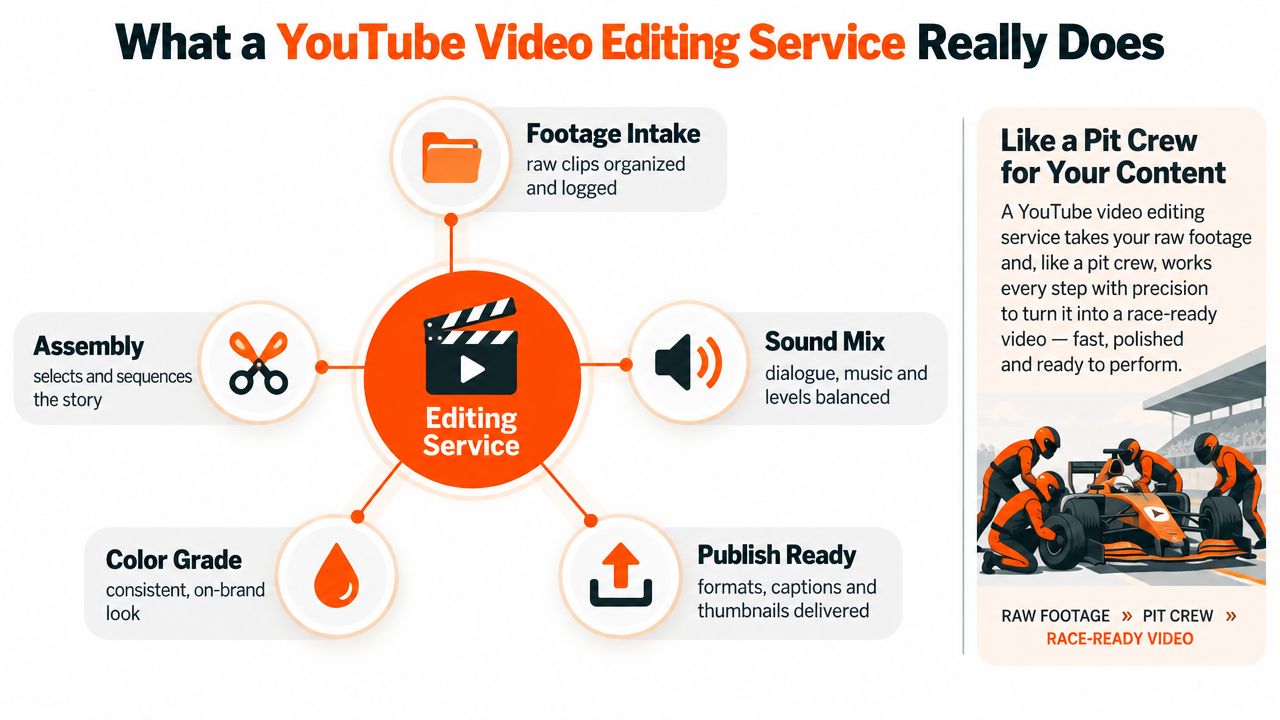
A YouTube video editing service is often misunderstood as “someone who cuts clips together.” That's part of it, but only part. A better analogy is a pit crew. The footage is the race car coming off the track. The service checks the parts, fixes the weak spots, and gets it ready to perform under pressure.
The core job is structure, not just software
Good editing starts before fancy transitions. It starts with deciding what the video is saying. In B2B, that might mean pulling the useful two-minute explanation out of a twenty-minute product walkthrough, tightening examples, and making sure the viewer understands the point before clicking away to answer email.
A service usually handles several layers of work at once:
Story shape: Finding the useful beginning, middle, and end.
Pacing: Removing dead air, repeats, and the classic “Can everyone see my screen?” opening.
Clarity elements: Lower thirds, callouts, chapter markers, and visual emphasis.
Polish: Audio balancing, color correction, and cleanup.
Packaging: Captions, thumbnails, titles, descriptions, and upload-ready exports.
A polished video usually looks simple because someone did a lot of invisible work.
That invisible work matters because the market is far from tiny. The global video editing market was valued at USD 3.54 billion in 2025 and is projected to reach USD 4.99 billion by 2031, with 5.88% CAGR over that period. Within that market, professional and commercial use accounted for 59.10% of revenue in 2025, large organizations held 64.20% of market share, and North America represented 37.60% of the total, according to Mordor Intelligence's video editing market report. In plain English, businesses already drive a large share of this category.
What gets delivered besides “the final video”
Non-editors often picture one output file. Real services usually produce a bundle.
A typical B2B package can include:
A main long-form edit for YouTube.
Short clips cut from the same recording for YouTube Shorts or other platforms.
Captions or subtitles formatted for readability.
Thumbnail design files that match brand standards.
Export versions for different aspect ratios or channels.
Project files or source organization, depending on the agreement.
Some teams also need help choosing software or understanding production stack differences. For that, a practical resource like this Viral.new video editor comparison can help clarify what different tools are built for before a company decides whether to keep work in-house or outsource it.
The three common service types
Not every YouTube video editing service works the same way. Buyers usually run into three categories.
Service Type | How it usually works | Best fit
Freelancer | One person handles editing and sometimes thumbnails or captions | One-off projects or low volume
Offshore editor | A dedicated editor works regularly with the team | Recurring output with tighter budgets
Full-service B2B agency | A team handles editing plus strategy, packaging, and workflow | Companies that need end-to-end support
A freelancer can be perfect for occasional work. A dedicated editor can help teams that publish often. A full-service setup makes sense when editing is tied to content strategy, SEO, repurposing, and approvals across multiple stakeholders.
What “end to end” actually means
“End to end” gets thrown around like confetti at a launch party. In reality, it should mean the partner can take a raw recording and move it through logging, rough cut, revisions, polish, packaging, and delivery without the client chasing every step.
If the team still has to explain thumbnail specs three times, manually create timestamps, rewrite titles, and upload files themselves every week, the service may be editing clips. It isn't carrying the whole workflow.
Why YouTube Editing Is Different for B2B Companies
B2B companies don't usually win on entertainment alone. They win when buyers understand a problem faster, trust the team behind the solution, and remember the company when a purchase conversation starts.
That changes the role of editing. For a creator channel, editing may focus on personality and pace. For B2B, editing has to support comprehension, credibility, and conversion support.

B2B videos carry heavier information
A software buyer doesn't watch a video for the same reason someone watches a prank channel or travel vlog. The buyer wants to know:
What problem does this solve
How does it work
Can this team explain it clearly
Is this worth passing to the boss or the buying committee
That means B2B editing often needs to simplify complex material without making it feel watered down. A product demo may need screen zooms, chaptered sections, annotations, and shorter explanations. A founder interview may need stronger structure so thought leadership doesn't drift into “podcast uncle” territory.
The same recording can do several jobs
A forty-five minute demo is a good example. For a B2B company, that single recording can become:
A searchable tutorial on YouTube
A shorter problem-solution edit for prospects
Multiple Shorts built from strong moments
Sales enablement clips for follow-up emails
Snippets for paid creative testing
That's why editing support keeps growing around the platform. YouTube's creator economy is large enough to sustain serious demand. Industry reporting in 2026 said YouTube had paid creators more than $100 billion over the prior five years, while YouTube's 2025 advertising revenue was estimated at about $40.37 billion and total 2025 revenue exceeded $60 billion. The same reporting estimated Shorts reached more than 200 billion daily views in 2025, up from 70 billion daily views in 2024, according to this YouTube 2025 revenue and creator economy report. For B2B teams, the point isn't celebrity creator envy. It's proof that the platform has deep commercial gravity.
What editing must optimize in B2B
A B2B edit has to do more than look clean. It has to reduce friction.
Consider a few common use cases:
Video Type | Editing goal | Practical example
Product explainer | Make complex features easy to follow | Add zooms, labels, and trimmed steps in a software walkthrough
Thought leadership | Keep authority while tightening pace | Remove rambling sections and add topic cards
Podcast repurposing | Turn long discussion into discoverable assets | Pull a sharp answer into a standalone clip
Ad creative variants | Refresh hooks and formats quickly | Create multiple intros from one source recording
Many companies also need YouTube to connect with a broader publishing plan, not just one channel in isolation. A useful reference for that bigger picture is this guide to YouTube channel growth strategy, which maps how channel programming connects to business goals.
Editing affects search, trust, and reuse
YouTube for B2B often works best when one strong piece of raw footage gets repackaged into several usable assets. Editing is the bridge. Without that bridge, teams have “content” in theory and a neglected folder in reality.
This section's video example shows the kind of platform thinking B2B teams need when using YouTube as a demand channel:
The practical shift is simple. A B2B company shouldn't treat editing like decoration added after the important work is done. The editing is part of the important work. It determines whether a useful idea reaches buyers in a form they'll watch.
Inside the Deliverables and Workflow From Brief to Publish
When teams hear “video editing service,” they often imagine a mysterious black box. Files go in. Stress comes out. Maybe a final MP4 appears if the moon cooperates.
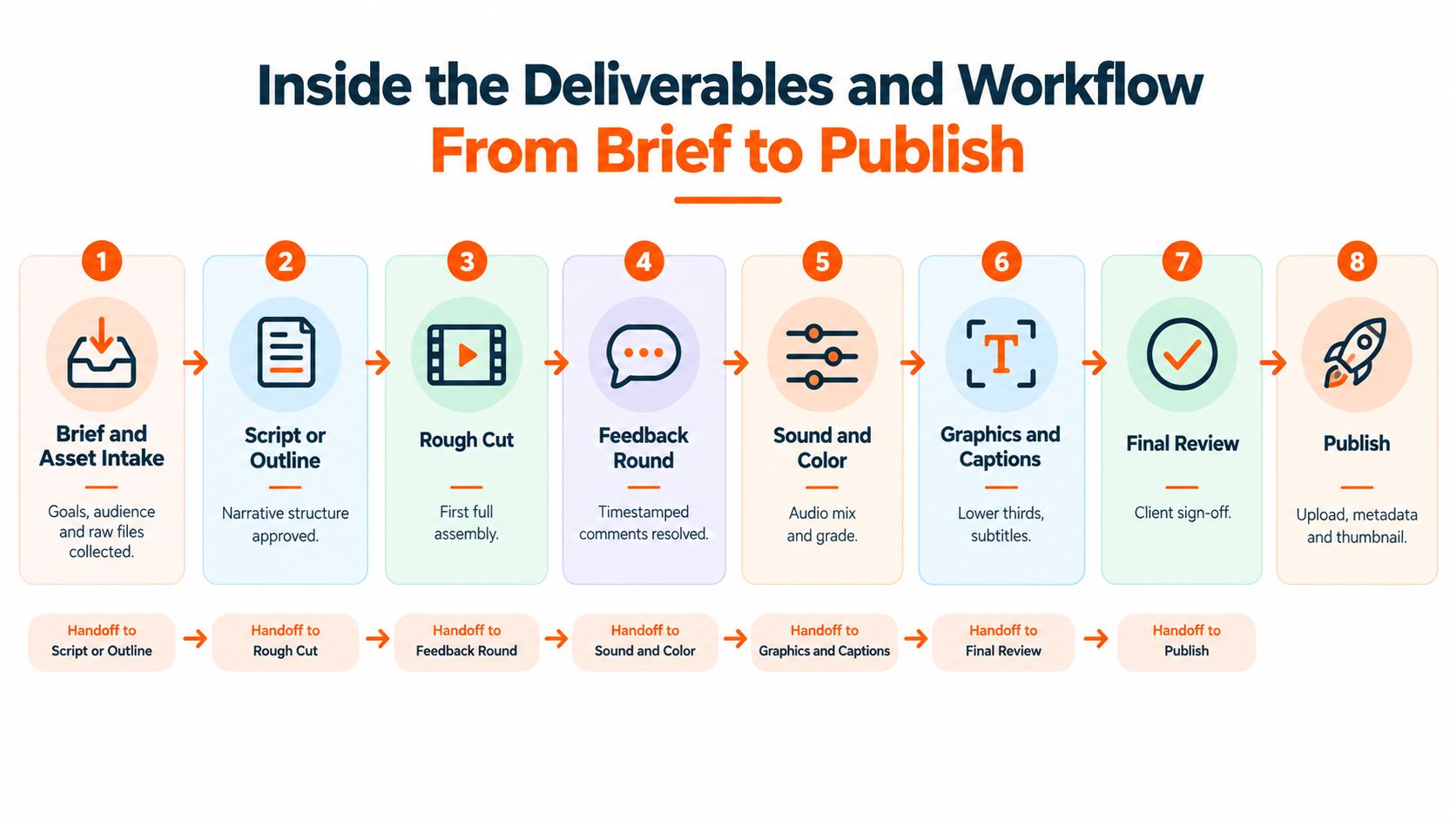
A stronger workflow is much less magical and much more useful. It follows a chain. Each handoff matters because weak handoffs create delays, confusion, and the dreaded “wrong version approved” problem.
Step one starts before editing
The best projects don't begin with software. They begin with a brief.
That brief should answer a few practical questions:
Who is this video for
What should the viewer understand or do after watching
What footage and brand assets are available
What format is needed, long-form, Shorts, ad variants, or all three
Who gives approval and how feedback will be delivered
For teams that need a cleaner intake process, this guide on how to brief a B2B video agency is a useful model because it pushes the conversation beyond “make it pop,” which is not a brief. It's a cry for help.
The workflow most B2B teams actually need
A dependable YouTube video editing service usually runs through these stages:
Brief and asset intake Raw footage, logos, music preferences, examples, and goals are collected.
Script or outline shaping Even unscripted content often needs a logical structure before editing starts.
Rough cut The first assembled version focuses on story, not final polish.
Feedback round Comments are gathered with timestamps so revision notes don't read like haunted poetry.
Sound and color pass Dialogue is cleaned up, levels are balanced, and the visual look is made consistent.
Graphics and captions Lower thirds, subtitles, simple animations, and on-screen callouts are added.
Final review The team checks branding, claims, and approval details.
Publish package Final exports, thumbnail, title options, description, tags, and upload assets are delivered.
Rough cuts answer “Is this the right story?” Final polish answers “Is this ready for the public?”
Technical settings that protect quality
Export settings sound boring until a good video looks muddy after upload. Then they suddenly become very interesting.
For YouTube long-form delivery, a technically sound export pipeline is to use an MP4 container with H.264 video, progressive scan, and a frame rate that matches the source footage. Common guidance clusters around roughly 8 to 12 Mbps for 1080p30, about 12 Mbps for 1080p60, about 16 to 24 Mbps for 1440p, and about 35 to 68 Mbps for 4K, while audio is typically kept at AAC-LC and 48 kHz, according to this YouTube export settings guide. That matters because YouTube re-encodes uploads, so sloppy exports can soften detail and worsen motion.
In simple terms, the service shouldn't just make the timeline look good inside Premiere Pro or DaVinci Resolve. It should export in a way that survives YouTube's own processing.
Captions, thumbnails, and metadata aren't extras
A lot of teams treat captions and metadata like garnish. That's backwards. These pieces affect usability and discoverability.
Google's video SEO guidance emphasizes that video pages should include descriptive text around the video, plus structured data and a video sitemap, and it also recommends strong metadata such as a clear title, detailed description, and relevant tags. This summary of Google-oriented video SEO guidance is a practical reminder that upload packaging helps search engines understand the content.
The same goes for music. When teams need licensed tracks, a resource that helps them find safe music for videos can save a lot of future cleanup. Nothing ruins a smooth publishing process like a copyright issue popping up after approval.
Why SLAs matter inside the workflow
Workflow quality isn't just about craft. It's about speed promises.
B2B teams need to know:
Turnaround time: How fast does a rough cut arrive?
Rush policy: What happens if a clip is needed the same day?
Revision process: Are revisions queued, limited, or ongoing?
Coverage: Is one editor handling everything, or can the service absorb higher volume?
Without answers, projects drift. With answers, the team can plan recording days, launch dates, and campaign windows without gambling on post-production luck.
Pricing Models SLAs and the True Cost at Volume
The biggest pricing mistake in YouTube editing is comparing a single video quote to a recurring content workflow. That's like pricing one sandwich and assuming the monthly office catering budget is sorted. It isn't. People keep eating, and content teams keep needing more assets.
Why headline rates fool buyers
A lot of listicles focus on per-video pricing because it's easy to compare. The trouble starts when a B2B team needs weekly long-form videos, repurposed Shorts, thumbnails, captions, and upload support. Then the cheap-looking option can become the expensive one.
Recent market summaries show a dedicated offshore editor can run about $1,800 to $3,500 per month, while mid-tier per-video pricing often clusters around $150 to $500 for long-form edits, according to this breakdown of YouTube video editor cost. The key difference shows up when a team moves from occasional editing to a repeating production system.
The three main pricing models
Here's the side-by-side view most buying teams need.
Pricing Model | Best For | Typical Cost Range | Turnaround and Scope
Per-video | Low volume or one-off projects | $150 to $500 for long-form edits | Scope is usually narrower. Turnaround varies by editor load.
Dedicated offshore editor | Steady recurring production | About $1,800 to $3,500 per month | Better continuity. Often supports ongoing edits and repeat style.
Flat-fee unlimited retainer | Teams with frequent requests and multi-format needs | Custom, varies by provider | Usually queue-based with broader coverage, revisions, and predictable workflow
The choice depends less on raw price and more on content volume, response speed, and scope creep.
When each model makes sense
A per-video setup works when the company publishes occasionally and doesn't need much repurposing. It's simple. It's easy to trial. It also tends to break once requests multiply.
A dedicated editor makes more sense when the team records regularly and wants continuity. The same person learns the product, brand, pacing preferences, and approval style. That saves time because fewer things need to be re-explained each week.
A flat-fee unlimited model fits teams that generate frequent content and hate surprise invoices. One long-form edit can trigger multiple clip requests, subtitle updates, thumbnail revisions, and metadata work. In that environment, project-by-project billing can feel like paying a parking meter every time someone blinks.
For companies weighing a queue-based option, this overview of unlimited video editing services is useful because it explains where that model works and where it can create bottlenecks if the provider is understaffed.
The SLA checklist buyers should ask for
Price without service levels is only half a proposal. A B2B team should ask for concrete operating details.
Standard turnaround: Is delivery measured in business hours or “sometime soon”?
Rush handling: Can urgent edits be prioritized without derailing everything else?
Revision policy: Are revisions capped, charged separately, or included?
Named coverage: Is there a dedicated editor or rotating bench?
Queue visibility: Can the team see what's in progress and what's next?
Cheap editing that misses campaign windows is expensive editing in disguise.
A simple volume test
If a company needs one occasional upload, per-video pricing may be perfectly fine. If it needs regular YouTube publishing plus repurposed clips, packaging, and repeatable speed, the buying decision should shift from “What is one edit worth?” to “What workflow can this provider reliably support?”
That's the point many rate cards skip. B2B buyers aren't just paying for a finished file. They're paying to remove production drag from a channel that needs consistent output.
How to Evaluate Partners and Avoid Costly Red Flags
Choosing a YouTube editing partner shouldn't feel like speed dating with demo reels. Nice visuals matter, but B2B teams need proof that the partner can handle complex products, messy stakeholder feedback, and recurring deadlines without turning every upload into a scavenger hunt.
What to verify before signing anything
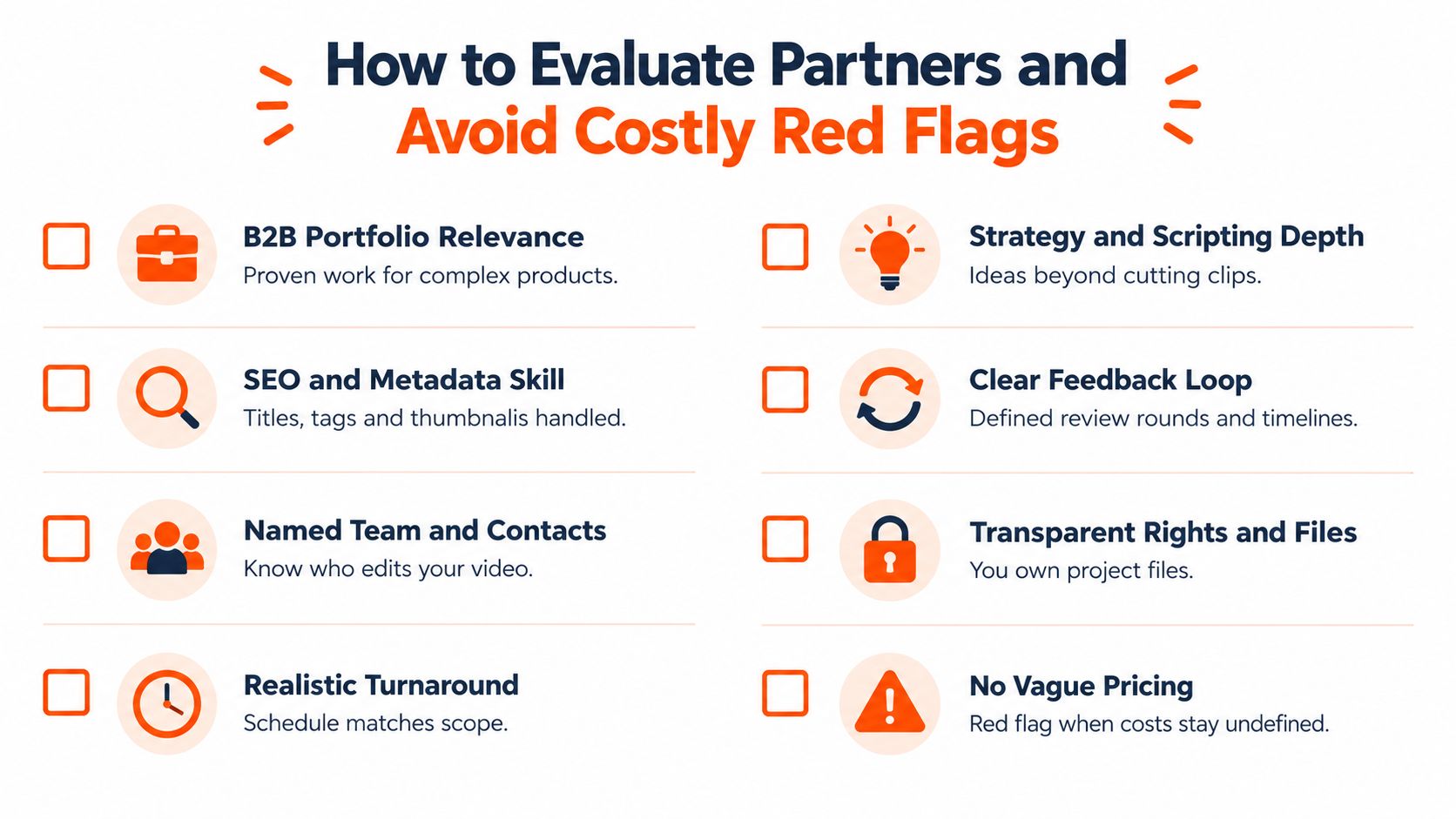
A strong evaluation process looks beyond showreels. B2B buyers should check whether the partner can handle substance, not just style.
A practical shortlist should include:
Relevant B2B work: Has the partner edited software demos, webinars, explainers, or expert interviews?
Strategy depth: Can the team shape a story, or do they only trim footage after someone else does the thinking?
SEO and packaging skills: Can they handle thumbnails, descriptions, and titles that fit YouTube?
Feedback discipline: Do they use timestamped comments and clear revision rounds?
File ownership: Are project files and final assets accessible if the relationship ends?
Why captions deserve more scrutiny
Captioning is one of the easiest places to spot the difference between a casual editor and a serious service. Auto-captions may be fast, but B2B content often needs more care because technical terms, product names, and speaker pacing can create a mess quickly.
Independent research and practitioner benchmarks indicate captions can improve discoverability, attention, and completion. One A/B-testing source reported roughly 15 to 20% higher average watch time for human-styled captions versus plain auto-captions, and another benchmark noted 12 to 15% higher completion rates for captioned short-form video, as summarized in this captioning and subtitle design research source. That doesn't mean every video needs karaoke-level styling. It means captions should be treated as part of retention, not a box-checking chore.
If a provider treats captions like an afterthought, there's a good chance they treat retention the same way.
Red flags that most listicles skip
Some warning signs don't appear until onboarding. That's why buyers should ask awkward questions early. Awkward now is cheaper than chaos later.
Common red flags include:
Red Flag | Why it matters
No clear SLA | Delivery expectations will slip when priorities change
Single-editor dependency | One absence can stall the entire content queue
Generic creator portfolio | Great lifestyle edits don't prove B2B clarity
Vague feedback process | Revisions become slow and subjective
Murky file handling | Source files and rights can become a dispute
Another subtle red flag is overpromising. If a partner says yes to every request instantly, buyers should ask how requests are prioritized, who is assigned, and what happens during busy weeks. “No problem” is nice. “Here's the workflow” is better.
Cost-saving habits that actually help
Not every fix requires changing partners. Teams can lower editing friction by making the footage easier to work with.
A few habits help immediately:
Batch recordings: Record several expert segments in one session instead of one at a time.
Template recurring elements: Standardize intros, outros, lower thirds, and CTA screens.
Plan repurposing upfront: Mark likely Shorts moments during recording.
Centralize assets: Keep logos, fonts, and brand examples in one shared location.
One option in the market is ContentBuck, which handles B2B video strategy, scripting, editing, thumbnails, SEO packaging, and distribution in one workflow for companies that want a system rather than isolated edits. That kind of setup suits teams that are trying to reduce vendor sprawl, not just outsource cutting.
A simple onboarding checklist
Before kicking off, the client should be able to answer these:
Who approves rough cuts and finals?
What does a standard turnaround look like?
Where are comments submitted?
Who owns project files and exports?
What recurring video types are expected each month?
If those answers aren't clear, the relationship is starting on foggy ground. Fog is fine in a movie trailer. It's terrible in production operations.
Choosing the Right Fit and Next Steps With ContentBuck
The right YouTube video editing service depends on what the business is trying to run. If the need is occasional cleanup for one-off uploads, a freelancer may be enough. If the company is building YouTube into a repeatable acquisition channel, the service needs stronger operations. That means strategy, editing, repurposing, packaging, and dependable turnaround all working together.
For B2B teams, the key question isn't “Who can edit a video?” Plenty of people can. The better question is “Who can help the team publish consistently without creating more coordination work?” That's where the difference shows up between a vendor that delivers files and a partner that supports a system.
A practical next step is to start with a small pilot if volume is still uncertain. A pilot works well for companies testing one webinar series, one podcast format, or a short batch of founder-led videos. It gives the team a way to inspect turnaround, communication, revision handling, and packaging quality before moving into a steadier workflow.
A retainer makes more sense when YouTube is already tied to demand generation and the team knows recurring output is needed. In that situation, the editing service should support not just long-form episodes, but also thumbnail production, Shorts repurposing, captions, SEO details, and a queue process that doesn't break every time the calendar gets busy.
The healthiest buying decision usually looks boring on paper. Clear scope. Clear SLAs. Clear file ownership. Clear repurposing rules. Boring is good here. Boring gets videos published.
FAQ sections and schema also matter on supporting pages around video content. Google Search Central says FAQPage structured data should be used only for official question-and-answer content, while forums or pages with user-submitted answers should use Q&A Page markup instead. That's a useful reminder to match structured data to the actual page type instead of sprinkling markup around like SEO glitter.
FAQs
What does a YouTube video editing service usually include
It usually includes cutting footage, improving pacing, balancing audio, color cleanup, captions, and final exports. Many services also handle thumbnails, Shorts repurposing, and YouTube metadata.
When should a B2B company outsource YouTube editing
A B2B company should outsource when raw footage is piling up, publishing is inconsistent, or the internal team can't handle editing without delaying other marketing work. It also makes sense when one recording needs to become several assets.
Is per-video pricing better than a monthly retainer
It depends on volume. Per-video pricing can work for occasional uploads. A monthly setup often fits better when the team needs regular long-form videos, Shorts, thumbnails, and faster turnaround.
What SLA questions should buyers ask
Buyers should ask about standard turnaround, rush options, revision limits, dedicated editor coverage, and how feedback is managed. If those answers are vague, the workflow will probably be vague too.
Why do captions matter so much on YouTube
Captions help viewers follow along, especially in short clips and information-heavy B2B videos. They also improve usability when people watch with sound low or off.
What keywords and SEO elements matter on video pages
Video pages should use descriptive titles, detailed descriptions, surrounding text that explains the video, and appropriate structured data. The goal is to help both viewers and search engines understand what the content covers.
ContentBuck offers B2B-focused YouTube editing, repurposing, thumbnails, SEO packaging, and broader video production support for teams that need a working system instead of a pile of partially finished files. For companies trying to turn webinars, demos, podcasts, and founder content into a steady acquisition engine, it's worth exploring how ContentBuck structures that workflow.
Parth Jasrapuria
Founder at ContentBuck
Building video systems for B2B businesses. Obsessed with YouTube growth, creative strategy, and organic SEO.