How Many Subscribers Before YouTube Drives B2B Leads?
Parth Jasrapuria
Founder
There is no subscriber number that switches on B2B leads on YouTube. The threshold is qualified, relevant viewers: buyers who match your ideal customer profile, watch past the intro, and take a tracked next step toward a conversation.
Four thousand subscribers, a green arrow on the dashboard, and one demo request last quarter. That tab sits open in a lot of browsers, and it's why "How Many Subscribers Before YouTube Drives B2B Leads?" keeps getting typed into search bars. Someone in leadership wants a number to approve the budget against. The number doesn't exist, and hunting for it delays the work that does produce leads.
Subscriber count records how many people pressed a button. It says nothing about what they do for a living, what they're evaluating, or whether they can sign a contract.
Relevance Beats Subscriber Count Every Time
A small channel can out-earn a big one when the viewers are already inside a buying decision. Buyer relevance and purchase-stage intent beat raw audience size every time, so the honest answer to the milestone question is that the milestone is the wrong unit.
The buying process explains why. Research published by Google and Bain found that B2B buying committees contain an average of 17 cross-functional stakeholders, and that 92% of B2B buyers already have a shortlist of preferred vendors before they actively begin the buying process. Most of the decision is forming before anyone fills out a form.
That gives a modest channel room to win. A video that answers an evaluation question can reach a committee member well before the demo request, and that timing is worth more than another thousand casual subscribers. A practical milestone is a repeatable flow of target-market viewers into high-intent assets such as product demos, comparison videos, implementation guides and consultation pages, then into CRM records where a named company starts looking real.
YouTube's own guidance describes subscriber count as an accumulated total rather than a measure of the current active audience (YouTube Help), and its recommendation system weighs things like watch history, searches and viewing duration rather than subscriber totals (YouTube Help). The four patterns below show how little the headline number tells you.
Channel type | Typical subscribers | Who watches | Likely B2B result
Niche cybersecurity channel | Under 1,000 | Prospects researching SOC 2 audit preparation | More qualified prospects
Broad business channel | 20,000+ | General business audience with mixed intent | Fewer qualified prospects
Tight operations series | Under 500 | Operations leaders watching one solution series | Demo requests
Large channel with weak viewing | 2,000-5,000 | Few people open new uploads | Little pipeline
Practical rule: 300 buyers beat 30,000 browsers. A subscriber count is a business card nobody dials.
Shorts deserve their own warning. YouTube Analytics separates subscribers by source, so long-form, Shorts, live streams and search are reported apart (YouTube Analytics). A Shorts run can add 1,000 subscribers, while a long-form comparison video pulls 100 views and three consultation requests. The small video usually pays the invoices.
Run a self-test today. Of your last 100 viewers, how many work at companies that fit your ICP, and how many watched past the midpoint? Then connect that to the website, where pricing-page revisits, two people from one domain, and repeat demo-page visits help show how to spot buying signals before a form fill makes it obvious.
The Numbers That Predict B2B Leads
Replace the subscriber target with a weekly scorecard. Six metrics, checked on the same day each week, that answer one question: are the right people moving toward a conversation?
Metric | Where to find it | What it tells you
Subscribers | YouTube Analytics overview | Accumulated audience, not active viewers
Returning viewers | YouTube Analytics audience report | Whether buyers come back to the channel
Watch time from target accounts | Analytics plus CRM account tags | Real interest from relevant companies
Audience retention | Retention report per video | Where viewers leave, against your channel's own typical retention
CTA clicks and landing page visits | UTM-tagged links in descriptions | Whether viewers take the next step
Demo requests and SQLs | CRM | Whether videos create pipeline
Returning viewers are the closest thing to a demand signal on the platform. Someone who watches three videos in a month is evaluating; someone who watched one viral clip and left is a number. Watch time from target accounts takes more work, because it means tagging viewer companies in the CRM by domain, but it's the only metric that tells you a named account is paying attention.
A 2,500-subscriber channel with a steady crew of returning viewers from target companies is healthier than a 15,000-subscriber channel where nobody comes back. The scorecard's job is to make that visible before the quarterly review does.
What to do with CTA activity
YouTube's native reporting separates thumbnails, impressions, click-through rate, views, unique viewers and returning versus new viewers, which makes subscriber growth a secondary audience-health metric rather than the conversion denominator. A useful operating floor is at least several hundred ICP-relevant viewers per content cluster across a measurement period, enough for CTA activity to be readable rather than a rounding error.
Compare your own funnel against realistic ranges rather than a fantasy number. The B2B YouTube benchmarks give you a starting point for click-through, retention and conversion rates by funnel stage.
Apply one filter to the scorecard. If a metric can't change a decision, drop it from the weekly review. A dashboard with fourteen columns gets opened twice and then abandoned.
Build a 90-Day Lead Tracking Setup
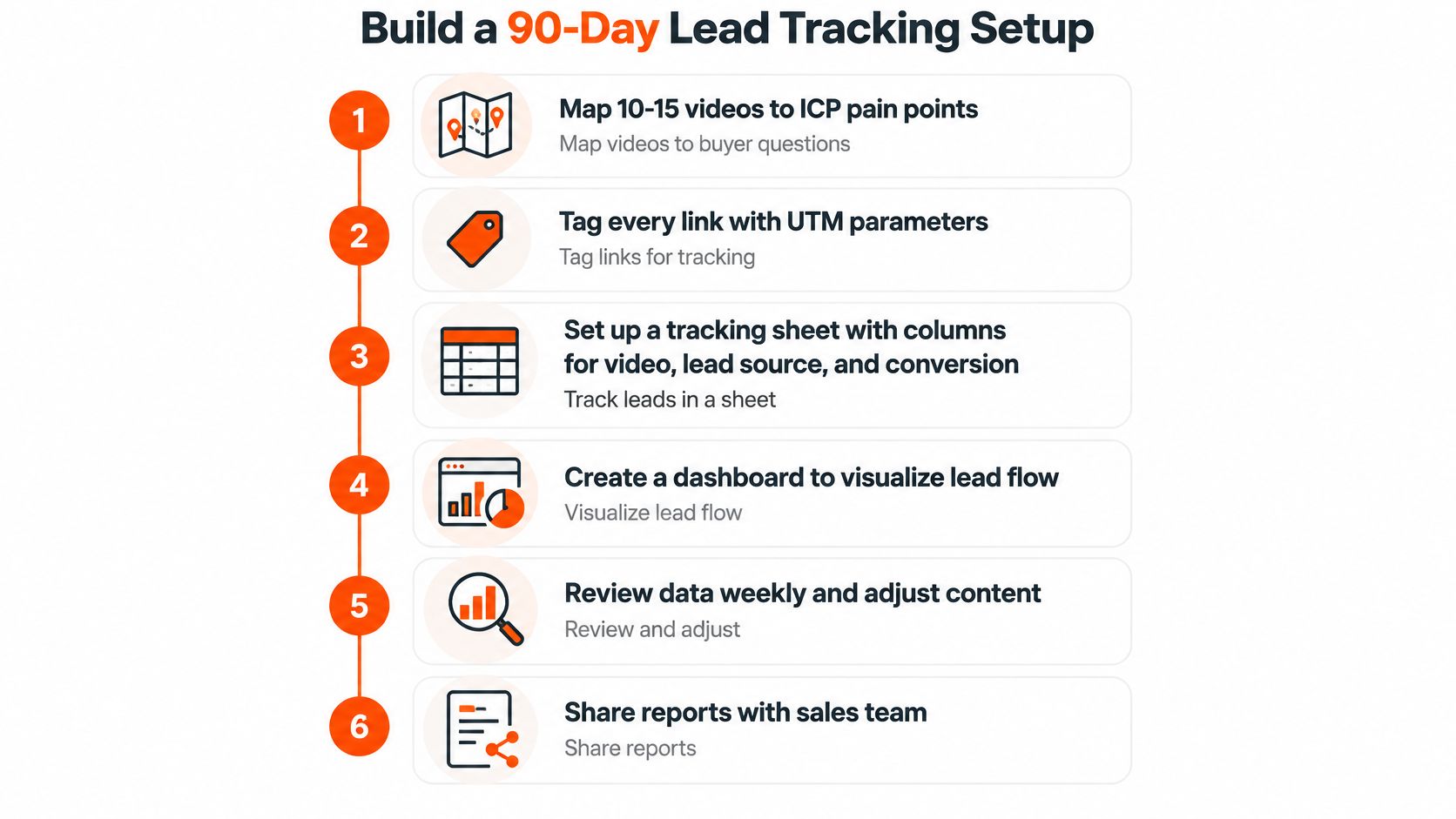
The setup that makes day 90 useful takes an afternoon and a spreadsheet. Six steps, each with the mistake that ruins it.
Map 10 to 15 videos to ICP pain points. One buyer question per video, worded the way buyers type it, such as "SOC 2 audit preparation" or "clean up CRM data before migration". The mistake is publishing videos that match a broad topic like "sales tips" and hoping the right person wanders in.
Tag every description link, pinned comment and end-screen page with campaign UTMs. Every visit then traces to a video, and branded search stops being credited to YouTube by accident. The mistake is pasting the same untagged homepage link into all 40 uploads.
Build one tracking sheet with video title, UTM tag, publish date and owner. Every upload gets an ID before it goes live. The mistake is reconstructing which video drove which lead from memory in month three.
Export YouTube Analytics monthly and match the scorecard metrics to CRM records on the same campaign tags. Compare like with like. The mistake is comparing channel totals against CRM totals and concluding the channel does nothing.
Reconcile in order, MQLs first, then sales-qualified leads and pipeline value. This keeps the story honest when a lead moves stages. The mistake is counting subscribers as leads, which inflates everything downstream.
Review at day 30, 60 and 90. Cut topics with no CTA clicks and double down on the topics that start qualified conversations. The mistake is waiting until day 90 to look, then having nothing to act on.
Two KPIs carry the whole programme: cost per qualified conversation and pipeline influenced per 1,000 ICP viewers, both segmented by topic and funnel stage. Those two numbers survive a budget review, which is more than a subscriber graph does.
A working setup at day 90 is boring and specific. Every video has a link, a count and a sales outcome next to it. If your tracking stops at clicks, the difference between traffic and qualified leads is where the reporting gap usually appears.
Turn Podcast Episodes Into YouTube Assets
A podcast feed is a stack of videos most buyers will never see, because podcast apps have almost no discovery engine. Repurpose each episode into a YouTube asset that feeds the same tracked funnel, in four moves.
Pick the episode that answers one buyer question sales hears constantly. If the sales team keeps explaining how to clean CRM data before a migration, that's the episode. Topic selection beats production quality here.
Record with the guest or slides on screen, then cut a 12 to 18 minute long-form version whose title names the buyer question word for word. Keep the strongest answer in the first 30 seconds.
Cut two or three short clips from the best answers, each ending with a pointer to the full video rather than a generic channel link, because a clip should send people somewhere specific.
Put a UTM-tagged CTA in the description pointing at a checklist or consultation page, then log the episode in the tracking sheet. A RevOps episode on CRM cleanup becomes a 14-minute video and three clips; the video picks up 100 views and two consultation requests, which beats a clip batch that harvests 1,000 disinterested subscribers.
Skip the audio file with a static cover image. Viewers leave in seconds, and YouTube reads the drop as a weak video. Full steps for the workflow sit in this guide to repurposing B2B podcast content.
Why YouTube Gets Less Credit Than It Deserves
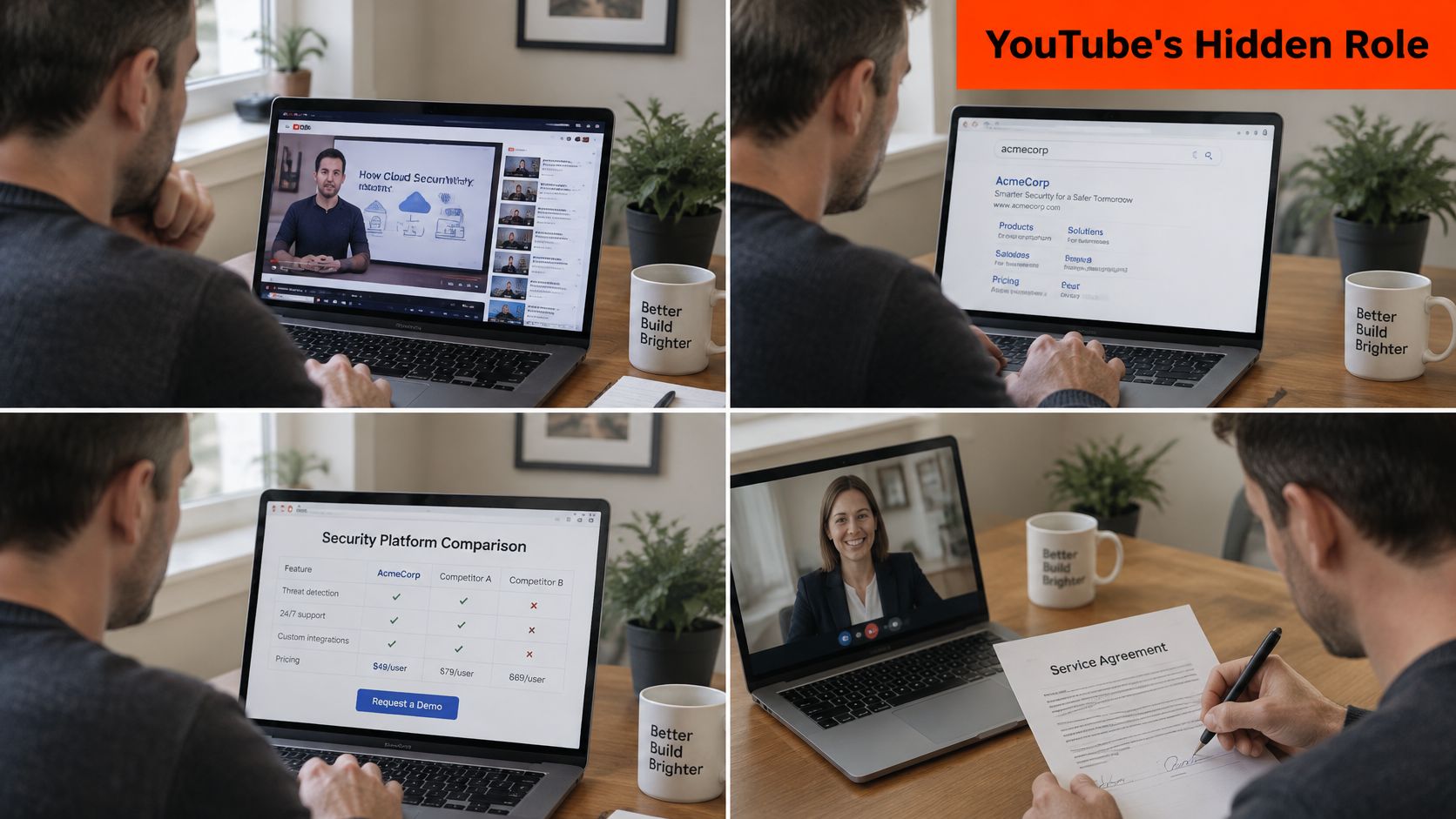
Open the last-click report and YouTube looks like a hobby. Follow one buyer and the picture changes. A finance lead watches an explainer on audit prep, searches the brand name two weeks later, reads a comparison page, and signs after a call. The final click belonged to a search engine, so the video that started the deal gets no credit at all.
Post-view behaviour supports that path. Published buyer research cited by ContentBuck indicates that 63% of surveyed senior leaders and B2B decision-makers visited a brand website after watching product or service content, and 60% watched a tutorial during evaluation. The viewing happens, the click attribution doesn't.
The fix is to read five attribution methods side by side instead of arguing for one:
First-touch shows which channel made the first known contact, and it's where video tends to appear.
Last-touch shows the final click before a form submission. Useful, and permanently unfair to early-stage content.
Assisted conversion counts every touch along the way, so a video can earn credit without owning the last click.
Account-level engagement asks whether anyone at the target company watched, which matters more in a 17-person buying committee than which individual clicked.
Self-reported attribution comes from one question on the booking form: how did you first hear about us? Sales hear the answer long before a dashboard does.
Tag video-engaged accounts in the CRM and compare win rate, sales-cycle length and deal size against accounts with no video activity. When a rep hears "we found you on YouTube three weeks before the demo," that goes in the record as a first-touch source, not an anecdote.
The video below walks through the same attribution problem from the sales side.
Report two views every month, the last-click view and the assisted view, side by side. Pricing, demo and implementation page visits after a view belong in both, because those pages show movement toward a purchase rather than casual interest.
Fixing a Channel That Gets Views but No Leads
Most stalls come from packaging, not traffic. Run the diagnosis loop before making another video:
Audit the first 30 seconds. YouTube's own definition of audience retention describes the share of viewers still watching at each point, and creators can compare a video against the typical retention of their 10 most recent videos of similar length (YouTube Analytics metrics). Videos holding at least half of viewers at the 30 second mark get flagged as having above typical intros.
Compare thumbnail click-through rate by topic and traffic source. A topic that pulls clicks from search and flops in feeds is a packaging problem, not a content problem.
Find the timestamp where retention falls off a cliff. That timestamp is usually where the video drifts away from the question in the title.
Rewrite one thing, opening, title, thumbnail or CTA, around the highest-intent question.
Run the revised format across a short series, not one upload. A single video proves nothing except that a coin landed on its edge.
Symptom | Likely cause | Fix
Many views, no CTA clicks | Video topic too broad | Rework the CTA and target one buyer question
High click-through, low watch time | Thumbnail promises more than the video delivers | Rewrite the opening and match the title to the content
Strong watch time, no returning viewers | No series or next-video path | Build playlists and end-screen links to a series
Subscribers rising, no pipeline | Audience outside the target market | Filter by company fit and publish ICP-focused topics
CTA clicks, no CRM match | Missing UTMs or tracking gaps | Add campaign UTMs and reconcile with CRM monthly
The expensive habit: change the title, thumbnail, opening and CTA in the same week, then celebrate the improvement without knowing which change caused it. That's not optimisation, it's a shrug with a spreadsheet.
A four-week test plan settles it. Week one, change one variable, say the opening hook, and watch retention at the 30 second mark. Week two, keep the hook and change the thumbnail, watching click-through rate. Week three, hold both and rewrite the CTA, watching UTM clicks. Week four, hold all three and publish a second video in the same format to check the result holds.
Timeline and Your First 90-Day Milestone
Search-led video moves slowly at first, because the videos need indexing and buyers research for weeks before they raise a hand. Expect four phases.
Months 0 to 1 are setup: the tracking sheet, the first uploads, and UTMs on every link. Months 1 to 3 build topic clusters and early viewers while the first CTA clicks arrive. Months 3 to 6 bring returning viewers and the first qualified conversations. Month 6 and beyond is where a library starts compounding, since older videos keep earning views.
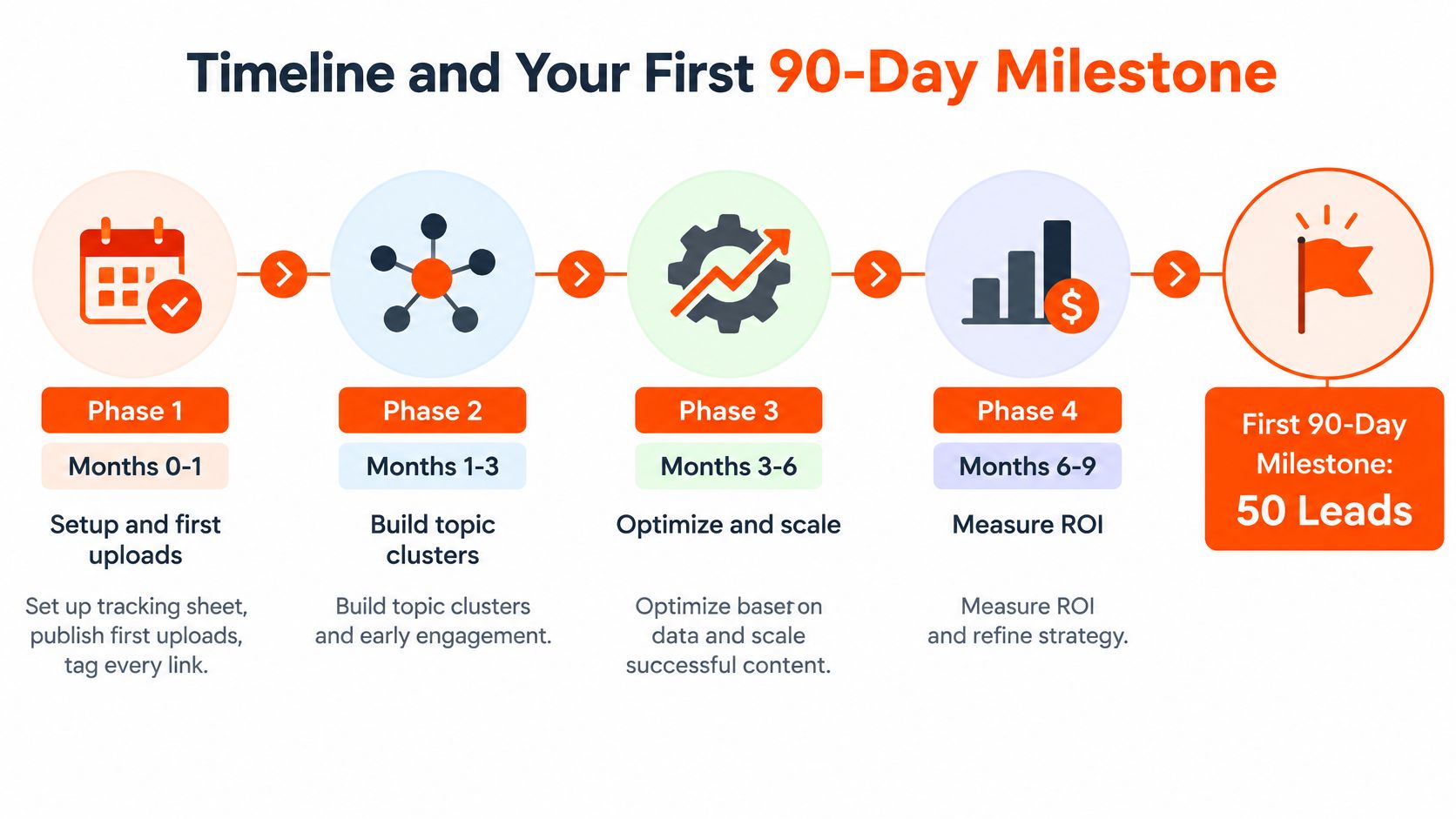
That shape is a slow cooker, not a microwave. ContentBuck states plainly that YouTube is a 3 to 6 month investment and isn't suited to companies that need leads within a week. The brand's own record includes a financial consultancy channel built from scratch that reached 12,000 subscribers and 18 meetings booked directly from YouTube in three months, alongside runs of 16 leads sourced from YouTube. Those are outcomes from a channel built around buyer questions, not a promise that every channel matches them.
A hypothetical channel shows the curve. Say a niche accounting-software channel sits at 900 subscribers and sees its first CTA clicks in month two, then books four demos by month five. Nobody knows in advance whether the next channel follows that line.
Start with one decision: choose a single ICP topic cluster, one CTA and a 90-day target written in qualified viewers and CTA clicks. Not subscribers.
Pick the question sales hears most, make three videos around it, attach one UTM-tagged CTA to each, and agree with sales on what counts as a qualified conversation. Book the month-3 review and the month-6 go or no-go decision now, while everyone still remembers the criteria.
Frequently Asked Questions
Is there a subscriber number where YouTube starts producing B2B leads? No. Relevance and buyer intent matter more than raw size, so track qualified viewers and their next steps instead of an audience milestone.
How many subscribers do I need before the channel is worth the effort? There's no fixed number. The better check is whether returning viewers from target companies are growing month over month.
Do Shorts help B2B lead generation? They can grow subscribers quickly, but they often bring low-intent viewers. Judge them on CTA clicks and CRM matches, not on subscriber gains.
How long until YouTube produces leads? Plan for a slow start of three to six months, with the first qualified conversations usually appearing around month three to six.
How do I prove ROI before I have enough subscribers for stable conversion rates? Read first-touch, last-touch and assisted views together, and tag video-engaged accounts in the CRM so watch behaviour sits next to opportunity records.
Can podcast episodes feed YouTube leads? Yes, when each episode answers one buyer question, gets cut into a long-form video plus clips, and links to a tracked next step.
ContentBuck builds B2B YouTube channels around this measured approach: weekly long-form videos with scripting, editing, thumbnails and search optimisation, short clips from each upload, and a monthly channel strategy that ties viewers to booked meetings instead of a subscriber milestone. If a channel already pulls views but no pipeline, ContentBuck's YouTube Growth service pairs the topic clustering described here with the UTM and CRM tracking that makes the results provable. Visit ContentBuck to review the case studies and pick your first ICP topic cluster.
Parth Jasrapuria
Founder at ContentBuck
Building video systems for B2B businesses. Obsessed with YouTube growth, creative strategy, and organic SEO.