Video Advertising Linkedin
Parth Jasrapuria
Founder
63% of B2B buyers say short-form social video influences their purchasing decisions, while LinkedIn video uploads grew 34% year over year. Video advertising on LinkedIn can influence serious buying conversations, but only when teams treat it as a testing system rather than a glossy one-off production.
A marketing leader can scroll through LinkedIn and barely notice the ads. Another software demo starts playing, the captions move too slowly, and the thumb reaches for the next post before the product has explained anything. That isn't a failure of video as a format. It's a failure of relevance, timing, and creative discipline.
LinkedIn can be expensive, especially for narrow B2B audiences. Video can also suffer from fatigue faster than a sales team suffers from the phrase “circle back.” The practical answer is to build short, modular creative, target people with a genuine buying connection, and judge success by qualified business outcomes rather than cheap views.
The B2B Buyer's Relationship with Video
A buyer researching procurement software rarely begins by requesting a demo. They may watch an expert explain a workflow problem, save a short comparison, or see a customer-facing leader describe how a familiar process breaks at scale. The vendor might not receive the click, but the message can still shape the shortlist.
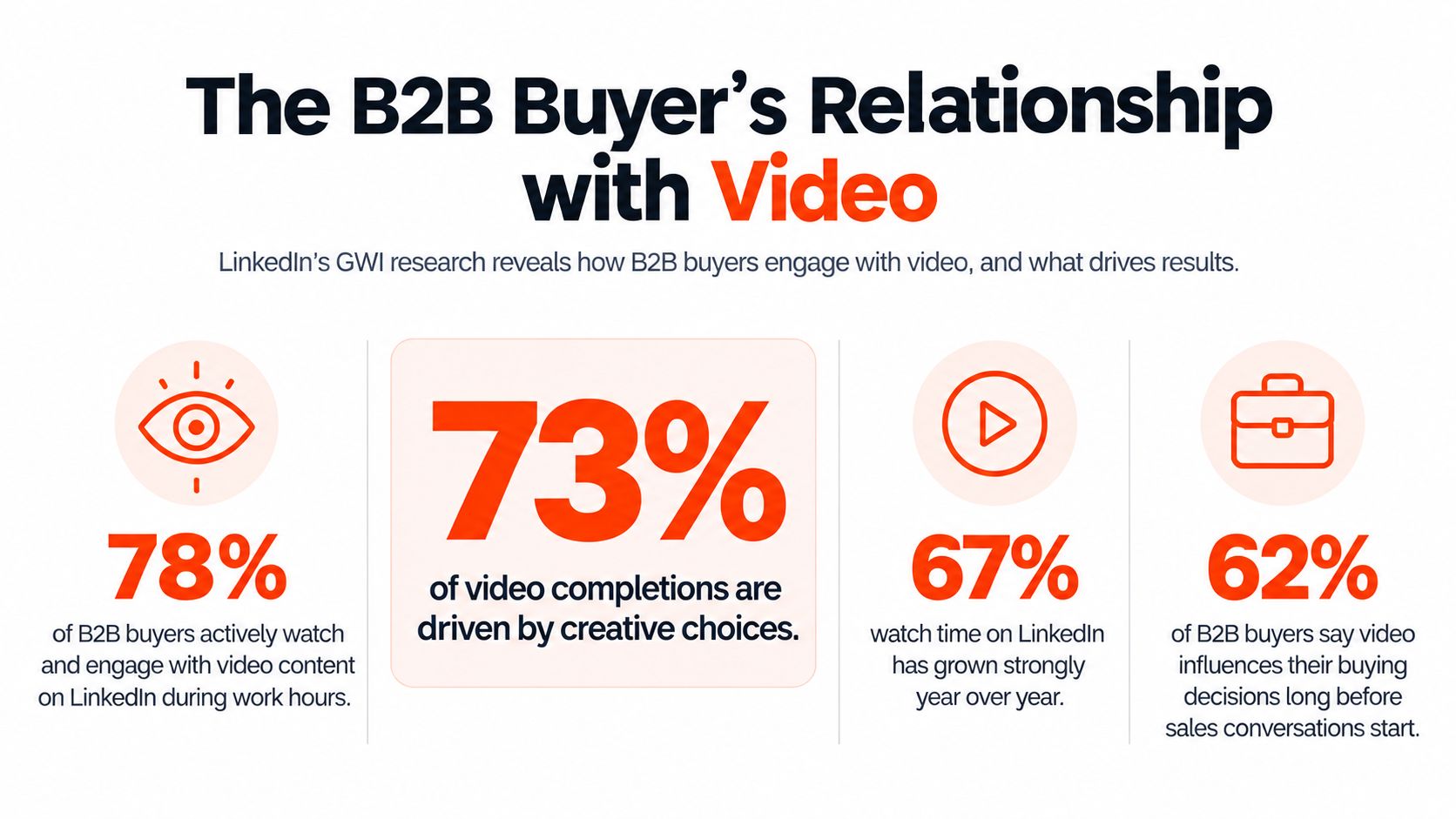
That matters because LinkedIn's 2024 Business of Influence research found that 63% of surveyed B2B technology buyers and business decision-makers said short-form social video helps inform their buying decisions. LinkedIn commissioned GWI to survey more than 1,700 buyers and decision-makers across the United States, United Kingdom, and India, with the research running from May 22 to June 11, 2024. The result measures buyer influence across major B2B markets, not just marketer enthusiasm for shiny new formats.
Trust starts before the sales call
The same research found that video-focused influencer content was trusted by 80% of buyers who consumed video content, while 67% of buyers familiar with B2B influencer marketing said influencer content played a critical role during the IT-consideration stage. Those findings point to a useful distinction. Video doesn't need to close the deal inside the feed to create commercial value.
A subject-matter expert can make a complicated product easier to understand. A founder can explain why a category exists. A customer-facing operator can describe the cost of leaving an old process untouched. Each format gives buyers a reason to remember a company before sales enters the conversation.
LinkedIn also reported that video uploads on its platform increased 34% year over year, identifying video as its fastest-growing content format at that time. More uploads mean more competition for attention, though. A generic “three reasons to transform your business” clip won't become compelling merely because it has moving images.
Practical rule: Use video to answer one buying question clearly, not to squeeze an entire product brochure into a moving rectangle.
The strongest LinkedIn videos usually feel useful before they feel promotional. A short clip might show a finance leader how an approval bottleneck develops, then demonstrate one mechanism that removes it. A cybersecurity company might explain a confusing risk in plain language and reserve the product pitch for the final moment.
This is why video advertising on LinkedIn is not just an awareness play. It can support consideration, credibility, and internal buying discussions. The buyer may forward the clip to a colleague, mention the speaker in a meeting, or search for the company later. Those actions don't always appear neatly inside last-click reporting, but they influence how buying groups form opinions.
Building a Modular Creative System
One polished video is a fragile advertising strategy. If the hook misses, the audience is wrong, or the offer changes, the whole asset becomes an expensive ornament.
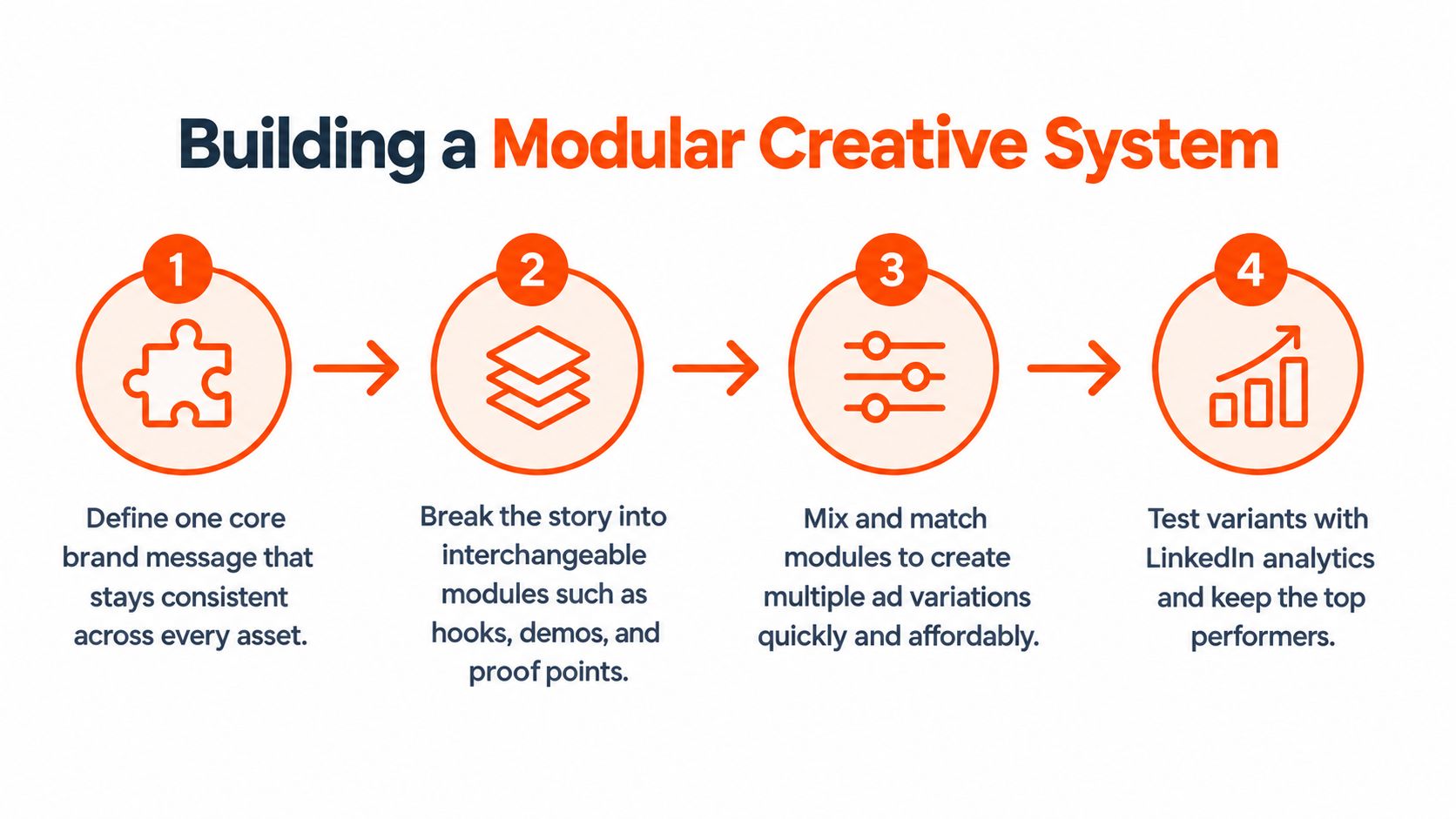
A modular system works differently. It treats every ad as a combination of reusable parts, so a team can change the opening, proof point, speaker, or call to action without rebuilding every frame. LinkedIn recommends a 15 to 30-second master video for broad placement eligibility across the LinkedIn Feed and LinkedIn Audience Network, which makes that length useful as a practical production base. The platform accepts videos from 3 seconds to 30 minutes, but a short master gives teams more placement flexibility and more testing options.
Build the master around one problem
A useful master video has four working parts:
The hook: Name the audience and problem immediately. “Finance teams lose visibility when approvals happen in email” is more useful than “Business is changing faster than ever.”
The problem: Show the consequence in a concrete way. A procurement manager might see requests scattered across spreadsheets, inboxes, and chat messages.
The proof point: Demonstrate one mechanism, result, or expert insight. Don't stack five features into a breathless product tour.
The action: Ask for one next step, such as watching a product walkthrough, reading a guide, or booking a qualified conversation.
The first 1 to 2 seconds should establish the ICP-specific problem, followed by one proof point or product mechanism and a single conversion action. This structure gives each creative element a job. It also makes editing less painful when the audience changes from operations leaders to finance leaders.
A practical example would be a workflow software company producing one screen recording, one customer interview excerpt, and several opening lines. The same core demonstration can then support a “reduce approval delays” version for operations, a “strengthen audit visibility” version for finance, and a “standardize handoffs” version for IT. The product footage remains useful, but the framing changes.
Teams that want a wider view of this process can use ContentBuck's ad creative strategy guide to develop a repeatable approach to messaging, testing, and production.
Test modules, not just finished ads
A modular library might contain:
Problem hooks: Different openings for cost, risk, speed, compliance, or team capacity.
Proof modules: A screen recording, expert explanation, customer statement, or process diagram.
Audience variations: Alternate language for a CMO, department head, practitioner, or founder.
Offer endings: A demo invitation, benchmark guide, consultation, or product page.
Format versions: Crops designed for horizontal, square, and vertical placements.
This approach prevents a common mistake: changing several variables at once and then pretending the report reveals a winner. If the hook, speaker, audience, and offer all change together, the team learns very little. A cleaner test changes one meaningful variable while keeping the rest stable.
The system also reduces the emotional attachment that often surrounds production. A video doesn't need to be a masterpiece. It needs to be understandable, relevant, technically sound, and easy to replace when the audience stops responding.
Technical Specs and Formats for Success
A strong concept still fails if the file cannot pass approval or becomes unreadable on mobile. LinkedIn supports MP4 uploads using H.264 or VP8 video, with AAC or MPEG-4 audio, and accepts files up to 500 MB, according to its video advertising specifications. Supported layouts include horizontal 16:9, square 1:1, and vertical 4:5 formats, with 720 × 900 pixels recommended for 4:5 video.
These limits should shape the creative system before editing begins. A 15 to 30-second master can produce several crops, while a long product lecture may fit fewer placements and require more editing. Keep faces, subtitles, logos, interface details, and calls to action within a central safe area so each version remains legible.
Short modular assets also reduce the cost of refreshing creative when ad fatigue appears. That matters on LinkedIn, where high CPC makes every weak impression expensive. Build exports that can be replaced quickly rather than treating each video as a finished spot.
Choose the ratio for the viewing context
A 16:9 edit suits desktop viewing and wide product demonstrations. A square version occupies a balanced footprint in the feed. A 4:5 version takes up more vertical space on mobile, which is why LinkedIn recommends that ratio for certain video placements.
LinkedIn also supports 9:16 vertical video, with dimensions that depend on the format. The Sponsored Content video specifications list a supported 4:5 range from 360 × 450 to 1,080 × 1,350 pixels. A B2B agency could use a wide testimonial for desktop viewers and a 4:5 crop that keeps the speaker, captions, and CTA prominent in the mobile feed.
The thumbnail should match the video's aspect ratio and resolution. An optional thumbnail can use JPG or PNG and must stay under 2 MB. Show the subject clearly at a glance, rather than placing a tiny logo in a large field of corporate colour.
Design for muted viewing
Captions make the message usable when a buyer watches without sound, a common behaviour in a professional feed. Supply an SRT file where required, use readable contrast, and keep captions clear of interface elements and lower-screen calls to action.
Teams can use social video editing for B2B campaigns when one source needs multiple crops, caption treatments, and delivery versions. Well-edited organic clips can also grow reach with LinkedIn video, using the same modular crops for paid and organic distribution.
Check every final export on a phone and desktop before launch. A composition that looks balanced on a large monitor may leave the buyer with a face, three words, and a CTA competing for the same small screen.
Targeting the Right B2B Audience
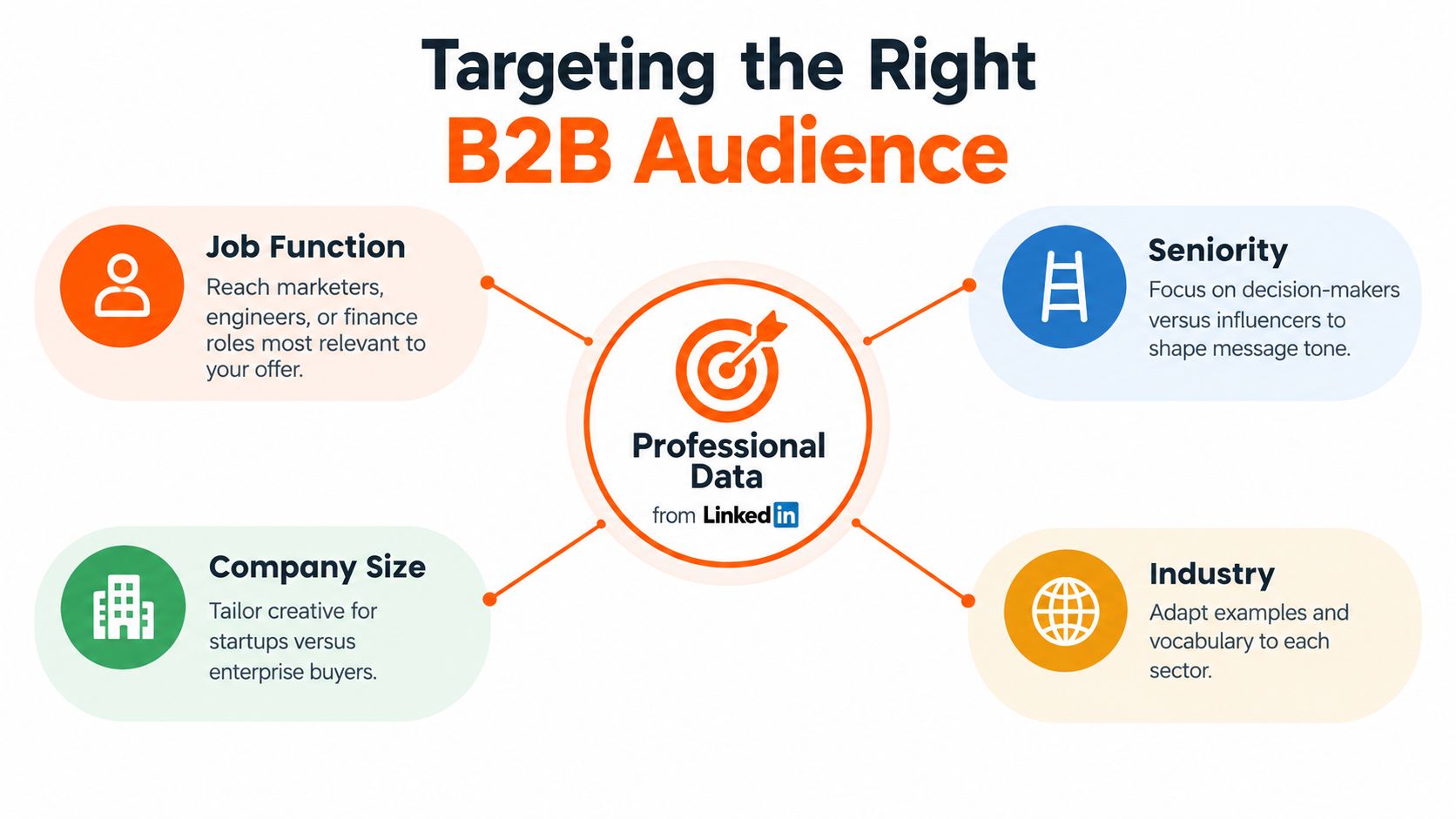
LinkedIn targeting becomes useful when the audience reflects a buying situation rather than a collection of vague interests. The platform can use professional and audience attributes including company, job experience, education, devices, demographics, interests, and traits, as described in its audience targeting guidance.
That creates a meaningful difference between broad and precise targeting. A campaign for procurement software aimed at everyone interested in “technology” may generate plenty of exposure from people who have no influence over purchasing. A campaign combining relevant company attributes, job experience, and seniority has a better chance of reaching people who understand the problem and can move a buying process forward.
Translate the ICP into targeting choices
Targeting choice | Useful question | Creative implication
Job function | Who experiences the problem directly? | Use the language of that team's workflow.
Seniority | Who approves, influences, or operates the purchase? | Adjust the message from strategic risk to practical execution.
Company | Which named accounts or business types matter? | Refer to scale, process complexity, or operating context.
Industry | Where does the problem appear differently? | Replace generic examples with sector-specific situations.
Education and experience | What level of familiarity can the audience reasonably have? | Explain unfamiliar terms instead of assuming expertise.
Consider a company selling data governance software. A message for a data engineer might show how policies are applied inside a workflow. A message for a chief information officer might focus on visibility, ownership, and risk. The product can remain the same, but the problem framing should match the viewer's responsibilities.
Job title targeting alone can be too narrow or too messy. Titles vary between companies, and a “growth” title can describe a senior executive, a generalist, or an intern. Combining job function with seniority and company attributes usually gives the creative a more useful context. Exclusions also matter. Removing irrelevant students, interns, or unrelated functions can prevent a high-cost platform from serving impressions to people who were never plausible buyers.
Audience test: If the ad's opening sentence could apply to almost every professional, the targeting or the message probably needs more work.
Match audience size to the economics
A narrow account list can make sense when each potential customer has substantial value and the sales process is coordinated. It can make less sense when the audience is too small to support learning, or when the creative has no reuse beyond one campaign. A broader sector audience may provide more delivery, but it needs stronger qualification through the hook and offer.
A useful operating model separates audiences by role in the journey. Cold audiences need a clear problem and credible explanation. Engaged viewers can receive a deeper demonstration. Existing prospects may respond better to proof, implementation detail, or a specific conversation offer.
Teams building outbound workflows alongside paid campaigns may find the LinkedIn data pipeline playbook useful for connecting professional data with prospecting processes. Paid video shouldn't operate as an isolated media activity. Sales feedback can reveal which job roles recognize the pain, which objections keep appearing, and which vocabulary belongs in the next hook.
The Power of Creative Over Production
A polished studio can make a weak idea look expensive. It can't make an irrelevant opening relevant.
LinkedIn's analysis of more than 13,000 B2B ads found that creative choices were linked to 73% of completions and 49% of engagements, as reported in the available 2025 LinkedIn advertising benchmark analysis. The practical lesson is not that production quality has no value. It's that the audience responds to decisions such as the hook, message, proof, speaker, captions, and action, not to the size of the lighting budget alone.

The opening earns the next second
A buyer doesn't owe an ad attention. The first frame should identify a problem, challenge a familiar assumption, or introduce a useful result. “Your procurement process is slow” is weak because it says almost nothing. “Three approval systems are hiding the same request” creates a more specific reason to continue.
Strong hooks can come from several angles:
Operational friction: Show the handoff, delay, or duplicate work the audience recognizes.
Financial pressure: Explain where waste or missed visibility begins, without making unsupported promises.
Expert disagreement: Challenge a common approach with a clear explanation.
Product mechanism: Demonstrate one action that separates the product from an old workaround.
Buyer language: Use a phrase from sales calls, support tickets, or customer interviews.
A phone-recorded explanation from a credible operator may outperform a cinematic montage if the operator answers a real question. A screen recording can work well when the interface appears quickly and the viewer understands what to watch for. Product animation is useful when the product is abstract, but animation shouldn't become an excuse to avoid saying what changes for the buyer.
Refresh before fatigue becomes expensive
Video fatigue appears when the same audience sees the same argument too often. A team may respond by increasing the bid or broadening targeting, when the better move is often to replace the creative. New footage isn't always necessary. New hooks, captions, speakers, proof points, crops, and offers can create meaningful variants from the same source material.
LinkedIn reports that video ads with a time-sensitive offer, promotion, or deal achieve 1.2 times the average video-completion rate, regardless of ad length. It also reports that an offer in the headline produces an average completion rate 8% higher than comparable ads without that treatment. The platform defines a completion as a video watched through approximately 97% to 100% of its length, while a view requires at least two continuous seconds of playback with at least 50% of the video on screen, as outlined in its video ads measurement definitions.
Those definitions matter because an autoplay impression isn't the same as meaningful exposure. Teams should test whether a clear offer belongs in the headline or opening message, then evaluate completion rate alongside average watch time, cost per view, and qualified conversion quality.
Creative operating principle: Build a library of variations before performance falls. Replacing one tired ad after collapse is slower and more expensive than maintaining a steady testing queue.
Measuring What Matters
Views tell you delivery happened. They do not prove the campaign earned pipeline.
That gap gets wider in B2B. One buyer watches the ad, another clicks later, and a third signs after a sales call. Last-click reporting usually credits the final touch and hides the earlier influence. If you only watch CTR, you will miss whether the video changed recall, consideration, or lead quality.
LinkedIn's Brand Lift Tests give you a native way to compare people exposed to a video campaign with a control group. The test is built to measure brand recall, favorability, and consideration, which helps separate perception lift from normal campaign reporting. That matters on a channel where a view can happen without a meaningful business outcome.
Build a reporting chain
A practical report needs four layers.
Exposure: Track video views, completion, average watch time, and cost per view. These numbers show whether the creative earns attention.
Response: Monitor clicks, landing-page engagement, form starts, and conversion rate. These show whether the message pushes someone to act.
Qualification: Separate ordinary leads from qualified leads, then check how closely they match the ICP and move through the sales process.
Commercial impact: Tie accepted opportunities, qualified demo rate, CRM-stage progression, and pipeline created back to the campaign where tracking allows.
A benchmark in the 2025 LinkedIn ads benchmark report reported a 29.4% year-over-year decline in U.S. video-ad CTR and an average U.S. cost per lead of $724.84. That is a reminder not to treat CTR as the only decision rule. A video can draw attention and still fail to qualify demand, or generate fewer clicks that are more relevant to revenue.
Keep audience definitions, frequency controls, landing-page experience, and conversion tracking consistent between exposed and control groups. If those inputs change, you cannot tell whether the lift came from the ad or from delivery bias. Repeat a lift test after real changes to the hook, proof, positioning, or offer, not after a logo tweak that no buyer noticed.
Teams reviewing organic and paid messaging can use the Linkboost LinkedIn content analyzer to spot recurring themes and identify angles worth adapting into video ads. For budget planning, a video ROI calculator helps structure assumptions around spend, conversion quality, sales value, and reuse.
When video deserves budget
Video is a weak spend when the audience is too small for learning, the offer is unclear, the sales value cannot support expensive distribution, or the team has one asset and no refresh plan. It also loses to static or document ads when the message can be explained faster without motion.
Video earns a stronger role when the product needs demonstration, the category needs education, the buying group needs expert trust, or one production can support paid, organic, sales, and retargeting use. The decision should come from qualified pipeline and reusable creative value, not from the assumption that motion automatically beats static.
Frequently Asked Questions
What video length works best for LinkedIn ads?
LinkedIn recommends a 15 to 30-second master when advertisers want broad eligibility across the Feed and Audience Network. The platform accepts videos from 3 seconds to 30 minutes, but shorter creative is easier to test, crop, caption, and adapt across placements.
Is LinkedIn video advertising too expensive for a small B2B team?
It can be. High distribution costs make broad experimentation risky for lean teams, especially when the audience is narrow or the sales value is modest. A small team should compare video with document, conversation, and single-image campaigns using qualified pipeline, then start with modular clips that can support several audiences and channels.
Should a B2B company use a product demo or an expert-led clip?
An expert-led clip is often better when the audience still needs to understand the problem or category. A product demo works when viewers already recognize the pain and need evidence that the mechanism is practical. Many campaigns benefit from both, with the expert framing the issue and the demo showing one relevant action.
How often should LinkedIn video creative be refreshed?
There is no universal calendar that fits every account. Refresh when watch quality, response, or lead quality weakens, and keep a variant library ready before fatigue becomes obvious. Changing the opening, proof point, speaker, captions, or offer can do more than producing an entirely new flagship video.
Conclusion - Your Next Steps
Video advertising on LinkedIn works best as an operating system, not a single production stunt. Use a short master, build interchangeable hooks and proof points, target professional attributes that reflect the ICP, and judge performance through qualified pipeline as well as attention metrics. The format can be expensive, but careless creative makes it more expensive. Audit the current campaign this week, replace one weak opening, create one audience-specific variation, and compare it with a control before approving another polished production.
ContentBuck helps B2B teams plan, script, edit, caption, and repurpose LinkedIn ad creative with modular hooks and platform-ready variants. Visit ContentBuck to explore an ongoing video production workflow built for faster testing and creative refresh.
Parth Jasrapuria
Founder at ContentBuck
Building video systems for B2B businesses. Obsessed with YouTube growth, creative strategy, and organic SEO.