LinkedIn Video Ads Specs: The Complete B2B Guide
Parth Jasrapuria
Founder
LinkedIn video ads are best exported as MP4/H.264 masters at 1920 × 1080 for horizontal formats, 1080 × 1080 or 1080 × 1350 for square and 4:5, or 1080 × 1920 for 9:16, capped at below 30 FPS and 500 MB. Those settings get a B2B team close to a reliable upload, but the critical production decision is choosing the right native version for each placement.
The familiar scene is simple. The campaign is drafted, the video looks polished, and someone asks for “the LinkedIn file.” That phrase causes more trouble than it should. LinkedIn supports several ratios, durations, codecs, caption workflows, and placement rules, so one export rarely serves every job well. A file can pass upload validation and still hide the logo, crush the product UI, or make the opening message unreadable on a phone.
What You'll Need to Export for LinkedIn Video Ads
A finished video and a LinkedIn campaign draft don't mean the production is finished. Before opening Premiere, DaVinci Resolve, or a render queue, the editor should decide which placements matter and prepare native versions rather than hoping one crop will behave everywhere.
LinkedIn supports wide, square, and vertical creative because B2B audiences see ads in different contexts. A desktop-style product walkthrough needs room for interface details. A square feed ad needs a composition that survives tighter framing. A vertical version needs larger captions, repositioned logos, and a subject placed safely away from interface controls.
Start with the export family
For most B2B campaigns, the working set looks like this:
Horizontal master: 1920 × 1080, 16:9, useful for desktop-oriented creative and in-stream use.
Square master: 1080 × 1080, 1:1, a practical feed version when the composition needs balanced space.
4:5 master: 1080 × 1350, LinkedIn's recommended vertical ratio for many feed situations.
9:16 master: 1080 × 1920, a full vertical version for mobile-oriented delivery.
The specification allows smaller files, but designing the master at the upper practical dimensions gives captions, screenshots, and interface details more room to survive compression. Content teams using an AI video creator can also treat the generated output as a starting point, then adjust each composition manually before delivery.
Practical rule: Reframe the scene, don't merely resize the canvas. A crop is fast. A readable ad is the thing that gets shipped.
The exact export list depends on the buying plan. A campaign focused on Feed may prioritize 4:5, square, and horizontal. A campaign that includes in-stream should protect the horizontal version. If Audience Network eligibility matters, maintaining multiple compliant formats is safer than trusting an automatic crop.
Aspect Ratios and Dimensions That Actually Ship
LinkedIn's dimension range is broad, but a producer doesn't need to export every possible size. The useful decision is which composition matches the viewing context and where the critical information sits.
Aspect Ratio | Recommended Dimensions | Allowed Range | Best B2B Placement
16:9 landscape | 1,920 × 1,080 or 1,200 × 675 | 640 × 360 to 1,920 × 1,080 | Desktop-style Feed and in-stream
1:1 square | 1,080 × 1,080 | 360 × 360 to 1,920 × 1,920 | Balanced Feed creative
4:5 vertical | 1,080 × 1,350 | 360 × 450 to 1,080 × 1,350 | Mobile-oriented Feed
9:16 vertical | 1,080 × 1,920 | 360 × 640 to 1,080 × 1,920 | Broader mobile-oriented placements
The 16:9 format suits webinar excerpts, founder interviews, screen demonstrations, and product explainers where the horizontal interface is part of the story. Its accepted range begins at 640 × 360 and reaches 1,920 × 1,080, but the recommended 1,920 × 1,080 master gives small product labels a better chance after platform processing.
The 1:1 square version is the dependable middle ground. It gives a feed ad more visual height than a horizontal layout without asking the viewer to rotate anything. The accepted range runs from 360 × 360 to 1,920 × 1,920.
Choosing the vertical version
LinkedIn lists 4:5 as a recommended vertical ratio, from 360 × 450 to 1,080 × 1,350. It's tall enough to occupy meaningful mobile space while still allowing a conventional feed composition. The 9:16 range runs from 360 × 640 to 1,080 × 1,920 and is better suited to a full vertical treatment.
A one-person marketing team should pick a primary master, then add only the versions required by the media plan. Someone working mainly with profile and brand assets may also find the guide to exact LinkedIn profile picture dimensions useful for keeping personal-brand visuals separate from ad-canvas decisions.
The key trade-off is speed versus control. Cropping a 16:9 interview into 4:5 may preserve the speaker, but it can cut off a product panel or caption. Native versions take more preparation, yet they prevent the classic result: a technically valid ad that looks as if it was edited by a window.
File Formats, Codecs, and Size Limits
LinkedIn's technical checklist is short enough to print and important enough to tape beside the export machine. The file should be MP4, the video should use H.264 or VP8, the audio should use AAC or MPEG4, the frame rate must be below 30 FPS, and the file must sit between 75 KB and 500 MB according to LinkedIn's video ad specifications.
H.264 is the sensible default. VP8 is supported, but H.264 is the setting most B2B editors, post-production tools, and review workflows already handle consistently. An MP4 wrapper with H.264 video and AAC audio is less adventurous, which is exactly what a paid upload should be.
The export settings that reduce surprises
A practical compliant export looks like this:
Container: MP4.
Video codec: H.264.
Audio codec: AAC.
Frame rate: 29.97 FPS or another constant rate below 30 FPS.
Audio rate: below 64 kHz.
Dimensions: matched to the selected ratio.
File size: above 75 KB and below 500 MB.
The below-30-FPS requirement deserves attention. A project set to 30 FPS may be interpreted differently by an export pipeline, so 29.97 FPS is a safer practical choice. A constant frame rate also helps prevent the audio drift and stutter that can appear when footage from phones, screen recorders, and cameras uses variable frame rate.
Audio shouldn't be treated as decoration. A clean AAC mix still matters when viewers enable sound, and the specification sets the audio rate below 64 kHz. The format rules for LinkedIn ads can serve as a second production reference, but the ad team should validate the final file in the actual campaign workflow.
Production habit: Render one short test file before sending a long export through the queue. A five-minute discovery process is cheaper than finding a codec problem after a launch deadline.
Duration Limits and What Length Really Wins
LinkedIn technically accepts video ads from 3 seconds to 30 minutes, but the usable planning range is much narrower. LinkedIn recommends 15 to 30 seconds to maximize eligibility across Feed and Audience Network placements, while in-stream video ads can run for up to 90 seconds.
That distinction matters because a technical maximum is not a creative recommendation. A 20-second product demo can show the problem, the interface, and the next step without asking a busy buyer to attend a small webinar. A 60-second explainer may make sense for an in-stream environment where the viewer has already committed to watching content. A 6-second hook variant can isolate the opening idea during creative testing.

Match runtime to the job
A short Feed ad needs a complete thought, not an unfinished trailer. It should identify the audience problem, show enough evidence to make the claim credible, and give the viewer a clear next action.
Longer creative works when the placement and message justify it. A technical software walkthrough may need more time than a demand-generation hook, but it still needs a strong opening because a longer runtime doesn't buy attention automatically.
The production mistake is funding one long video and cutting it randomly into shorter pieces. A better workflow writes the short version as its own argument, then creates an in-stream extension when the story genuinely needs more room.
The following video gives editors another visual reference for thinking about LinkedIn ad creative and pacing.
A 30-minute ceiling belongs in the specification checklist, not the creative brief. Most B2B acquisition teams should begin with the 15-to-30-second version, then earn a longer cut through a clear placement reason.
The First 10 Seconds Rule and Hook Testing
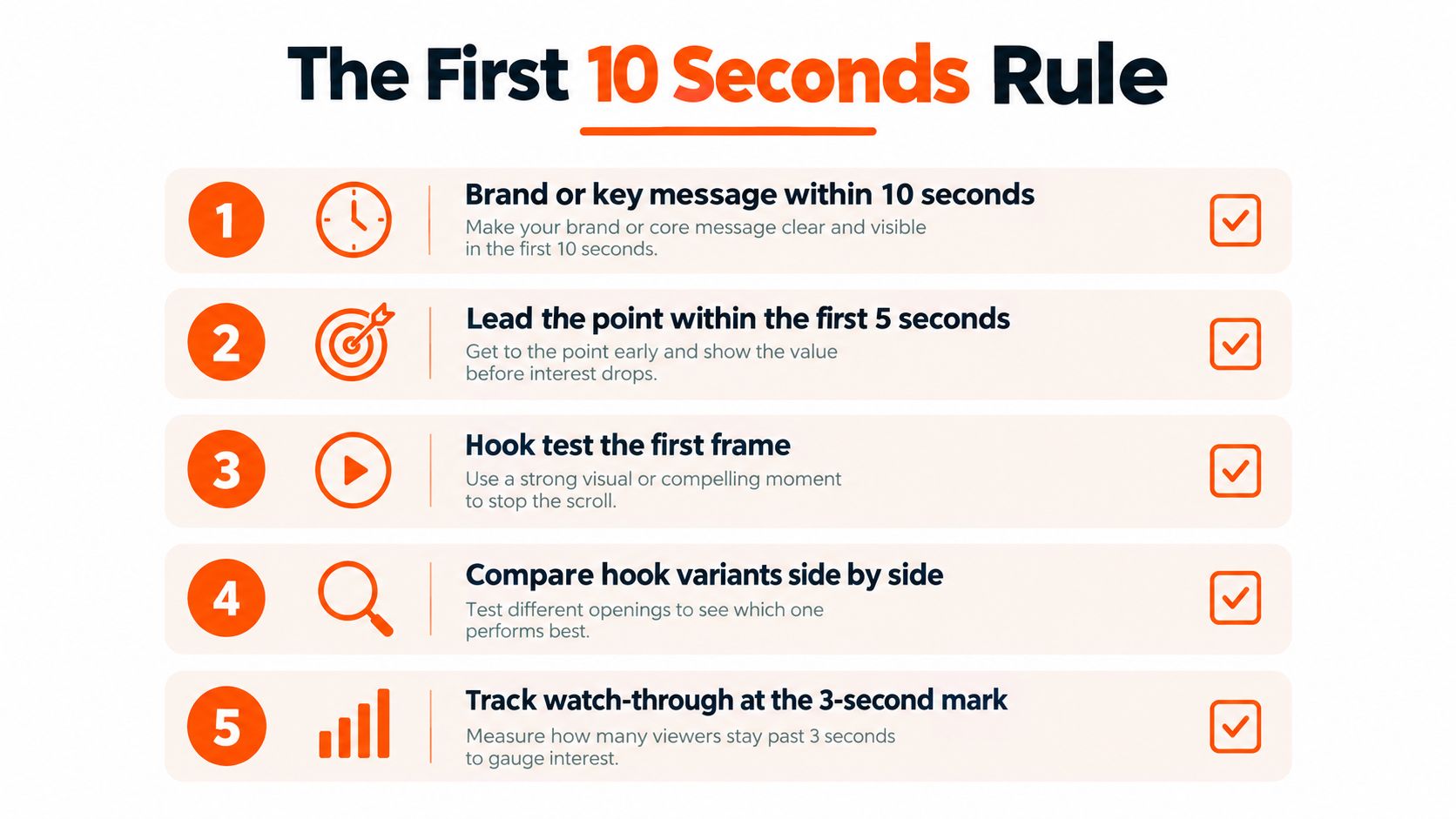
LinkedIn's guidance gives the opening a firm job. The brand logo or key message should appear within the first 10 seconds, while LinkedIn's marketing guidance recommends establishing the point within the first 5 seconds. Those aren't identical instructions, and the practical answer is to make the first frame understandable before the viewer has time to wonder what the video is about.
The opening can test several angles without changing the rest of the campaign:
Quantified business problem: Put the measurable business issue on screen immediately.
Product outcome: Show the result first, then reveal how the product creates it.
Customer proof point: Lead with a credible user situation or outcome.
Direct question: Ask the buyer a question that identifies the pain without a long introduction.
Each version should keep the audience, offer, landing page, and bid conditions consistent. Otherwise, the campaign tests several moving parts and produces a spreadsheet full of decorative confusion.
Design for a silent first impression
The first frame should communicate without audio. Burned-in captions, readable typography, and a clear visual sequence help a sound-off viewer understand the proposition before the narration becomes useful. The audio mix still needs to be clean for viewers who turn sound on, but sound should support the message rather than carry it alone.
Copy has its own limits. LinkedIn permits up to 3,000 characters of introductory text, recommends a video headline of 70 characters to reduce truncation, and sets a 200-character maximum for that headline. The headline should do one job, not repeat the entire voiceover.
A practical test compares the opening five seconds, the first frame, and the transition into proof. If a product demo starts with a slow logo animation, replace it with the product outcome. If a founder interview begins with a long greeting, move the strongest buyer-relevant sentence forward. The ad doesn't need to shout. It needs to stop making the viewer wait.
Captions, SRT Files, and Multilingual Delivery
Captions are both a delivery requirement and a communication layer. LinkedIn requires captions in SRT format, and the SRT file must contain text only. Custom styling such as font colors isn't supported, so a colorful subtitle file won't create brand distinction. The platform's caption mechanics remain unchanged.
B2B ads often autoplay without sound, which makes caption planning part of conversion design. A viewer should be able to understand the product category, the problem, and the next step from the visual sequence and on-screen text.
Burned-in captions versus uploaded SRT
Burned-in captions are permanently part of the video image. They give the editor control over font, placement, line breaks, contrast, and terminology. They're useful when the caption design is part of the brand system or when a product interface needs the text positioned carefully around it.
An uploaded SRT track remains valuable for accessibility and platform handling. A robust production package can include both:
Video with burned-in captions: controlled visual presentation for silent viewing.
Plain-text SRT: platform caption track for accessibility workflows.
Caption review record: checks for timing, punctuation, terminology, line length, and mobile readability.
The important nuance sits in LinkedIn's API workflow. That workflow supports English-language captions only, and a caption-processing failure can make an Ads Video ineligible to serve. This means a file can look correct to an editor and still create a delivery problem when the caption process fails.
Localize the creative, not only the subtitle file
An English caption file isn't a localization strategy. For a German software campaign, for example, the team should decide whether the original visuals, spoken narration, terminology, and call to action remain understandable after translation. A localized video master may be safer than placing a long translated sentence into a layout designed for English.
Global teams should keep language versions organized by campaign, ratio, and placement. Each localized master needs its own caption QA, especially where product names, technical terms, and regulated language appear. A single English SRT can pass validation while still reducing comprehension for the people the campaign is supposed to reach.
Captions should be reviewed like copy, not treated like an automatic export accessory.
Thumbnails That Don't Get Rejected
A thumbnail is its own production asset, not merely a frame grab that escaped the edit. LinkedIn accepts JPG or PNG thumbnails up to 2 MB, and the image should match the video's aspect ratio and resolution.
For a 4:5 video exported at 1,080 × 1,350, the thumbnail should use that same shape and resolution. Pulling a horizontal still for the vertical version can introduce black bars, awkward framing, or a composition that doesn't match the ad card.
Choose a frame that explains the offer
A strong B2B thumbnail usually has one clear visual anchor:
Product interface: Use a readable screen only when the UI remains legible at feed size.
Human face: Choose an expression that supports the message instead of looking like a passport photo.
Outcome visual: Show the report, workflow, or result the buyer cares about.
Short text treatment: Keep the promise brief and visible without turning the thumbnail into a tiny slide deck.
The thumbnail shouldn't promise a different video. If the image shows a dashboard but the video opens with a talking head, the viewer receives a small bait-and-switch before playback even starts.
For a focused visual workflow, the thumbnail design guide is useful when building stills that need to work across video placements and review surfaces.
Matching Specs to Feed, In-Stream, and Audience Network
A campaign shouldn't export for “LinkedIn” as if LinkedIn were one screen. Feed, in-stream, and Audience Network placements create different demands for framing, runtime, audio, and caption treatment.
Feed creative needs to survive interruption. Short, caption-first ads work well as a production starting point because the viewer may encounter them mid-scroll with sound disabled. Square and 4:5 versions often give the message more vertical presence than a thin wide card, while the horizontal format remains useful when the source material depends on that space.
In-stream creative has more room for a sustained explanation. It can run up to 90 seconds, so a product story can develop beyond a quick feed hook. The audio mix matters more because the viewer is already watching content, but the opening still needs to identify the subject quickly.
Audience Network creative should be treated conservatively. Multiple formats help the ad remain eligible across inventory, and native renders reduce the risk that automatic cropping removes a logo, speaker, caption, or call to action.
Pick the primary placement first
The media plan should decide which version receives the most creative attention. If Feed is primary, begin with the square or 4:5 composition and adapt the horizontal cut. If in-stream is primary, build the horizontal narrative first and create a shorter feed argument. If Audience Network is included, validate every required format before launch instead of treating it as a hopeful checkbox.
A placement-aware workflow prevents the editor from asking one heroic 16:9 file to become a square, a vertical ad, an in-stream story, and an off-platform unit. The file may survive. The message usually won't.
For teams planning the broader campaign, this guide to video advertising on LinkedIn provides useful context for connecting creative decisions with paid distribution.
Pre-Upload Checklist for B2B Editors
A clean pre-flight check catches more problems than a last-minute upload retry. The editor or ad operations manager can paste the following list into a project ticket and mark each item before Campaign Manager receives the file.
Canvas: Confirm the aspect ratio matches the intended placement.
Dimensions: Use the approved horizontal, square, 4:5, or 9:16 dimensions.
Container: Export an MP4 file.
Video codec: Use H.264 unless the workflow has a specific reason to use VP8.
Audio: Use AAC or MPEG4 audio and keep the audio rate below 64 kHz.
Frame rate: Confirm the export is below 30 FPS and preferably constant.
File size: Keep the file above 75 KB and below 500 MB.
Runtime: Use 15 to 30 seconds when Feed and Audience Network eligibility matter.
Opening: Show the key message within the first 10 seconds and establish the point within the first 5 seconds.
Captions: Attach a text-only SRT and review any burned-in captions.
Thumbnail: Export JPG or PNG, keep it under 2 MB, and match its ratio and resolution to the video.
Copy: Keep the headline near 70 characters, with a 200-character maximum.
The team can also review the final cut using a structured social video editing workflow. That review should happen on a phone as well as a desktop monitor. A caption that looks generous on a large screen can become microscopic in a feed.
LinkedIn Video Ads Specs FAQ
Does square or landscape perform better?
There isn't one universal winner. The correct test compares native square, 4:5, and horizontal versions while keeping the audience, offer, landing page, and bid conditions consistent. A product UI may need horizontal space, while a feed-first message may read more comfortably in square or 4:5.
Should a team create separate masters or crop one file?
Separate masters are the safer production choice. Cropping can remove interface details, captions, faces, or calls to action, while native compositions let the editor reposition each element for its frame.
How should captions be localized?
Create language-specific caption reviews and localized video versions when translated text changes the layout or spoken meaning. The API-based caption workflow supports English-language captions only, so global campaigns shouldn't assume that one English SRT covers every market or delivery path.
What causes an upload rejection?
Start with the error message, then check the container, codec, audio format, frame rate, file size, caption file, and thumbnail. An MP4 using H.264 video, AAC audio, a below-30-FPS frame rate, a compliant file size, and a plain-text SRT removes many common causes. If the file still fails, re-export a short test rather than repeatedly uploading the same suspect render.
ContentBuck produces B2B video ad creatives with platform-specific crops, captions, text-on-screen treatments, and delivery formats for LinkedIn campaigns. Visit ContentBuck to discuss a production workflow that turns one campaign idea into placement-ready masters, variants, and ongoing creative updates.
Parth Jasrapuria
Founder at ContentBuck
Building video systems for B2B businesses. Obsessed with YouTube growth, creative strategy, and organic SEO.